Reading List
The most recent articles from a list of feeds I subscribe to.
Average Semi-detached house prices in UK by county – Statistical Analysis using R
Making NixOS modules for fun and (hopefully) profit
Making NixOS modules for fun and (hopefully) profit


Good morning everyone! Say this happens to you: you've been coding nonstop on something you want to share with your friends and it works on your MacBook. You want it to stay up when your MacBook goes to sleep or you get on a plane or something, and all you have to do is the easy task of putting it into production. It's just simple, right?
Just add a Dockerfile, they say! So you do that and then you have a Docker image that you can push to your target machine and then you find out that you can't just push it from machine to machine, you have to push it to a registry.
So you make an account on the Docker hub only to find out that their rate limits are very aggressive so you have to move to something like GHCR and aggressively cache all your images there so you don't run afoul of the comically small Docker Hub rate limits which will block your attempts to deploy it to your cloud provider of choice.
So you do that and you pull this on a VM running on someone else's computer, and then you need to figure out the other fun part:
You need to configure nginx. Of course it uses its own bespoke configuration language that no other program on the planet uses (this is an unfortunately common pattern in our industry) so it's even more googling for that. But then you realize you need to configure the real final boss of the internet:
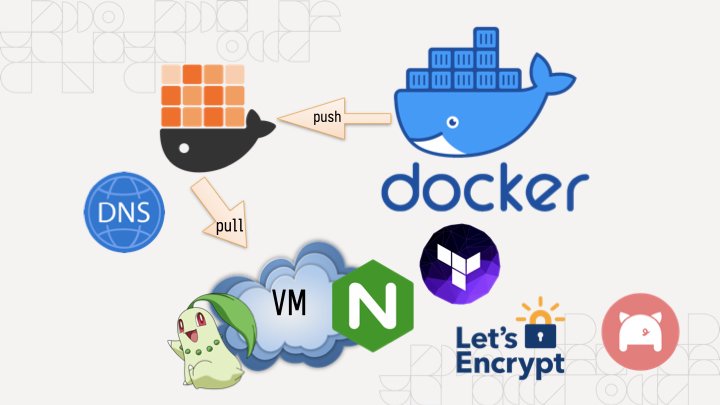
DNS. It's never DNS until it's always DNS. So you install the artist formerly known as Terraform, lego, and provision your DNS and HTTPS certificates (because of course nginx doesn't just natively have this support in anno dominium two thousand and twenty three like any sensible HTTP reverse proxy should). And then you're finally done. It's taken you an hour to hack up the service and a whole 8 hours to research and implement everything to deploy it. This is madness. Why do we have to put up with this?
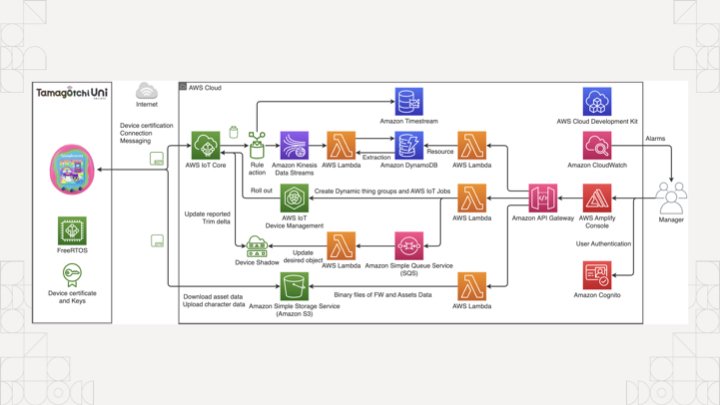
The koolaid runs deep in the cloud too, if you're not careful you'll end up accidentally making an entire event sourcing platform with an unrealistic amount of complexity to manage something as simple as a tamagochi. You're just trying to make an HTTP service show up on the internet, you don't need to know what an ALB, EKS, ECS, IAM, or PFA is.
Of course, complain about this online and a certain tangerine community funded by big YAML will decry that you should use Kubernetes to simplify all this down to "simple" and "easy to understand" things, conveniently ignoring that they use a string templating language for structured data.
There has got to be something simpler, right? What if you didn't have to deal with nearly any of that? What if you could just push and run your binary on a home server and then access it? No dealing with the cloud. No dealing with security groups or IAM or DNS or HTTPS or any of the slings and arrows of outrageous investment. What if you could just describe the state of the system you want instead of going three layers deep into a side of devops hell that you will never return from unscathed?

This is the real value of NixOS. Today I'm going to show you how to turn an arbitrary Go program into a NixOS service and then I'll expose it to the world thanks to Tailscale Funnel. This means you can link it to your group chat of friends and restore balance to the force. Or whatever it is you zoomers do in group chats.
All that said, let me introduce myself. I'm Xe Iaso, I write that one blog that you keep finding when you google Nix and NixOS stuff. I'm a writer, gamer, philosopher of chaos magick, and have a critical blogging addiction.
Today I'm going to cover a few core things so you can make your own NixOS modules: I'm going to cover what a NixOS module is and why you should care, the parts of one, how to make your own, and then I'm going to tempt the demo gods by doing a live deployment to a virtual machine on my MacBook.
Before I get started though, let's get some exercise in. Raise your hand if this is your first exposure to Nix and/or NixOS.
(About half the room raises their hands)
Alright, thanks.
Raise your hand if you've ever used it before.
(The other half of the room raises their hands)
That's about what I expected.
How about if you have it installed on a server at home?
(The same people raise their hands)
Okay, okay, I see.
How about if you're one of the lucky few where your employer uses it in production?
(Only a few of those people raise their hands)
Oh, wow, okay. That makes sense. You can lower your hands now.
Just so we're on the same page, Nix is a package manager that lets you declare all of the inputs for a program and get the same output from the build process.
func Build(
  inputs []Package,
  steps BuildInfo,
) (
  output Package,
  err Error,
)
One of the main ways that Nix stands out from the crowd is the idea that package builds are functions. They effectively take in inputs, use them against some instructions, and then either return a package or the build fails due to an error. Because there were no other options at the time, Nix uses its own programming language also named Nix to define packages.
Remember, Nix was the result of lamentations at the state of software and this was the result.
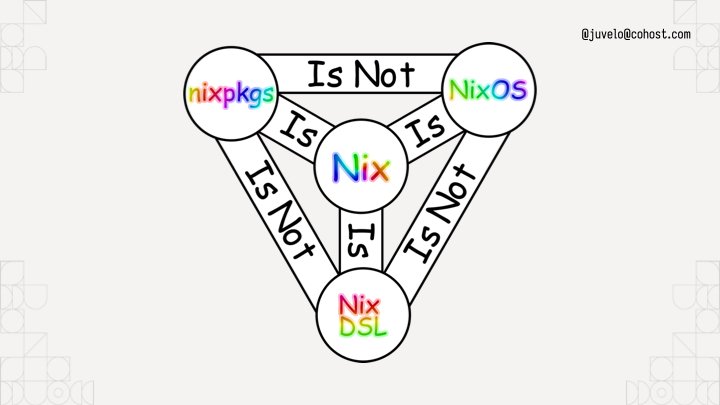
To help you understand, I've put up this helpful diagram. It uses rainbow comic sans so you know it's legit. Nixpkgs the standard library uses Nix the language, but it is not NixOS the operating system. I like to think about NixOS like this:
NixOS is the natural consequence of using Nix to build Linux systems. You can think about NixOS as a bunch of prebaked snippets of configuration that you can combine info a running system that does what you want. Each of those snippets is called a module. Nixpkgs (the standard library in Nix land) ships with a bunch of them that do things from compiling systemd to configuring Tailscale for you. Here's a simple NixOS module from my homelab:
{ config, pkgs, ... }:

{
  services.prometheus.exporters.node.enable = true;
}
A NixOS module is a function that takes the current state of the world and returns things to change in it. The module I'm showing here is from my homelab, specifically the part that enables the prometheus node exporter so that I can report when machines suddenly go offline or their hard drives are going bad. This is a very simple example. When you import it, it always takes effect. There's no flags to enable it or disable it. This is fine for my usecase however, because I want my homelab cluster to always be monitored. Things get a lot more fun when you add options into the mix:
{ lib, config, pkgs, ... }:

with lib;

let cfg = config.within.vim;
in {
  options.within.vim.enable = mkEnableOption "Enables Within's vim config";

  config = mkIf cfg.enable {
    home.packages = [ pkgs.vim ];
    home.file.".vimrc".source = ./vimrc;
  };
}
Compare it to this module, this is a dot file management module that sets up my vimrc on my machines. I have the option within.vim.enable, and if that is set to true, the vim configuration is dropped in place. If it's not set to true, it won't put the vim configuration in the system. NixOS modules have options and configuration outputs. Options let you customize the configuration to meet your spacebar heating needs.
{ ... }:

{
    imports = [ ./vim ];
    within.vim.enable = true;
}
To use this, you'd add the path to the file to an imports output of the module, then add a within.vim.enable = true statement inside your home-manager configuration.
The state of the world is the input, and any new changes are the outputs. This lets you build a Linux system exactly the way you want to. It's just a new and interesting way to write a function.
services.nginx.virtualHosts."xeiaso.net" = {
  locations."/" = {
    proxyPass = "http://unix:${toString cfg.sockPath}";
    proxyWebsockets = true;
  };
  forceSSL = cfg.useACME;
  useACMEHost = "xeiaso.net";
  extraConfig = ''
    access_log /var/log/nginx/xesite.access.log;
  '';
};
Above all else: you can configure programs like nginx directly in your NixOS configuration without having to learn how to write nginx config, saving you from having to configure every single program on your system in its own bespoke ways.
(Pause)

Of course, things become a lot more fun when you can build your own NixOS modules that have your own programs running on your own machines. Let's do that with an example program that shows quotes from the legendary British science fiction author Douglas Adams.
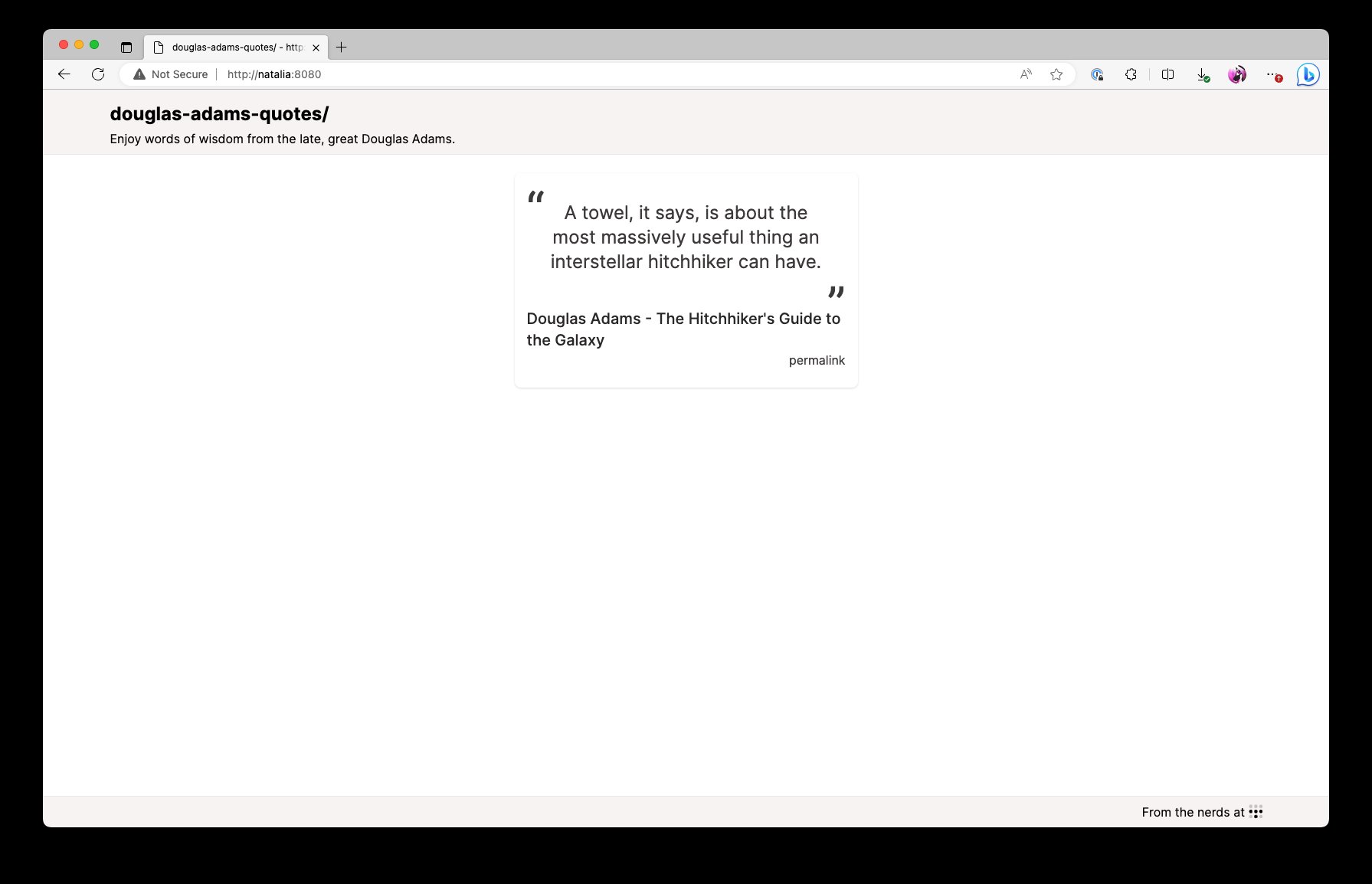
This is what the end result will look like. It'll be the quotes on a screen that refreshes every time you press F5. This will let you spread the undeniable wisdom of the late and great Douglas Adams, author of the five part trilogy The Hitchhiker's Guide to the Galaxy.

So overall, the infrastructure setup will look like this: my MacBook and the VM are both connected to each other with Tailscale. When I enable Tailscale Funnel, the VM is going to have its HTTPS port opened up to the public internet so that you can visit this service running on a VM, on my MacBook, on conference Wi-Fi. Let's hope the demo gods are in our favour!

By the way, Tailscale's gonna take care of the DNS and Let's Encrypt problems for us. No having to figure that out in the conference!
{
  description = "Douglas Adams quotes";

  # Nixpkgs / NixOS version to use.
  inputs.nixpkgs.url = "nixpkgs/nixos-unstable";

  outputs = { self, nixpkgs }:
  let # ...
  in
  {
    packages = ...;
    nixosModules.default = ...;
    devShell = ...;
    checks.x86_64-linux = ...;
  }
}
I've opened a VS Code session with an "empty" flake configuration. Nix flakes let you create a set of packages, development environments, NixOS modules, and even end to end integration tests. To start, this flake will import nixpkgs:
# Nixpkgs / NixOS version to use.
inputs.nixpkgs.url = "nixpkgs/nixos-unstable";
And then it declares a devShell for all of the developer dependencies:
devShell = forAllSystems (system:
  let pkgs = nixpkgsFor.${system};
  in with pkgs;
  mkShell {
    buildInputs =
      [ go_1_21 gotools go-tools gopls nixpkgs-fmt nodejs yarn ];
  });
This is relevant because I want you to imagine a world where your compilers aren't in your shell by default. This devShell configuration adds the packages relevant to the project to the development environment. This is a Go project with some CSS managed by Tailwind, so it's got the Go compiler, some Go development tools, npm, and yarn. A pretty normal set of things really.
To enter the development environment, run nix develop. I'm going to run yarn start:css in another shell to rebuild when any of the template files change.
Now that we have that, let's see how we would add a package to the flake. One of the flake output kinds is Nix packages, so we make an output named packages and paste in some boilerplate to get a Go package working:
packages = forAllSystems (system:
  let
    pkgs = nixpkgsFor.${system};
  in
  {
    default = pkgs.buildGo121Module {
      pname = "douglas-adams-quotes";
      inherit version;
      src = ./.;
      vendorSha256 = null;
    };
  });
The package would look something like this. This forAllSystems / nixpkgsFor hack is something you can work around with flake-utils, but for right now I'm doing everything manually. This is basically a bunch of predefined copies of nixpkgs for all the supported architectures, much like there's a devshell for every supported architecture. Either way, we get a Go module built into a package, and we define the dependency hash as null because this is only using the standard library. It's called default in the flake because it's best practice to name your package that.
Just to test it, you can run nix build to build the default package in that flake.nix file:
nix build
Perfect! It builds! The binary is in ./result/bin/ and we can run it wherever we want.
$ ./result/bin/douglas-adams-quotes --help
Usage of ./result/bin/douglas-adams-quotes:
  -addr string
        listen address (default ":8080")
  -slog-level string
        log level (default "INFO")
If it didn't work we wouldn't get this far!
nixosModules.default = { config, lib, pkgs, ... }:
with lib;
let
    cfg = config.xe.services.douglas-adams-quotes;
in
{
    options.xe.services.douglas-adams-quotes = {
        enable = mkEnableOption "Enable the Douglas Adams quotes service";

        logLevel = mkOption {
            type = with types; enum [ "DEBUG" "INFO" "ERROR" ];
            example = "DEBUG";
            default = "INFO";
            description = "log level for this application";
        };

        port = mkOption {
            type = types.port;
            default = 8080;
            description = "port to listen on";
        };

        package = mkOption {
            type = types.package;
            default = self.packages.${pkgs.system}.default;
            description = "package to use for this service (defaults to the one in the flake)";
        };
    };

    config = mkIf cfg.enable {
        systemd.services.douglas-adams-quotes = {
            description = "Douglas Adams quotes";
            wantedBy = [ "multi-user.target" ];

            serviceConfig = {
            DynamicUser = "yes";
            ExecStart = "${cfg.package}/bin/douglas-adams-quotes --slog-level=${cfg.logLevel} --addr=:${toString cfg.port}";
            Restart = "on-failure";
            RestartSec = "5s";
            };
        };
    };
};
We defined the devShell to build the program development. We defined the package to build the software, and now we'll define the module to tell NixOS how to run the software. This is a basic NixOS module. It's defined inline to the flake for now, moving it to its own file is an exercise for the reader.
Like I said before, a NixOS module is a function that takes in the state of the world and returns new additions to the state of the world. This NixOS module provides some options under xe.services.douglas-adams-quotes and then if the module is enabled, it creates a new systemd service to run it in. We're in the future, so we can use fancy things like DynamicUser to avoid having to run this service as root.
options.xe.services.douglas-adams-quotes = {
    enable = mkEnableOption "Enable the Douglas Adams quotes service";
    logLevel = ...;
    port = ...;
    package = ...;
};
The real fun part comes when you define options for the service. Every one of these options correlates to CLI flags so you can change various options on the fly. It's good practice to map any non-secret configuration settings to options so that users can have easy escape hatches for changing things like the HTTP bind port or log level to get debug output. Secrets are a more complicated thing due to how Nix works, so we're not going to talk about those today.
So we have everything we need now. We have development environment configuration, a package build, and finally a NixOS module to get the service running. The last step is to push it into prod. I have a NixOS virtual machine set up for this on my MacBook, but you may want to run this somewhere else, such as in Hyper-V on your gaming tower. Or maybe the cloud, I won't judge!
Now we get to the fun part, enabling the NixOS module. I'm going to use the VS Code Tailscale extension to SSH in and open up the files in my VM, so lemme do that real quick.
Let's peer into my VM's deployment flake and see what we can do to deploy it. This is a brand new, never opened VM, the only thing I did was set up a flake in /etc/nixos/flake.nix that imports the autogenerated configuration from the installer. This allows us to import things like the Douglas Adams Quotes service into the VM.
{
  inputs.nixpkgs.url = "github:NixOS/nixpkgs/nixos-unstable";

  outputs = { self, nixpkgs, ... }: {
    nixosConfigurations.douglas-adams = nixpkgs.lib.nixosSystem {
      system = "aarch64-linux";
      modules = [
        ./configuration.nix
      ];
    };
  };
}
Here's what the file looks like. I import nixos unstable, and then I create a nixos configuration for a machine named douglas-adams. This "modules" block has a list of NixOS module filenames or literal expressions. This lets you import NixOS modules from other flakes and define your own NixOS modules on the fly.
{
  inputs.nixpkgs.url = "github:NixOS/nixpkgs/nixos-unstable";
  inputs.daquotes = {
    url = "github:Xe/douglas-adams-quotes";
    inputs.nixpkgs.follows = "nixpkgs";
  };

  outputs = { self, nixpkgs, daquotes, ... }: {
    nixosConfigurations.douglas-adams = nixpkgs.lib.nixosSystem {
      system = "aarch64-linux";
      modules = [
        daquotes.nixosModules.default
        ./configuration.nix
        ({ pkgs, ... }: {
          xe.services.douglas-adams-quotes = {
            enable = true;
          };
        })
      ];
    };
  };
}
To make it import this, first we add a new input that points to the Douglas Adams quotes flake. This then gets threaded into the outputs function, we import the module, and finally enable it on the system.
(Pause)
That's it. That's how you enable the service on the VM. Now all that's left is SSHing in and running a nixos-rebuild to enable it.
I just right-click on the douglas-adams node, ssh in with Tailscale handling the auth, and then run the magic nixos-rebuild command: nixos-rebuild switch --flake /etc/nixos and hit enter.
And now the source code gets pulled, the package gets built, the service gets created and then we can see that the process is running. Let's prove that it's working:
[root@douglas-adams:/]# curl http://localhost:8080/quote.json | jq
{
    "quote":"The story so far: In the beginning the Universe was created. This has made a lot of people very angry and been widely regarded as a bad move.",
    "person":"Douglas Adams",
    "source":"The Restaurant at the End of the Universe",
    "id":2
}
Et voila. But, we aren't stopping there. I also enabled serving it with Tailscale Funnel so that you can see it on your phones:
tailscale serve https / http://localhost:8080
tailscale funnel 443 on
Get your phones out, I'm gonna be showing a QR Code:

Scan this QR code. You can trust me, right? It's not gonna be a Rick Roll. I'm not that mean. When you do, you'll connect to my VM on my laptop on the conference wifi, yet still exposed to the public internet.
(Pause for audience to discover that it does in fact work, applause)

In conclusion, NixOS modules aren't hard. It's just options to configure systemd or nginx or even Tailscale. It's a function that takes in the state of the world and returns new parts to add to the whole. This gives you a nearly infinite level of composition and logistical freedom to implement whatever you want. Every systemd option is exposed as a NixOS flag. Your programs can become services trivially. It's just that easy. I promise.
But, now you know how to make your own NixOS modules for fun and (hopefully) profit!
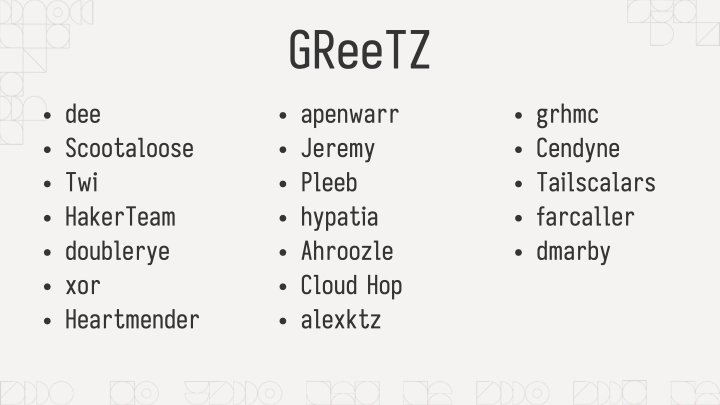
Before we get this talk wrapped up, I just want to thank everyone on this list for helping me make this talk shine. Thanks everyone!
(Pause for applause)
And with that, I've been Xe! Thank you so much for coming to this talk. I hope you've had a good conference and I'll be wandering around in case you have any questions. I've posted a summary of the code samples on my blog at xeiaso.net so you can look into my code some more.
Oh by the way, if you're looking, Tailscale is hiring. I know it's probably rare to see someone like this at a Linux conference but if you're a Windows expert please let me know. That role has been so hard to fill.
I try to answer every question I can, but if I don't get to you, please email dynamicuser at xeserv dot us and I'll reply to your questions as soon as I can.
Thanks again to the All Systems Go organizers for having me here and I hope you continue having a good day. Be well!
There was a question about encrypted secrets in NixOS. I suggest using agenix to have age-encrypted secrets in your NixOS configs. It has you encrypt things against SSH host public keys for your machines. It's a bit of a hack, but it works well enough that it's what I use in prod for my own stuff. This really needs to be solved upstream with proper handling of secret values at the Nix level.


/nix/store is world-readable. Depending on your threat model and if your NixOS configs are open source, this can be fine. If your threat model includes public NixOS configs, this becomes less fine; especially when CI is brought into the mix. You wouldn't want someone to figure out what your secrets are in your CI flow and then exfiltrate Tailscale authkeys or something, that could be bad!In a git repository, where do your files live?
Hello! I was talking to a friend about how git works today, and we got onto the
topic – where does git store your files? We know that it’s in your .git
directory, but where exactly in there are all the versions of your old files?
For example, this blog is in a git repository, and it contains a file called
content/post/2019-06-28-brag-doc.markdown. Where is that in my .git folder?
And where are the old versions of that file? Let’s investigate by writing some
very short Python programs.
git stores files in .git/objects
Every previous version of every file in your repository is in .git/objects.
For example, for this blog, .git/objects contains 2700 files.
$ find .git/objects/ -type f | wc -l
2761
note: .git/objects actually has more information than “every previous version
of every file in your repository”, but we’re not going to get into that just yet
Here’s a very short Python program
(find-git-object.py) that
finds out where any given file is stored in .git/objects.
import hashlib
import sys


def object_path(content):
    header = f"blob {len(content)}\0"
    data = header.encode() + content
    digest = hashlib.sha1(data).hexdigest()
    return f".git/objects/{digest[:2]}/{digest[2:]}"


with open(sys.argv[1], "rb") as f:
    print(object_path(f.read()))
What this does is:
- read the contents of the file
- calculate a header (
blob 16673\0) and combine it with the contents - calculate the sha1 sum (
e33121a9af82dd99d6d706d037204251d41d54in this case) - translate that sha1 sum into a path (
.git/objects/e3/3121a9af82dd99d6d706d037204251d41d54)
We can run it like this:
$ python3 find-git-object.py content/post/2019-06-28-brag-doc.markdown
.git/objects/8a/e33121a9af82dd99d6d706d037204251d41d54
jargon: “content addressed storage”
The term for this storage strategy (where the filename of an object in the database is the same as the hash of the file’s contents) is “content addressed storage”.
One neat thing about content addressed storage is that if I have two files (or
50 files!) with the exact same contents, that doesn’t take up any extra space
in Git’s database – if the hash of the contents is aabbbbbbbbbbbbbbbbbbbbbbbbb, they’ll both be stored in .git/objects/aa/bbbbbbbbbbbbbbbbbbbbb.
how are those objects encoded?
If I try to look at this file in .git/objects, it gets a bit weird:
$ cat .git/objects/8a/e33121a9af82dd99d6d706d037204251d41d54
x^A<8D><9B>}s<E3>Ƒ<C6><EF>o|<8A>^Q<9D><EC>ju<92><E8><DD>\<9C><9C>*<89>j<FD>^...
What’s going on? Let’s run file on it:
$ file .git/objects/8a/e33121a9af82dd99d6d706d037204251d41d54
.git/objects/8a/e33121a9af82dd99d6d706d037204251d41d54: zlib compressed data
It’s just compressed! We can write another little Python program called decompress.py that uses the zlib module to decompress the data:
import zlib
import sys

with open(sys.argv[1], "rb") as f:
    content = f.read()
    print(zlib.decompress(content).decode())
Now let’s decompress it:
$ python3 decompress.py .git/objects/8a/e33121a9af82dd99d6d706d037204251d41d54
blob 16673---
title: "Get your work recognized: write a brag document"
date: 2019-06-28T18:46:02Z
url: /blog/brag-documents/
categories: []
---
... the entire blog post ...
So this data is encoded in a pretty simple way: there’s this
blob 16673\0 thing, and then the full contents of the file.
there aren’t any diffs
One thing that surprised me here is the first time I learned it: there aren’t
any diffs here! That file is the 9th version of that blog post, but the version
git stores in the .git/objects is the whole file, not the diff from the
previous version.
Git actually sometimes also does store files as diffs (when you run git gc it
can combine multiple different files into a “packfile” for efficiency), but I
have never needed to think about that in my life so we’re not going to get into
it. Aditya Mukerjee has a great post called Unpacking Git packfiles about how the format works.
what about older versions of the blog post?
Now you might be wondering – if there are 8 previous versions of that blog
post (before I fixed some typos), where are they in the .git/objects
directory? How do we find them?
First, let’s find every commit where that file changed with git log:
$ git log --oneline  content/post/2019-06-28-brag-doc.markdown
c6d4db2d
423cd76a
7e91d7d0
f105905a
b6d23643
998a46dd
67a26b04
d9999f17
026c0f52
72442b67
Now let’s pick a previous commit, let’s say 026c0f52. Commits are also stored
in .git/objects, and we can try to look at it there. But the commit isn’t
there! ls .git/objects/02/6c* doesn’t have any results! You know how we
mentioned “sometimes git packs objects to save space but we don’t need to worry
about it?“. I guess now is the time that we need to worry about it.
So let’s take care of that.
let’s unpack some objects
So we need to unpack the objects from the pack files. I looked it up on Stack Overflow and apparently you can do it like this:
$ mv .git/objects/pack/pack-adeb3c14576443e593a3161e7e1b202faba73f54.pack .
$ git unpack-objects < pack-adeb3c14576443e593a3161e7e1b202faba73f54.pack
This is weird repository surgery so it’s a bit alarming but I can always just clone the repository from Github again if I mess it up, so I wasn’t too worried.
After unpacking all the object files, we end up with way more objects: about 20000 instead of about 2700. Neat.
find .git/objects/ -type f | wc -l
20138
back to looking at a commit
Now we can go back to looking at our commit 026c0f52. You know how we said
that not everything in .git/objects is a file? Some of them are commits! And
to figure out where the old version of our post
content/post/2019-06-28-brag-doc.markdown is stored, we need to dig pretty
deep into this commit.
The first step is to look at the commit in .git/objects.
commit step 1: look at the commit
The commit 026c0f52 is now in
.git/objects/02/6c0f5208c5ea10608afc9252c4a56c1ac1d7e4 after doing some
unpacking and we can look at it like this:
$ python3 decompress.py .git/objects/02/6c0f5208c5ea10608afc9252c4a56c1ac1d7e4
commit 211tree 01832a9109ab738dac78ee4e95024c74b9b71c27
parent 72442b67590ae1fcbfe05883a351d822454e3826
author Julia Evans <julia@jvns.ca> 1561998673 -0400
committer Julia Evans <julia@jvns.ca> 1561998673 -0400

brag doc
We can also get same information with git cat-file -p 026c0f52, which does the same thing but does a better job of formatting the data. (the -p option means “format it nicely please”)
commit step 2: look at the tree
This commit has a tree. What’s that? Well let’s take a look. The tree’s ID
is 01832a9109ab738dac78ee4e95024c74b9b71c27, and we can use our
decompress.py script from earlier to look at that git object. (though I had to remove the .decode() to get the script to not crash)
$ python3 decompress.py .git/objects/01/832a9109ab738dac78ee4e95024c74b9b71c27
b'tree 396\x00100644 .gitignore\x00\xc3\xf7`$8\x9b\x8dO\x19/\x18\xb7}|\xc7\xce\x8e:h\xad100644 README.md\x00~\xba\xec\xb3\x11\xa0^\x1c\xa9\xa4?\x1e\xb9\x0f\x1cfG\x96\x0b
This is formatted in kind of an unreadable way. The main display issue here is that
the commit hashes (\xc3\xf7$8\x9b\x8dO\x19/\x18\xb7}|\xc7\xce\…) are raw
bytes instead of being encoded in hexadecimal. So we see \xc3\xf7$8\x9b\x8d
instead of c3f76024389b8d. Let’s switch over to using git cat-file -p which
formats the data in a friendlier way, because I don’t feel like writing a
parser for that.
$ git cat-file -p 01832a9109ab738dac78ee4e95024c74b9b71c27
100644 blob c3f76024389b8d4f192f18b77d7cc7ce8e3a68ad	.gitignore
100644 blob 7ebaecb311a05e1ca9a43f1eb90f1c6647960bc1	README.md
100644 blob 0f21dc9bf1a73afc89634bac586271384e24b2c9	Rakefile
100644 blob 00b9d54abd71119737d33ee5d29d81ebdcea5a37	config.yaml
040000 tree 61ad34108a327a163cdd66fa1a86342dcef4518e	content <-- this is where we're going next
040000 tree 6d8543e9eeba67748ded7b5f88b781016200db6f	layouts
100644 blob 22a321a88157293c81e4ddcfef4844c6c698c26f	mystery.rb
040000 tree 8157dc84a37fca4cb13e1257f37a7dd35cfe391e	scripts
040000 tree 84fe9c4cb9cef83e78e90a7fbf33a9a799d7be60	static
040000 tree 34fd3aa2625ba784bced4a95db6154806ae1d9ee	themes
This is showing us all of the files I had in the root directory of the
repository as of that commit. Looks like I accidentally committed some file
called mystery.rb at some point which I later removed.
Our file is in the content directory, so let’s look at that tree: 61ad34108a327a163cdd66fa1a86342dcef4518e
commit step 3: yet another tree
$ git cat-file -p 61ad34108a327a163cdd66fa1a86342dcef4518e

040000 tree 1168078878f9d500ea4e7462a9cd29cbdf4f9a56	about
100644 blob e06d03f28d58982a5b8282a61c4d3cd5ca793005	newsletter.markdown
040000 tree 1f94b8103ca9b6714614614ed79254feb1d9676c	post <-- where we're going next!
100644 blob 2d7d22581e64ef9077455d834d18c209a8f05302	profiler-project.markdown
040000 tree 06bd3cee1ed46cf403d9d5a201232af5697527bb	projects
040000 tree 65e9357973f0cc60bedaa511489a9c2eeab73c29	talks
040000 tree 8a9d561d536b955209def58f5255fc7fe9523efd	zines
Still not done…
commit step 4: one more tree….
The file we’re looking for is in the post/ directory, so there’s one more tree:
$ git cat-file -p 1f94b8103ca9b6714614614ed79254feb1d9676c
.... MANY MANY lines omitted ...
100644 blob 170da7b0e607c4fd6fb4e921d76307397ab89c1e	2019-02-17-organizing-this-blog-into-categories.markdown
100644 blob 7d4f27e9804e3dc80ab3a3912b4f1c890c4d2432	2019-03-15-new-zine--bite-size-networking-.markdown
100644 blob 0d1b9fbc7896e47da6166e9386347f9ff58856aa	2019-03-26-what-are-monoidal-categories.markdown
100644 blob d6949755c3dadbc6fcbdd20cc0d919809d754e56	2019-06-23-a-few-debugging-resources.markdown
100644 blob 3105bdd067f7db16436d2ea85463755c8a772046	2019-06-28-brag-doc.markdown <-- found it!!!!!
Here the 2019-06-28-brag-doc.markdown is the last file listed because it was
the most recent blog post when it was published.
commit step 5: we made it!
Finally we have found the object file where a previous version of my blog post
lives! Hooray! It has the hash 3105bdd067f7db16436d2ea85463755c8a772046, so
it’s in git/objects/31/05bdd067f7db16436d2ea85463755c8a772046.
We can look at it with decompress.py
$ python3 decompress.py .git/objects/31/05bdd067f7db16436d2ea85463755c8a772046 | head
blob 15924---
title: "Get your work recognized: write a brag document"
date: 2019-06-28T18:46:02Z
url: /blog/brag-documents/
categories: []
---
... rest of the contents of the file here ...
This is the old version of the post! If I ran git checkout 026c0f52 content/post/2019-06-28-brag-doc.markdown or git restore --source 026c0f52 content/post/2019-06-28-brag-doc.markdown, that’s what I’d get.
this tree traversal is how git log works
This whole process we just went through (find the commit, go through the
various directory trees, search for the filename we wanted) seems kind of long
and complicated but this is actually what’s happening behind the scenes when we
run git log content/post/2019-06-28-brag-doc.markdown. It needs to go through
every single commit in your history, check the version (for example
3105bdd067f7db16436d2ea85463755c8a772046 in this case) of
content/post/2019-06-28-brag-doc.markdown, and see if it changed from the previous commit.
That’s why git log FILENAME is a little slow sometimes – I have 3000 commits in this
repository and it needs to do a bunch of work for every single commit to figure
out if the file changed in that commit or not.
how many previous versions of files do I have?
Right now I have 1530 files tracked in my blog repository:
$ git ls-files | wc -l
1530
But how many historical files are there? We can list everything in .git/objects to see how many object files there are:
$ find .git/objects/ -type f | grep -v pack | awk -F/ '{print $3 $4}' | wc -l
20135
Not all of these represent previous versions of files though – as we saw
before, lots of them are commits and directory trees. But we can write another little Python
script called find-blobs.py that goes through all of the objects and checks
if it starts with blob or not:
import zlib
import sys

for line in sys.stdin:
    line = line.strip()
    filename = f".git/objects/{line[0:2]}/{line[2:]}"
    with open(filename, "rb") as f:
        contents = zlib.decompress(f.read())
        if contents.startswith(b"blob"):
            print(line)
$ find .git/objects/ -type f | grep -v pack | awk -F/ '{print $3 $4}' | python3 find-blobs.py | wc -l
6713
So it looks like there are 6713 - 1530 = 5183 old versions of files lying
around in my git repository that git is keeping around for me in case I ever
want to get them back. How nice!
that’s all!
Here’s the gist with all the code for this post. There’s not very much.
I thought I already knew how git worked, but I’d never really thought about
pack files before so this was a fun exploration. I also don’t spend too much
time thinking about how much work git log is actually doing when I ask it to
track the history of a file, so that was fun to dig into.
As a funny postscript: as soon as I committed this blog post, git got mad about
how many objects I had in my repository (I guess 20,000 is too many!) and
ran git gc to compress them all into packfiles. So now my .git/objects
directory is very small:
$ find .git/objects/ -type f | wc -l
14