Reading List
The most recent articles from a list of feeds I subscribe to.
TinyPilot: Month 38
New here?
Hi, I’m Michael. I’m a software developer and the founder of TinyPilot, an independent computer hardware company. I started the company in 2020, and it now earns $60-80k/month in revenue and employs seven other people.
Every month, I publish a retrospective like this one to share how things are going with my business and my professional life overall.
Highlights
- I failed to sell recurring TinyPilot license subscriptions.
- I realized I made TinyPilot way too configurable.
- I thought I’d been investing poorly into TinyPilot’s development, but writing this retrospective made me realize I’m mostly on track.
Goal grades
At the start of each month, I declare what I’d like to accomplish. Here’s how I did against those goals:
gokrazy is really cool
When you deal with Linux, you end up hearing about "distributions" as different "flavors" of Linux combined with a bunch of other tools. This is mostly true, but it's slightly missing the forest for the trees.
Consider this famous and often misunderstood quote by Richard Stallman:
I'd just like to interject for a moment. What you're referring to as Linux is in fact, GNU/Linux, or as I've recently taken to calling it, GNU plus Linux.Linux is not an operating system unto itself, but rather another free component of a fully functioning GNU system made useful by the GNU corelibs, shell utilities and vital system components comprising a full OS as defined by POSIX.

Many pages of ink have been spilled over analyzing this quote, and a lot of them fall short of really getting at the heart of the matter. What this actually means is something like this:
By itself, Linux is useless. It does boot the system, it does interface with hardware, but without a bunch of other tools, it's not very useful. It's like a car without a steering wheel, or a boat without a rudder. It does something, but it's not very useful. The real value of things like the GNU project, systemd, openrc and other tools in that vein is that they make Linux useful. They make it into a complete system that you can use to do things. They are the proverbial steering wheel and rudder in the metaphor.

Most Linux systems on the face of the planet are built with GNU tools and utilities. In order to compile the Linux kernel, you need to use GCC. In order to run ls to list files in the current directory, you need to use GNU coreutils. Every dynamically linked program uses glibc for performing basic system interactions like writing to files or opening network sockets. Everything is built on top of the GNU toolset. This is why Stallman is so adamant about calling it GNU/Linux. It's not that he's trying to take credit for Linux, it's that he's trying to give credit to the GNU project for making Linux useful.
However, there's a lot of room for nuance here. For example, Alpine Linux is a Linux distribution that uses musl libc instead of glibc and busybox instead of GNU coreutils. It's still a Linux distribution, but it doesn't use the GNU toolset. It's still a Linux distribution, but it's not GNU/Linux.
So, what is a Linux distribution? It's a collection of tools that make Linux useful. It's a collection of tools that make Linux into a complete system. It's not a "flavor" of Linux (though this conceptually can exist with alternative kernels like the Zen kernel patchset), it's a system that just so happens to make Linux useful.
As a counter-argument, consider the reason why Linux runs on more devices worldwide than there are people: Android. Android does use the Linux kernel, but it doesn't use any GNU tools in the stack at all. You can't take programs that are compiled against other Linux distributions and run them on Android. You can't take programs that are compiled against Android and run them on other Linux distributions.

I'm going to argue that Android is not a Linux distribution unto itself. Android is a Linux implementation. It uses the Linux kernel, but that's where the similarities with the rest of the ecosystem end. Android is its own little world where there's just enough system tools to get the system running, but once you get into the UI, it's a completely different world. It's a completely different ecosystem. It's a completely different operating system.

/bin/sh, it's a Linux distribution.gokrazy
gokrazy is a Linux implementation that I've used off and on for a few years now. It's a very interesting project because everything on the system is written in Go save the kernel. The init process is in Go (and even listens over HTTP to handle updates!), every userland process is written in Go, and even the core system services are written in Go.
Out of the box a gokrazy install comes with these basic tools:
- The
initprocess that is mandated to be the parent of all userland processes by the Linux kernel. - A DHCP client that automatically configures the network interface.
- A NTP client that automatically sets the system clock.
- A little tool to save randomness from the kernel to a file so that it can be used to seed the random number generator on boot (because the Raspberry Pi doesn't have a robust hardware random number generator)
That's it. Everything else from the web UI to A/B update logic is written in Go. It boots in literal seconds, uses an insanely small amount of RAM out of the box, and runs with nearly zero overhead. When you configure your gokrazy install to run additional software, you do so by adding the Go command path to a configuration file and then updating to trigger a reboot into the new version.
Here's an example of what my gokrazy virtual machine's file tree looks like:
/ # tree etc gokrazy user
etc
├── breakglass.authorized_keys
├── gokr-pw.txt
├── gokrazy
│   └── sbom.json
├── hostname
├── hosts
├── http-port.txt
├── https-port.txt
├── localtime
├── machine-id
├── resolv.conf -> /tmp/resolv.conf
└── ssl
    └── ca-bundle.pem

gokrazy
├── dhcp
├── heartbeat
├── init
├── ntp
└── randomd

user
├── breakglass
├── fbstatus
├── qemu-guest-kragent
├── serial-busybox
├── tailscale
├── tailscaled
└── waifud-gok-agent
That is the entire system. It's all stripped down to these few programs, configuration files, and one symlink for DNS resolution. This is a very minimal system, and it's all you need to run statically linked Go programs. It's very easy to deploy your own services to it too. It's probably the easiest platform I know of that lets you just deploy a Go binary and have it run as a service, automatically restarting when it crashes.
The tooling
When I used gokrazy back in the day, you had to use a command line called gokr-packer that you passed a bunch of command line flags to with information about all the Go programs you wanted to run on the machine, configuration for those programs, and any other meta-information like where the update tool should push the image to. It was a bit of a pain to use, but it worked. Recently the gok tool was added to the project, and this has been revolutionary when it comes to using and administrating gokrazy installs.
Essentially, gok is a wrapper around the existing gokr-packer logic with a JSON file to store your configuration details. It's a lot easier to use, understand, and automate. You don't have to remember command line flags or maintain unwieldy scripts. You just edit a JSON file and push updates with gok update. It's amazingly simple.
Setting up a gokrazy machine
As an example, I'm going to show you how to install a bunch of tailnet addons to a gokrazy machine. I'm also going to assume that you don't have a gokrazy install set up yet, so we'll need to install it. To do this, we'll need to do a few simple things:
- Install the
goktool. - Create your
gokconfiguration. - Install Tailscale on the machine.
- Create your "seed" image with
gok overwrite. - Boot it on your Raspberry Pi or VM.
- Push any updates to the image to the machine with
gok update.
First, let's install the gok tool. In order to do this, you need to have the Go toolchain installed. Once you have that, you can run go install to install the gok tool:
go install github.com/gokrazy/tools/cmd/gok@main
~/go/bin is in your $PATH variable so that you can run it by the name gok instead of ~/go/bin/gok.Next, create a new gokrazy configuration with gok new:
gok new -i casa
This will create a configuration named casa (cf: Spanish for "house") in ~/gokrazy/casa. This is where all of your configuration files will live. You can edit the configuration file with gok edit:
gok edit -i casa
If you are making a virtual machine
If you are making a virtual machine, you will need to override the kernel and firmware packages. You can do this by adding the following to your configuration file:
{
  // ...
  "KernelPackage": "github.com/rtr7/kernel",
  "FirmwarePackage": "github.com/rtr7/kernel",
  // ...
}
You will need to prefix the gok overwrite and gok update commands with GOARCH=amd64 to ensure that Go builds x86_64 binaries instead of ARM binaries:
GOARCH=amd64 gok update -i casa
If you don't do this, you will get arm64 binaries being built. This may require manual recovery of your virtual machine.
Let's make our lives easier by installing Tailscale on the machine. By default, gokrazy will announce its hostname over DHCP, which usually makes most consumer routers pick it up and then lets you ping it by name. When you have MagicDNS enabled, Tailscale can take over this logic and prevent you from accessing the machine by name.
However, Tailscale is written in Go and doesn't require any of the services that most Linux distributions provide in order to function. It's a perfect fit for gokrazy. You can install it with gok add:
gok add tailscale.com/cmd/tailscaled
gok add tailscale.com/cmd/tailscale
And be sure to add the mkfs service to create a persistent partition on /perm:
gok add github.com/gokrazy/mkfs
Next, fetch an auth key from the admin console and make sure you check that it's reusable. Then, add the following to your configuration file under the PackageConfig block:
{
    // ...
    "PackageConfig": {
        // ...
        "tailscale.com/cmd/tailscale": {
            "CommandLineFlags": [
                "up",
                 // paste your key here!
                "--authkey=tskey-auth-hunter2-hunter2hunter2hunter2"
            ]
        },
        // ...
    }
    // ...
}
tailscale up flags you want here, such as --advertise-exit-node if you want to use your gokrazy machine as an exit node.This will make your machine automatically connect to Tailscale on boot.
Next, we need to create our "seed" image with gok overwrite. First, figure out what the device node for your SD card is. On Linux, you can do this with lsblk:
lsblk
And then look for the one that has the same size as your SD card. In my case, it's /dev/sdd. Once you have that, you can run gok overwrite:
gok overwrite --full /dev/sdd
However if you want to write the image to a file (such as if you are doing mass distribution or making a VM image), you need to use gok overwrite with a file instead of a device node. This will create a 16 GB image:
gok overwrite -i casa --full gokrazy.img --target_storage_bytes 17179869184
Once you have your image, you can write it to your SD card with dd (or balenaEtcher) or import it into your virtual machine hypervisor of choice.
Once you have your image written to your SD card, you can boot it on your Raspberry Pi or VM.
breakglass as a tool of last resort to modify things, but you only have a very minimal subset of busybox to work with, so it should be avoided if at all possible.Once you have your machine booted and it responds to pings over Tailscale, you can open its HTTP interface in your browser. If you called your machine casa, you can open it at http://casa. It will prompt you for a username and password. Your username is gokrazy, and the password is near the top of your config.json file. When you log in, you'll see a screen like this:
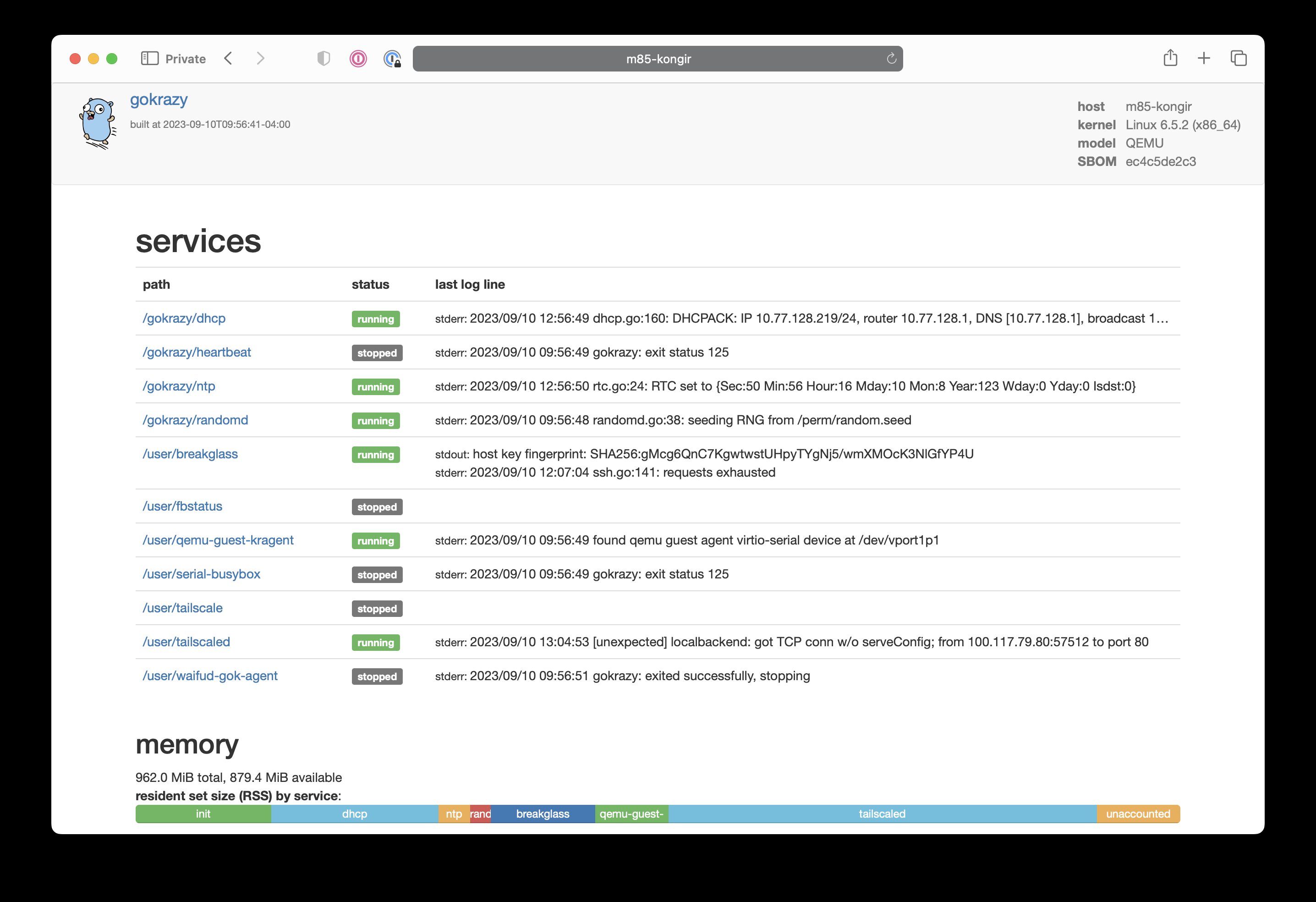
This is the gokrazy web UI. It lets you see the status of your machine and any logs that are being generated by your applications. You can also start, stop, and restart any of your applications from here. It's a very simple UI, but it's fantastic for debugging and monitoring.
Tailnet addons
Now that we have a Gokrazy system up and running, let's add some programs to it! I'm going to list a couple tailnet addons that give your tailnet superpowers. These are all written in Go, so they're a perfect fit for gokrazy.
Today I'm going to show you how to install these tools into your tailnet:
- golink - a URL shortener at
http://go - tmemes - an internal meme generator you can host at
http://memegen - tclip - a pastebin you can host at
http://paste
These tools help you augment your tailnet by giving you tools that will make you and your team's life a lot easier. A URL shortener helps you link to complicated Google Docs URLs. A meme generator gives you a new innovative way to let off steam. A pastebin lets you share text with your team without having to worry about the service you're using going offline due to no fault of your own.
golink
To install golink, we need to add the golink binary to the configuration. You can do this with gok add:
gok add github.com/tailscale/golink/cmd/golink
Then configure it with gok edit:
{
    // ...
    "PackageConfig": {
        // ...
        "github.com/tailscale/golink/cmd/golink": {
            "CommandLineFlags": [
                "--sqlitedb=/perm/home/golink/data.db"
            ],
            "Environment": [
                // the same one from before
                "TS_AUTHKEY=tskey-auth-hunter2-hunter2hunter2hunter2"
            ],
            // don't start the service until NTP catches up
            "WaitForClock": true
        },
        // ...
    }
    // ...
}
And finally push it with gok update:
gok update -i casa
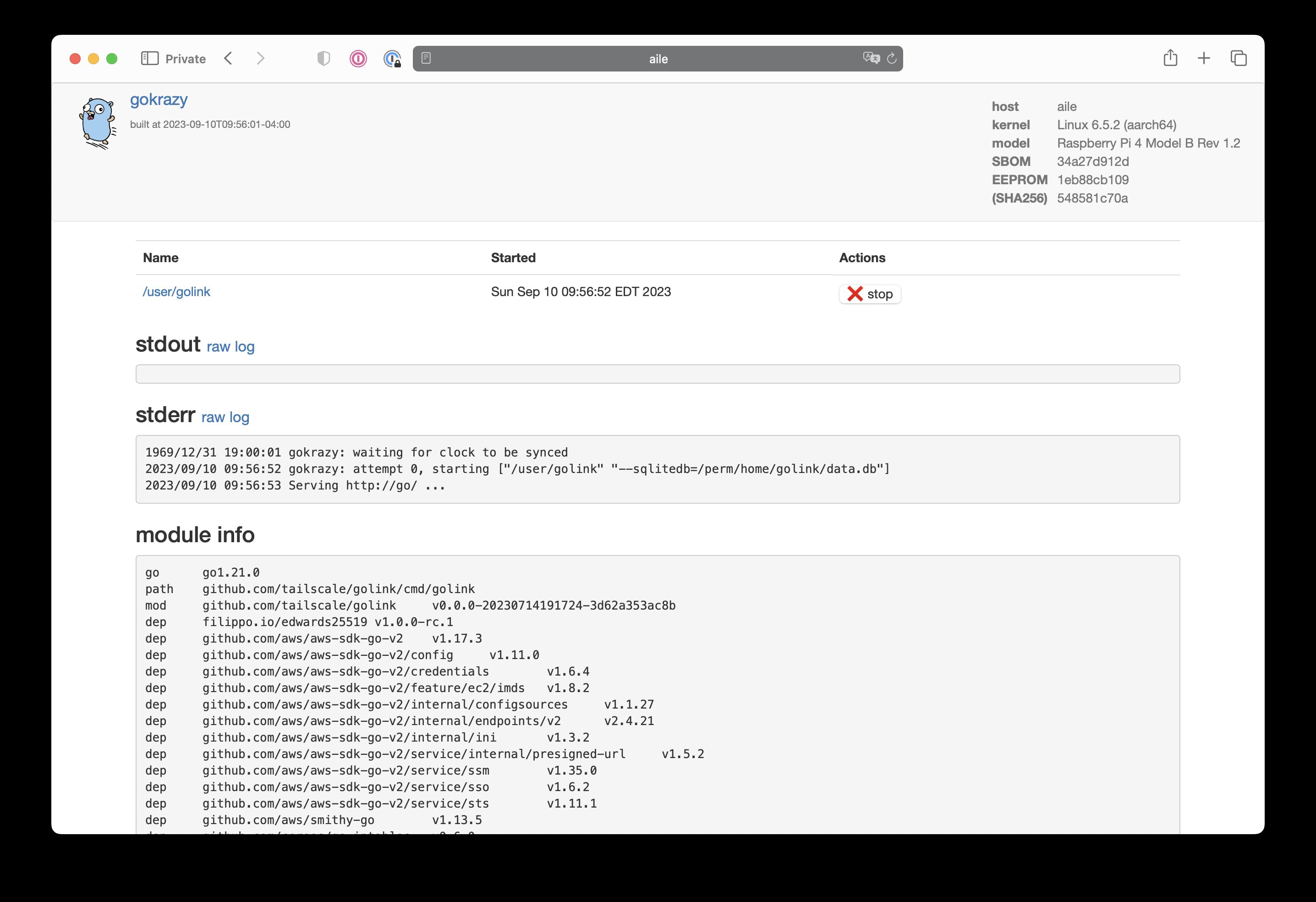
It'll build the image, push it out over Tailscale, trigger a reboot, and be back up in the span of a minute. Once it's back up, you can open the web UI again and see the status of your golink instance at http://casa/status?path=%2fuser%2fgolink:
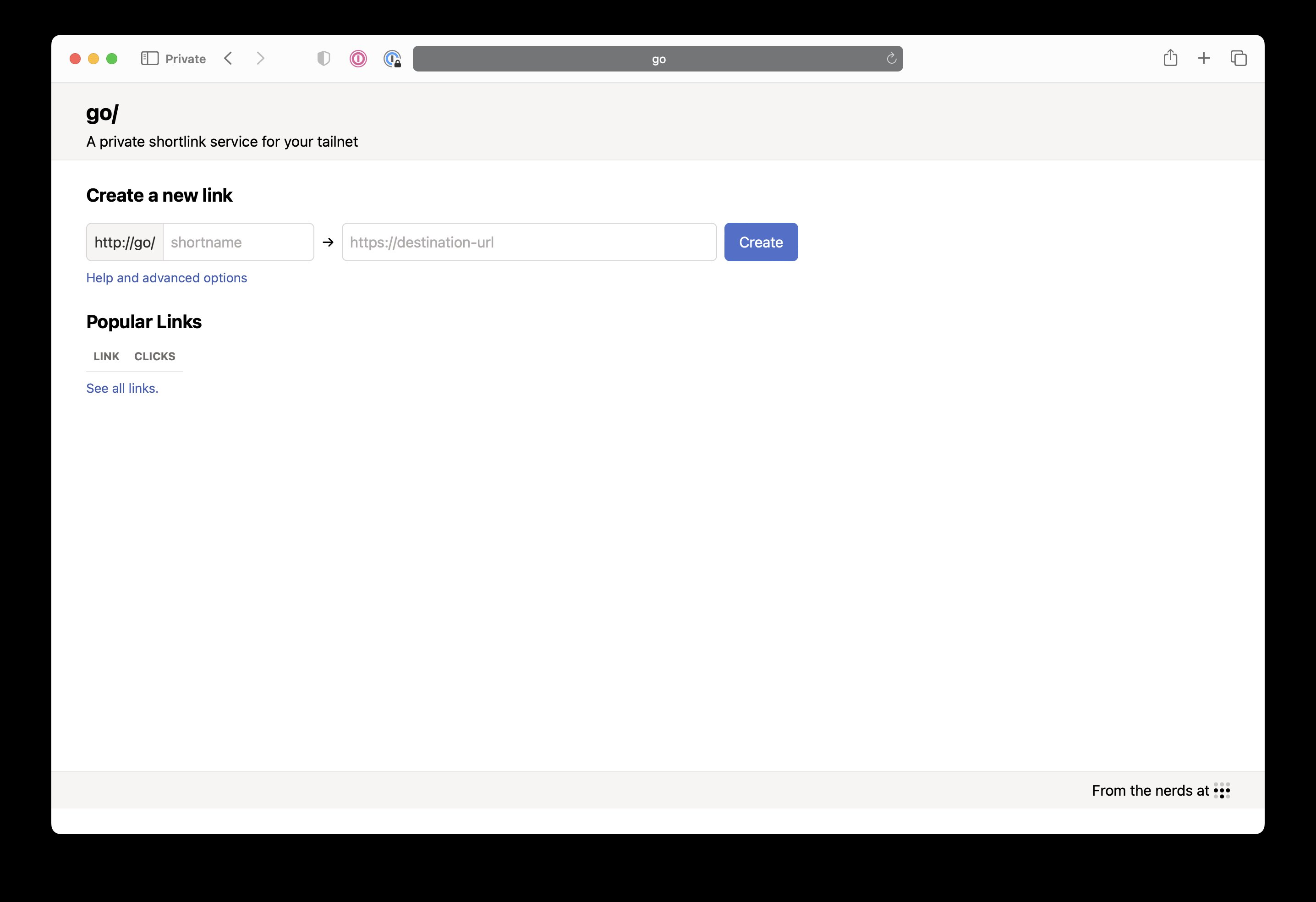
And then you can start using short URLs at http://go:
And that's it! You now have a super minimal VM running small programs that let you do useful things to you. You can add more programs to your configuration file and push them with gok update to add more functionality to your machine. You can even add your own programs to the configuration file and push them to your machine. It's a very simple system, but it's very powerful.
tmemes
Google is infamous for having an internal service named memegen. This allows Googlers to make internal-facing memes about the slings and arrows that impact them as highly paid programmers. This is an internal service inside Google that has a lot of serious investment of time and energy to make it the best possible experience it can be. It's to the point that reportedly people can keep up with how an all-hands meeting is going by the tone of the sarcastic memes that are being posted to memegen.
The main reason this is run inside Google is to avoid information leaking via memes. Yes, this is an actual threat model.
Thanks to the magic of Tailscale, you can make your own private memegen using tmemes. tmemes is a tailnet addon that lets you post image macro templates and layer wisdom over it in the form of text.
Here's an example meme:

To add tmemes to your gokrazy machine, you can use gok add:
gok add github.com/tailscale/tmemes/tmemes
Then open your config with gok edit and add the following to your PackageConfig block:
{
    // ...
    "PackageConfig": {
        // ...
        "github.com/tailscale/tmemes/tmemes": {
            "Environment": [
                "TS_AUTHKEY=tskey-auth-hunter2-hunter2hunter2hunter2"
            ],
            "CommandLineFlags": [
                // change this to your desired hostname
                "--hostname=memegen",
                // change this to your username on Tailscale
                "--admin=Xe@github",
                "--store=/perm/home/tmemes"
            ],
            "WaitForClock": true
        },
        // ...
    },
    // ...
}
And then push it with gok update:
gok update -i casa
Then you can head to http://memegen and upload a template to make your own dank memes.
If you want to integrate your own tools with tmemes, you can check out the API documentation. This should help you do whatever it is you want with a meme generator as a service.
tclip
Sometimes you just need a place to paste text and get a URL pointing to it. tclip is a tool that you can add to your tailnet and get exactly that. It's a very simple tool, but it's very useful. It's also written in Go, so it's a perfect fit for gokrazy. Their recent update to remove Cgo dependencies makes it possible to run your tclip node on a gokrazy machine.
To add tclip to your gokrazy machine, you can use gok add:
gok add github.com/tailscale-dev/tclip/cmd/tclipd
Then open your config with gok edit and add the following to your PackageConfig block:
{
    // ...
    "PackageConfig": {
        // ...
        "github.com/tailscale-dev/tclip/cmd/tclipd": {
            "CommandLineFlags": [
                "--data-location=/perm/home/tclip/"
            ],
            "WaitForClock": true,
            "Environment": [
                "TS_AUTHKEY=tskey-auth-hunter2-hunter2hunter2hunter2",
                "USE_FUNNEL=true" // Remove this if you don't want to use Funnel
            ]
        },
        // ...
    }
}
And then push it with gok update:
gok update -i casa
And then you can start using it by heading to http://paste. Install the command-line tool on your development workstation with go install:
go install github.com/tailscale-dev/tclip/cmd/tclip@latest
Here's an example tclip link if you want to see what it looks like in practice: interjection.c. It's a very simple tool, but it's very useful.
Conclusion
gokrazy is insanely cool. It's the easiest way to deploy Go services to your homelab. It integrates seamlessly with Tailscale, and is something that I'm very excited to see grow and mature. I'm very excited to see what the future holds for gokrazy, and I'm very excited to see what people do with it.
I've seen signs that they're going to be adding an automatic update process, and that has me very excited. I'm also excited to see what other services people add to the gokrazy ecosystem. I'm hoping to add a few of my own in the future, and I'm hoping to see what other people do with it.
gokrazy is really cool
Import from a URL in Nix
I’m still a Nix beginner, and one thing I couldn’t figure out until recently was how to keep parts of my configuration.nix file under source control.
My goal
I’d like for my Nix configuration files to be modular and reusable, so depending on the system or flake, I can pull in only the configuration files I need. I’d like all my Nix configuration files to be under source control so that different systems can depend on different versions of any file so I don’t have to upgrade every system to the latest version of each configuration file at the same time.
Ableist interactions
This week, a product launched and claimed to generate “production ready” code. But it also generates code with accessibility problems, which contradicts “production ready”. When someone called this out publicly, a community showed itself from its worst side. What can we learn?
I'll state again, I wrote this to share learnings around community respondes to a concern about accessibility issues. Because these kinds of replies are common and it's useful to have context. I don't want to add fuel to the issue, which is why I left out links to individual tweets and people.
I do want to call out Vercel, a business with a large voice in the developer community, which I do at the end of the post.
The “production ready” claim
I’ll start by elaborating on my first point. “Has accessibility issues” contradicts “production ready”, for three reasons:
- equal access to information is a human right
- most organisations have legal requirements to make accessible products
- it can cost companies money if people can’t use their products (you wouldn’t stop every fifth customer from entering your shop).
I will note it was an “alpha” launch, but the words “production ready” were used and not nuanced (not in marketing and not in the actual tool; a warning banner could go a long way). Fair enough, maybe they want to look at accessibility later (a personal pet peeve though: I recommend shifting left instead, doing accessibility earlier is easier).
The company could have made different choices. If it is known that accessibility is problematic, maybe the product could have come with a checklist that helps people avoid some of the most common issues? Or some kind of warning or banner that explains nuances the “production ready” line? These are choices to be made, to balance between what makes the product look less good and what harms end users.
Ableism
Many of the responses were ableist: they discriminate or contain social prejudice against people with physical or mental disabilities. A key point to make here is: don't feel offended if you or your comment is called ableist. Instead, listen and learn (seriously, it's an opportunity). The system is ableist, on top of which individuals make comments that can be called ableist. We (as a people) need to identify and break down that system, but also, people can individually learn: everyone has a degree of ableism (like they have some degree sexism and racism). I know I do. I've been learning about accessibility for about 15 years and still learn new things all the time (same for sexism, or racism, etc, these are all things need regular introspection; and they are related, see also intersectionality).
Learning from the responses
Below, I'll list some responses I found problematic, and try and explain why. I'm hoping this is helpful for people who want to understand better why accessibility is critical, and why accessibility specialists point this out.
- “can’t expect them to make everything perfect, especially in the alpha release” - I think it's fair to have expectations from a company that is a large voice in the web development community
- “Here's a better framing”, “Why the agressive tone?”, “Why are these people so insufferable? (…)” - this shifts the question about accessibility to one about how the person asking for equality phrases their feedback (this is tone policing, a common derailment tactic)
- “🤮 being an insufferable dick to well-meaning, well-intentioned people is not going to work for your cause, no matter how good of a cause it is” - this seems to suggest that inaccessibility is ok as long as the intentions are good (that is ableist; equal access cannot be bought off by good intentions only. It is actual equality that is required)
- “Paying a six figure engineer to add features only 1% of your user base needs only makes profit sense after, idk, 100K active users? [screenshot of ChatGPT to prove the number]” - it’s not only about profit sense, it’s also about ethical sense and legal sense. If you want to focus on profit only: about 20% of people has a disability (says WHO). Also, almost all people will develop disabilities in some form throughout their life while they age.
- ‘You are complaining about a WYSIWYG editor not being accessible to the blind---do you make similar complains about sunsets and VR headsets?’ and ‘I don't think anyone using this site needs accessibility’- this is a fundamental misunderstanding of how people with disabilities use the web. Yes, blind people use WYSIWYG editors (and so do people with other disabilities, which is why creators of these tools care, see the accessibility initiatives for tools like TinyMCE). See also Apple's videos on Sady Paulson, who uses Switch Control to edit videos or on how people use tools like Door Detection and Voice Control.
- ‘Then what is the argument for accessibility, if not screen readers or search engine crawlers?’ - again, there are many more ways people with disabilities use the web, and beyond permanent disabilities (as mentioned, about 20% of people), there are people with temporary impairments (from broken arms to word) and situational impairments
Some responses were particularly hostile and personal. “I'm shocked that you're unemployed ..🤯🤯😅”, “Okay, Karen”, “(…) She wants attention”, “No matter how much you shame Vercel, they don't want you. They never will”, “Go accessibility pimp else where (sic) and pretend that others give a shit”, “[you are] being an insufferable dick”. These are all unacceptable personal attacks.
If you work at Vercel (this was relating the v0 product), please consider speaking up (silence speaks too) and/or talking with your community about how accessibility is viewed and how people in the community interact. The quotes in this post are all real quotes, from people defending Vercel. To his credit, the CEO gave the right example with his response (”Thanks for the feedback”)
Wrapping up
So, in summary: the “production ready” claim and lack of nuance about what that means is problematic. Pointing it out got responses I'd call ableist, plus a few responses that were plain hostile. All of this reflects badly on the community.
It's not new that accessibility advocates get hostile responses to reasonable requests (or when doing their job). But it's been a while since I've seen so many of those responses, so I wanted to take the opportunity to write down some common misunderstandings.
Originally posted as Ableist interactions on Hidde's blog.