Reading List
The most recent articles from a list of feeds I subscribe to.
Quickly find the Gravatar that corresponds to a given email
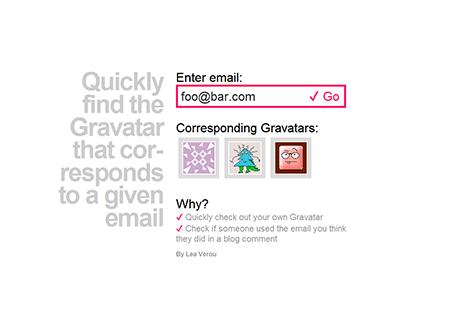
Today I needed to quickly find the Gravatars that corresponded to a bunch of email addresses for some reason (don’t ask). After a bit of googling and wandering around in Gravatar’s official site and others, I firgured out it’s probably much quicker to write a short PHP script for that myself, than keep looking.
Here it is, in case someone ever needs to do something similar: (click on the screenshot)
(has anyone noticed my latest love affair with Helvetica/Arial? :P )
Quickly find the Gravatar that corresponds to a given email
Today I needed to quickly find the Gravatars that corresponded to a bunch of email addresses for some reason (don’t ask). After a bit of googling and wandering around in Gravatar’s official site and others, I firgured out it’s probably much quicker to write a short PHP script for that myself, than keep looking.
Here it is, in case someone ever needs to do something similar: (click on the screenshot)
(has anyone noticed my latest love affair with Helvetica/Arial? :P )
Reading cookies the regular expression way
While taking a look on the 2nd 24ways article for 2009, I was really surprised to read that “The Web Storage API is basically cookies on steroids, a unhealthy dosage of steroids. Cookies are always a pain to work with. First of all you have the problem of setting, changing and deleting them. Typically solved by Googling and blindly relying on PPK’s solution.” (bold is mine)
Of course, there’s nothing wrong with PPK’s solution. It works just fine. However, I always thought his readCookie() function was too verbose and complicated for no reason. It’s a very common example of someone desperately trying to avoid using a regular expression. I googled for “javascript read cookie” and to my surprise, all examples found in the first results were very similar. I never understood why even experienced developers are so scared of regular expressions. Anyway, if anyone wants a shorter function to read a cookie, here’s what I use:
function readCookie(name) { // Escape regexp special characters (thanks kangax!) name = name.replace(/([.*+?^=!:${}()|[\]\/\\])/g, ‘\\$1’);
var regex = new RegExp(‘(?:^|;)\\s?’ + name + ‘=(.*?)(?:;|$)’,‘i’), match = document.cookie.match(regex);
return match && unescape(match[1]); // thanks James! }
Update: Function updated, see comments below.
I’ve been using it for years and it hasn’t let me down. :)
Probably lots of other people have come up and posted something similar before me (I was actually very surprised that something like this isn’t mainstream), but I’m posting it just in case. :)
Reading cookies the regular expression way
While taking a look on the 2nd 24ways article for 2009, I was really surprised to read that “The Web Storage API is basically cookies on steroids, a unhealthy dosage of steroids. Cookies are always a pain to work with. First of all you have the problem of setting, changing and deleting them. Typically solved by Googling and blindly relying on PPK’s solution.” (bold is mine)
Of course, there’s nothing wrong with PPK’s solution. It works just fine. However, I always thought his readCookie() function was too verbose and complicated for no reason. It’s a very common example of someone desperately trying to avoid using a regular expression. I googled for “javascript read cookie” and to my surprise, all examples found in the first results were very similar. I never understood why even experienced developers are so scared of regular expressions. Anyway, if anyone wants a shorter function to read a cookie, here’s what I use:
function readCookie(name) { // Escape regexp special characters (thanks kangax!) name = name.replace(/([.*+?^=!:${}()|[\]\/\\])/g, ‘\\$1’);
var regex = new RegExp(‘(?:^|;)\\s?’ + name + ‘=(.*?)(?:;|$)’,‘i’), match = document.cookie.match(regex);
return match && unescape(match[1]); // thanks James! }
Update: Function updated, see comments below.
I’ve been using it for years and it hasn’t let me down. :)
Probably lots of other people have come up and posted something similar before me (I was actually very surprised that something like this isn’t mainstream), but I’m posting it just in case. :)
Exploring browser-supported Unicode characters and a tweet shortening experiment
I recently wanted to post something on twitter that was just slightly over the 140 chars limit and I didn’t want to shorten it by cutting off characters (some lyrics from Pink Floyd’s “Hey You” that expressed a particular thought I had at the moment – it would be barbaric to alter Roger Waters’ lyrics in any way, wouldn’t it? ;-)). I always knew there were some ligatures and digraphs in the Unicode table, so I thought that these might be used to shorten tweets, not only that particular one of course, but any tweet. So I wrote a small script (warning: very rough around the edges) to explore the Unicode characters that browsers supported, find the replacement pairs and build the tweet shortening script (I even thought of a name for it: ligatweet, LOL I was never good at naming).
My observations were:
- Different browsers support different Unicode characters. I think Firefox has the best support (more characters) and Chrome the worst. By the way, it’s a shame that Chrome doesn’t support the Braille characters.
- The appearance of the same characters, using the same font has huge differences across browsers. A large number of glyphs are completely different. This is very apparent on dingbats (around 0x2600-0x2800).
- For some reason unknown to me, hinting suffers a great deal in the least popular characters (common examples are the unit ligatures, like ㏈ or ㎉). Lots of them looked terribly unlegible and pixelated in small sizes (and only in small sizes!!). Typophiles feel free to correct me if I’m mistaken, but judging by my brief experience with font design, I don’t think bad hinting (or no hinting at all) can do that sort of thing to a glyph. These characters appeared without any anti-aliasing at all! Perhaps it has to do with Cleartype or Windows (?). If anyone has any information about the cause of this issue, I would be greatly interested.
- It’s amazing what there’s in the Unicode table! There are many dingbats and various symbols in it, and a lot of them work cross browser! No need to be constrained by the small subset that html entities can produce!
The tweet shortening script is here: http://lea.verou.me/demos/ligatweet/
I might as well write a bookmarklet in the future. However, I was a bit disappointed to find out that even though I got a bit carried away when picking the replacement pairs, the gains are only around 6-12% for most tweets (case sensitive, of course case insensitive results in higher savings, but the result makes you look like a douchebag), but I’m optimistic that as more pairs get added (feel free to suggest any, or improvements on the current ones) the savings will increase dramatically. And even if they don’t I really enjoyed the trip.
Also, exploring the Unicode table gave me lots of ideas about scripts utilizing it, some of which I consider far more useful than ligatweet (although I’m not sure if I’ll ever find the time to code them, even ligatweet was finished because I had no internet connection for a while tonight, so I couldn’t work and I didn’t feel like going to sleep)
By the way, In case you were wondering, I didn’t post the tweet that inspired me to write the script. After coding for a while, It just didn’t fit my mood any more. ;-)