Reading List
The most recent articles from a list of feeds I subscribe to.
The curious case of border-radius:50%
Admittedly, percentages in border-radius are not one of the most common use cases. Some even consider them an edge case, since most people seem to set border-radius in pixels or --rarely-- ems. And since it’s not used very frequently, it’s still quite buggy. A bit of a chicken and egg case actually: Is it buggy because it’s used rarely or is it used rarely because it’s buggy? My vote would go to the first, so the purpose of this post is to let people know about why percentages in border-radius are incredibly useful and to highlight the various browser whims when it comes to rendering them.
Specification
Before we go into discussing implementations, let’s first examine what the right thing to do is, i.e. what the specification says:
Percentages: Refer to corresponding dimension of the border box.
The two length or percentage values of the ‘border-*-radius’ properties define the radii of a quarter ellipse that defines the shape of the corner of the outer border edge (see the diagram below). The first value is the horizontal radius, the second the vertical radius. If the second value is omitted it is copied from the first. If either length is zero, the corner is square, not rounded. Percentages for the horizontal radius refer to the width of the border box, whereas percentages for the vertical radius refer to the height of the border box.
Why is that useful?
It’s the only way of utilizing border-radius to draw a circle or ellipse, i.e. a rounded shape without any straight lines whatsoever (without knowing the dimensions in advance).
As you will see below, Firefox used to have a bug, or actually a different interpretation of the spec, which I think is a quite commonly needed use case, even more than ellipses: It always drew a regular curve for the corners (quarter of a circle) with the maximum possible radii. This is a very commonly needed shape in UI design. If you’re using OSX, you’re seeing it everywhere: the buttons, the scrollbars, even Skype (notice the blue or grey shading around the usernames in a chat). As I’m writing this post, I can see the same shape in the buttons of Wordpress’ admin panel. And as the current spec stands, there’s no way to do that. You have to know the height (or width, if you want a vertical shape) in advance, which even when possible, makes border-radius depend on the value of other attributes (such as line-height) and you have to remember to change it every time you change those, which causes maintenance headaches. And what’s worse is that the Backgrounds & Borders module is almost done, so it’s quite unlikely that this will change anytime soon. :(
As noted in this comment by David Baron, that assumption wasn’t exactly correct about Firefox’s old rendering. It just resolved % as relative to width in every case (kinda like percentages in margins) and when the height was smaller than the width, it applied the rules for radii that are too big, which say to reduce it equally. A straightforward deduction is that we do have a standards-compliant way to get the behavior from old versions of Firefox, in every browser: Just specify a very big radius, like 9999px.
Different implementations, different bugs
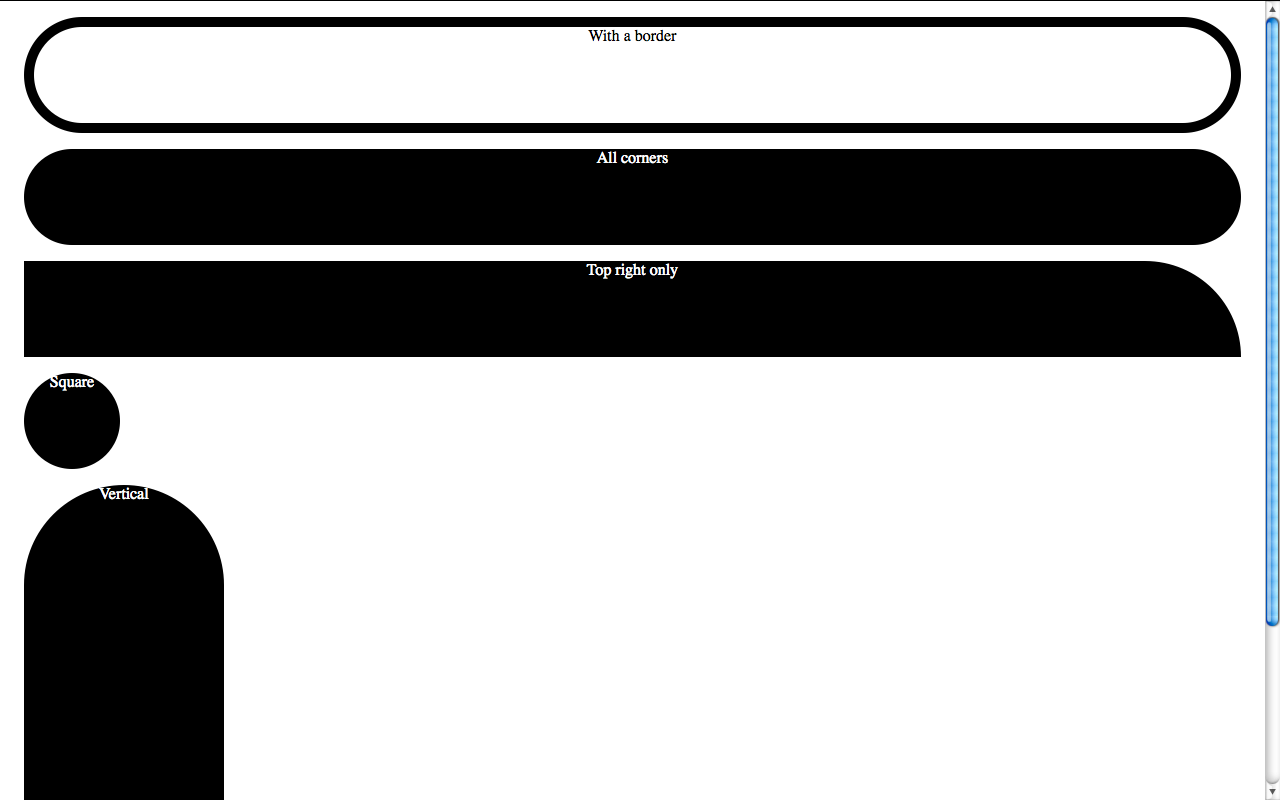
As I mentioned above, Gecko up to Firefox version 4 beta 6 always draws a regular curve for the corners with the largest radii applicable, resulting in a shape that is either a perfect circle or a rectangle with a semicircle on top and bottom (if height > width) or right and left (if width > height).
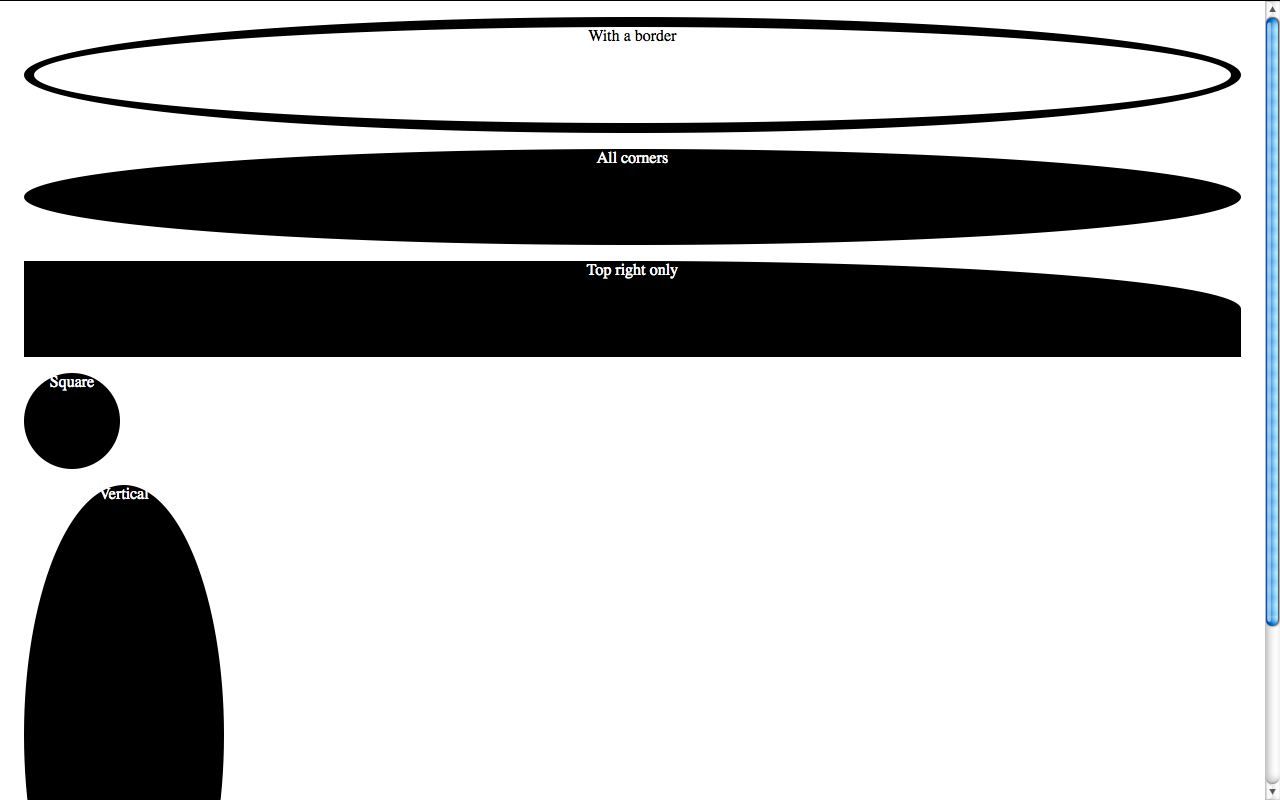
In the latest nightlies this bug is fixed, and it follows the spec to the letter. I can’t help but wonder if this was a bug, a misinterpretation of the spec or a deliberate disagreement with it.
Webkit was late to support percentages in border-radius, but it seems to be the first (it or IE9, I’m not sure) to follow the spec to the letter --concerning corner radii at least-- and renders an ellipse (horizontal radius = width/2, vertical radius = height/2) no matter what. Webkit however seems to be having serious trouble with borders, rendering them with variable width strokes (!).
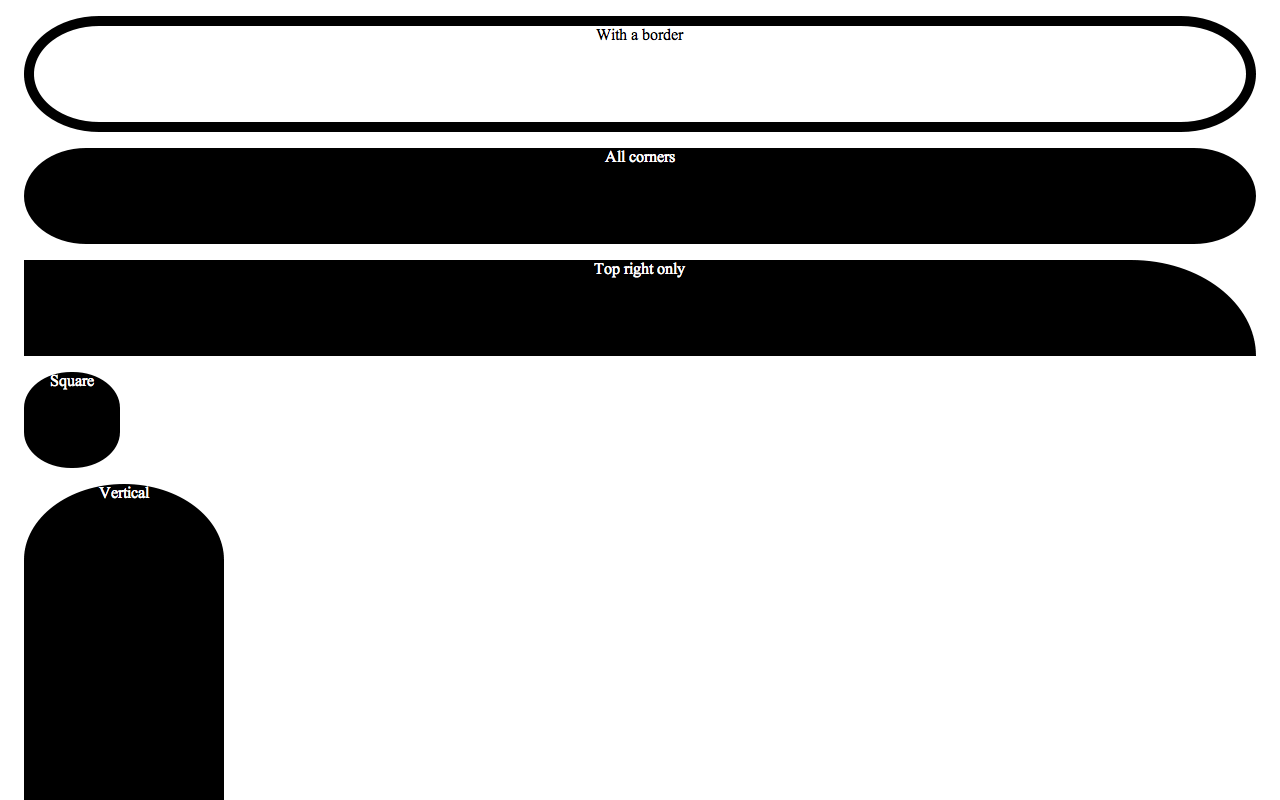
Presto (Opera) is the weirdest when it comes to rendering a percentage border-radius. I can’t figure out the algorithm it uses to determine the radii of the corners even if it was to save my life, it even changes according to window size in my testcases! Since I’ve been using border-radius:50% regularly, I’ve had the pleasure of observing Opera’s rendering in many different designs and I still can’t find a pattern. It’s particularly funny when rendering the little fuchsia comment bubbles in the homepage of my blog: Every one of them has a different radius, even if they are about the same size. It even got one of them right and rendered it as an ellipse once!
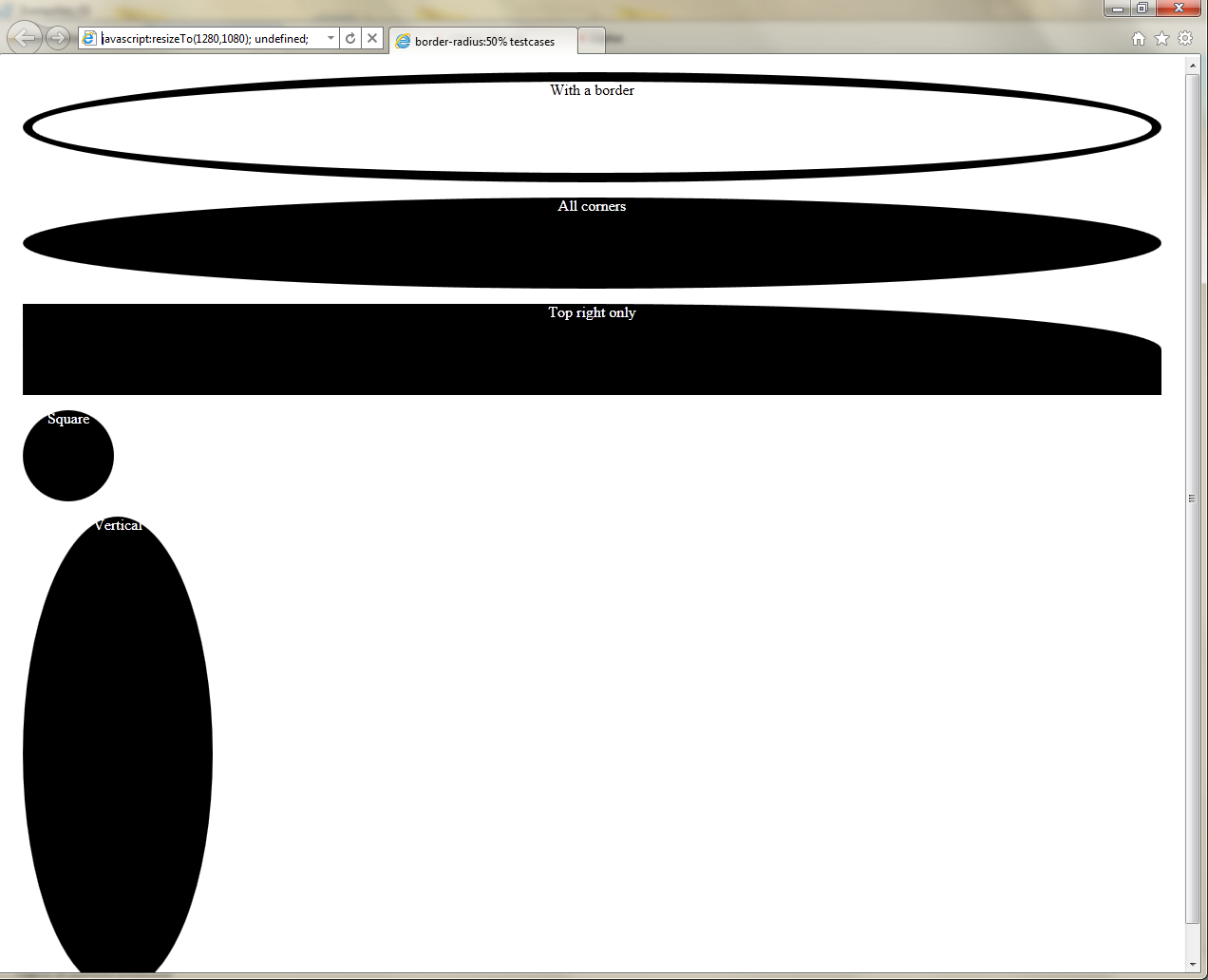
Trident (IE9), along with the latest Gecko nightly is the only 100% correct one when it comes to rendering the testcases, which is not surprising since the IE team boasted quite a lot for their bulletproof border-radius implementation. Well, their CSS3 support might be a bit lacking, but at least the bits they actually implement aren’t buggy. Kudos for that.
Note: Of course all bugs mentioned above have been reported to the respective browser vendors (except the Gecko one that is already fixed in the nightlies).
My FT2010 slides and CSSS: My presentation framework
 About a week ago, I was in Warsaw, Poland to give my first talk at a big conference, Front Trends 2010. As every first-time speaker, I was extremely nervous and worried that everything would go bad. That my talk would be boring or too basic or that I would just freeze at stage, unable to say a word. It was a 2-hour talk with a break in between, so I was also terrified that nobody would show up the second hour.
Contrary to my fears and insecurities, it went better than I could have ever hoped. The feedback on twitter and in general was enthusiastic! There wasn’t a single negative comment. Even people I look up to, like Tantek Çelik, PPK, Jake Archibald or Robert Nyman had something good to say! And instead of nobody showing up the second hour, the audience almost doubled!
At this point, I would like to thank Christian Heilmann for helping me become less nervous before my talk by going through all my slides with me and offering his invaluable advice for every part (I forgot to follow most of it, but it really helped in my attitude). I can’t thank you enough Christian!
Many attendees asked me for my slides and presentation framework. You can find my slides online here or download them. However, before you follow those links, read below:
- I originally ran my presentation in Firefox 4 beta so I was testing mainly in that and Minefield (Firefox’s nightly releases). It supports other browsers too (Chrome 7, Opera 10.6+), but it still displays better in Firefox or Minefield and is (surprisingly) faster in them.
- Opera has issues with a few unicode characters I used in some places and won’t display Helvetica Neue even if it’s installed (@font-face is not an option with that font, for legal reasons)
- Any non-Gecko browser will not display CSS gradients, since Gecko is the only engine so far that supports the standard syntax. Therefore the gradient demos and the multiple backgrounds demo won’t work in non-Gecko browsers.
- Some slides are a bit slow on Webkit. The first slide is extremely slow in it, you have been warned.
- Opera and Webkit have (different) bugs with border-radius: 50%, so some things using it will look funny.
- I have only tested in OSX browsers. I have no idea how it will perform on Windows or Linux distros yet.
- It’s a 2-hour talk and the presentation was designed to run locally. It’s not small and it will take a while to load. That’s due to the images used, as you can easily see from the zip archive.
- The editable examples many of you liked are based on this CSS mindfuck by Anne van Kesteren. It’s smart and convenient, but beware: It breaks really, really easily. It’s good for changing the code realtime, but it will most likely break if you try to add extra code.
In case you’re not feeling very adventurous today, or you’re just using a computer with only unsupported browsers, here’s the presentation as a series of images (not interactive, but still the same info):
CSS3: A practical introduction (FT2010 talk)
 By popular demand, I’m also releasing my presentation framework, for which in the meantime I found a name (CSSS, inspired by S5), designed a logo and made a simpler, sample presentation with a different, simpler theme. I released it in a public repo on Github (finally got around to learning the basics of Github and loved it!). Please note that this is a very first version and I haven’t been able to test it much, especially on Windows, since my Mac is quite new and I keep postponing to install some virtualization software. A friend reported that Firefox 3.6 on Windows has serious issues with it, although it runs fine on my FF3.6 copy for Mac. It doesn’t work at all in IE, even IE9, as I don’t yet have IE to test it out. Please report any issues on Github’s bug tracker and eventually I --or someone else, you’re all welcome :p-- will fix them (don’t forget to mention exact browser version and OS). If you’re using Safari, press Ctrl+H for something cool ;) (it works on the others too, but it’s slower and not smooth)
 Some may ask: “If CSS3 degrades so gracefully and we can use it today as you told us in your talk, then why all these issues with different browsers in CSSS or your FT presentation?”. First of all, these are not everyday use cases. Projects like CSSS or my FT presentation are quite experimental, use a lot of CSS3, including many edge cases and I could have devoted more time to make them degrade more gracefully, but given the target audience, I don’t think it’s worth it much. It’s expected that there might be rendering problems in some browsers or that they might be slow, browsers need edge cases to highlight problems in their implementations of the new stuff before it’s finalized. Every time I experiment with CSS3, I find at least one browser bug, which I generally try to report (don’t let that scare you though, as I said, I have a penchant for edge cases).
You may have also noticed I redesigned my blog. As you may have noticed, I have fallen in love with that Rainbow Wood wallpaper by Luke Roberts and I just had to put it in my blog too :P The new design has a few issues with Opera at the moment, but I hope to fix them soon. It will also look better to those that have Helvetica Neue installed.
My FT2010 slides and CSSS: My presentation framework
About a week ago, I was in Warsaw, Poland to give my first talk at a big conference, Front Trends 2010. As every first-time speaker, I was extremely nervous and worried that everything would go bad. That my talk would be boring or too basic or that I would just freeze at stage, unable to say a word. It was a 2-hour talk with a break in between, so I was also terrified that nobody would show up the second hour.
Contrary to my fears and insecurities, it went better than I could have ever hoped. The feedback on twitter and in general was enthusiastic! There wasn’t a single negative comment. Even people I look up to, like Tantek Çelik, PPK, Jake Archibald or Robert Nyman had something good to say! And instead of nobody showing up the second hour, the audience almost doubled!
At this point, I would like to thank Christian Heilmann for helping me become less nervous before my talk by going through all my slides with me and offering his invaluable advice for every part (I forgot to follow most of it, but it really helped in my attitude). I can’t thank you enough Christian!
Many attendees asked me for my slides and presentation framework. You can find my slides online here or download them. However, before you follow those links, read below:
- I originally ran my presentation in Firefox 4 beta so I was testing mainly in that and Minefield (Firefox’s nightly releases). It supports other browsers too (Chrome 7, Opera 10.6+), but it still displays better in Firefox or Minefield and is (surprisingly) faster in them.
- Opera has issues with a few unicode characters I used in some places and won’t display Helvetica Neue even if it’s installed (@font-face is not an option with that font, for legal reasons)
- Any non-Gecko browser will not display CSS gradients, since Gecko is the only engine so far that supports the standard syntax. Therefore the gradient demos and the multiple backgrounds demo won’t work in non-Gecko browsers.
- Some slides are a bit slow on Webkit. The first slide is extremely slow in it, you have been warned.
- Opera and Webkit have (different) bugs with border-radius: 50%, so some things using it will look funny.
- I have only tested in OSX browsers. I have no idea how it will perform on Windows or Linux distros yet.
- It’s a 2-hour talk and the presentation was designed to run locally. It’s not small and it will take a while to load. That’s due to the images used, as you can easily see from the zip archive.
- The editable examples many of you liked are based on this CSS mindfuck by Anne van Kesteren. It’s smart and convenient, but beware: It breaks really, really easily. It’s good for changing the code realtime, but it will most likely break if you try to add extra code.
In case you’re not feeling very adventurous today, or you’re just using a computer with only unsupported browsers, here’s the presentation as a series of images (not interactive, but still the same info):
CSS3: A practical introduction (FT2010 talk)
By popular demand, I’m also releasing my presentation framework, for which in the meantime I found a name (CSSS, inspired by S5), designed a logo and made a simpler, sample presentation with a different, simpler theme. I released it in a public repo on Github (finally got around to learning the basics of Github and loved it!). Please note that this is a very first version and I haven’t been able to test it much, especially on Windows, since my Mac is quite new and I keep postponing to install some virtualization software. A friend reported that Firefox 3.6 on Windows has serious issues with it, although it runs fine on my FF3.6 copy for Mac. It doesn’t work at all in IE, even IE9, as I don’t yet have IE to test it out. Please report any issues on Github’s bug tracker and eventually I --or someone else, you’re all welcome :p-- will fix them (don’t forget to mention exact browser version and OS). If you’re using Safari, press Ctrl+H for something cool ;) (it works on the others too, but it’s slower and not smooth)
Some may ask: “If CSS3 degrades so gracefully and we can use it today as you told us in your talk, then why all these issues with different browsers in CSSS or your FT presentation?”. First of all, these are not everyday use cases. Projects like CSSS or my FT presentation are quite experimental, use a lot of CSS3, including many edge cases and I could have devoted more time to make them degrade more gracefully, but given the target audience, I don’t think it’s worth it much. It’s expected that there might be rendering problems in some browsers or that they might be slow, browsers need edge cases to highlight problems in their implementations of the new stuff before it’s finalized. Every time I experiment with CSS3, I find at least one browser bug, which I generally try to report (don’t let that scare you though, as I said, I have a penchant for edge cases).
You may have also noticed I redesigned my blog. As you may have noticed, I have fallen in love with that Rainbow Wood wallpaper by Luke Roberts and I just had to put it in my blog too :P The new design has a few issues with Opera at the moment, but I hope to fix them soon. It will also look better to those that have Helvetica Neue installed.
On attr() and calc()
I recently posted my first suggestion to www-style, the official W3 mailing list for CSS development. It was about allowing attr() values inside calc(). In this post I’ll describe in greater detail why I believe this is necessary, since not everyone follows www-style. If anyone has something to add in the discussion, you may post in the list, it’s public.
attr()
As you can easily find out in the specification, the W3 is planning for attr() to play a much bigger role in tomorrow’s CSS than it played in CSS 2.1, where it was originally defined, which opens up exciting possibilities. In a nutshell, we’re going to be able to use attr() in any property, for any type of value, let it be <length>, <number>, <color> or anything else. If the type is not obvious, we’re able to define it, via the second parameter and include a fallback value in the 3rd one. We might even be able to do things like float: attr(X); (keywords are still under consideration).
calc()
On the other hand, as you’re probably already aware of, since calc() is one of the hyped CSS3 features, we’re finally going to be able to do calculations with different types of units, for example calc(100% - 30px), which is something web designers requested for years.
calc(attr())
You can easily see from the grammar presented in the specification for calc() that it does not allow attr() values to be used as operands in the calculations. To me, this is an obvious oversight. Since attr() values can be used anywhere, including where lengths and numbers are allowed, not being able to use them in calc() is absurd. As David Storey pointed out, this could be enormously useful when used in conjunction with the new form control attributes (min, max, step and the like) or HTML5 custom data attributes (data-x).
Philosophically, it makes perfect sense that attr() should be allowed anywhere a <length> or <number> or <angle> or … is. We can’t expect attributes to only hold semantic and not presentational data, but expect these data to be ready to be utilized for presentation purposes, without any calculations whatsoever.
The first use case I can think of is the one that inspired me to suggest this. A while ago, I was researching CSS-based bar charts and progress bars. It turned out that there is no practical and purely semantic solution for specifying the bar widths. Either you have to include inline styles or you bloat your CSS with countless classes or ids, one for each width or —even worse— bar. In cases where you just want to use the displayed percentage of the bar as its width as well, attr() can actually help. However, as you can see, this is not always the case. Most of the times the bar values are not percentages or you want to also perform calculations on the percentage, for example include padding (because usually you display the number as well) or cut it in half to prevent the bar chart from appearing very big, etc, in which calc() combined with attr() could be a lifesaver.
One could argue that bar charts and progress bars are not legitimate CSS use cases but hacks that work around the lack of cross-browser SVG support, and it’s very possible that they are right (although the addition of elements like <progress> in HTML5 is by itself an argument for the opposite). However, the use cases are not limited to that. Αny kind of stylistic treatment that is supposed to convey some kind of fraction or number (progress, temperature, distance etc) will benefit from keeping the actual data in a data-x attribute and utilize them via attr() and calc().
Admittedly, coming up with more generic use cases is not very easy, since they greatly depend on the particular application. However, the same difficulty arises when trying to come up with use cases for the attr() function by itself when used for the numerical types (<number>, <length> etc), in properties other than content. Perhaps this is the reason that not even the specification contains any practical examples for it either. I guess almost any real-life use case for attr(*, number|integer|length|angle|frequency|em|px|…, *) is also a use case for this.
So far I’m optimistic about it, since almost all participants in the discussion were positive. However, calc() has already started being implemented (by Mozilla), so as time goes by, it will be increasingly harder to make changes to its grammar.
What do you think? How would you use it if it’s implemented?
Edit: Sometime in Spring 2012, the issue was brought up again, and the CSS WG agreed that attr() should be permitted in calc(). Now it’s just a matter of browsers catching up to the spec. :)
On attr() and calc()
I recently posted my first suggestion to www-style, the official W3 mailing list for CSS development. It was about allowing attr() values inside calc(). In this post I’ll describe in greater detail why I believe this is necessary, since not everyone follows www-style. If anyone has something to add in the discussion, you may post in the list, it’s public.
attr()
As you can easily find out in the specification, the W3 is planning for attr() to play a much bigger role in tomorrow’s CSS than it played in CSS 2.1, where it was originally defined, which opens up exciting possibilities. In a nutshell, we’re going to be able to use attr() in any property, for any type of value, let it be <length>, <number>, <color> or anything else. If the type is not obvious, we’re able to define it, via the second parameter and include a fallback value in the 3rd one. We might even be able to do things like float: attr(X); (keywords are still under consideration).
calc()
On the other hand, as you’re probably already aware of, since calc() is one of the hyped CSS3 features, we’re finally going to be able to do calculations with different types of units, for example calc(100% - 30px), which is something web designers requested for years.
calc(attr())
You can easily see from the grammar presented in the specification for calc() that it does not allow attr() values to be used as operands in the calculations. To me, this is an obvious oversight. Since attr() values can be used anywhere, including where lengths and numbers are allowed, not being able to use them in calc() is absurd. As David Storey pointed out, this could be enormously useful when used in conjunction with the new form control attributes (min, max, step and the like) or HTML5 custom data attributes (data-x).
Philosophically, it makes perfect sense that attr() should be allowed anywhere a <length> or <number> or <angle> or … is. We can’t expect attributes to only hold semantic and not presentational data, but expect these data to be ready to be utilized for presentation purposes, without any calculations whatsoever.
The first use case I can think of is the one that inspired me to suggest this. A while ago, I was researching CSS-based bar charts and progress bars. It turned out that there is no practical and purely semantic solution for specifying the bar widths. Either you have to include inline styles or you bloat your CSS with countless classes or ids, one for each width or —even worse— bar. In cases where you just want to use the displayed percentage of the bar as its width as well, attr() can actually help. However, as you can see, this is not always the case. Most of the times the bar values are not percentages or you want to also perform calculations on the percentage, for example include padding (because usually you display the number as well) or cut it in half to prevent the bar chart from appearing very big, etc, in which calc() combined with attr() could be a lifesaver.
One could argue that bar charts and progress bars are not legitimate CSS use cases but hacks that work around the lack of cross-browser SVG support, and it’s very possible that they are right (although the addition of elements like <progress> in HTML5 is by itself an argument for the opposite). However, the use cases are not limited to that. Αny kind of stylistic treatment that is supposed to convey some kind of fraction or number (progress, temperature, distance etc) will benefit from keeping the actual data in a data-x attribute and utilize them via attr() and calc().
Admittedly, coming up with more generic use cases is not very easy, since they greatly depend on the particular application. However, the same difficulty arises when trying to come up with use cases for the attr() function by itself when used for the numerical types (<number>, <length> etc), in properties other than content. Perhaps this is the reason that not even the specification contains any practical examples for it either. I guess almost any real-life use case for attr(*, number|integer|length|angle|frequency|em|px|…, *) is also a use case for this.
So far I’m optimistic about it, since almost all participants in the discussion were positive. However, calc() has already started being implemented (by Mozilla), so as time goes by, it will be increasingly harder to make changes to its grammar.
What do you think? How would you use it if it’s implemented?
Edit: Sometime in Spring 2012, the issue was brought up again, and the CSS WG agreed that attr() should be permitted in calc(). Now it’s just a matter of browsers catching up to the spec. :)