Reading List
The most recent articles from a list of feeds I subscribe to.
CSS3 patterns gallery and a new pattern
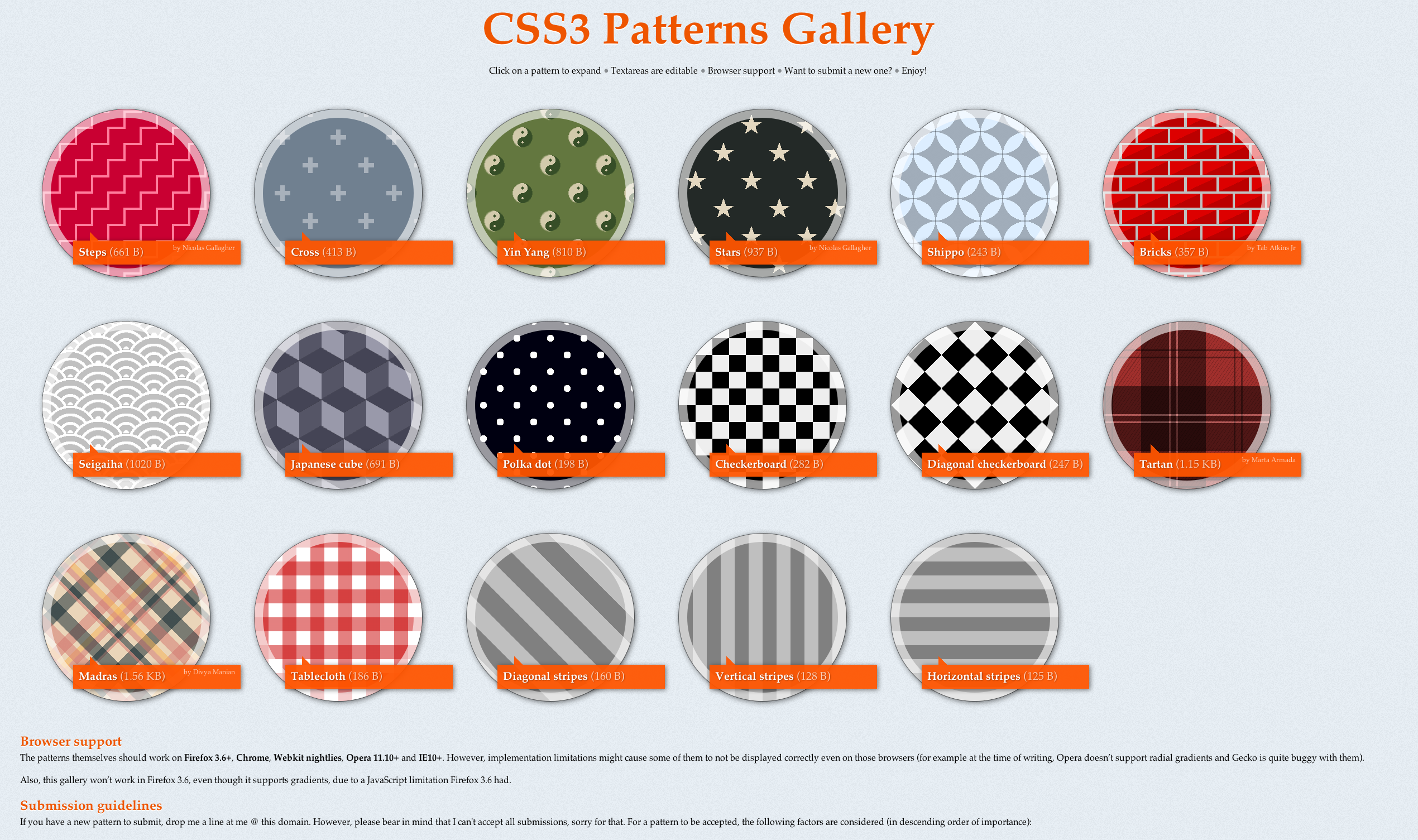 I finally got around to doing what I wanted to do for quite a few months: Create a gallery with all the basic patterns I was able to create with CSS3 gradients. Here it is: CSS3 Pattern Gallery
Also, it includes a brand new pattern, which is the hardest one I have ever made so far: Japanese cubes. Thanks to David Storey for challenging me about it.
Supported browsers:
- Firefox 4 (the patterns themselves work on 3.6 too but the gallery doesn’t due to a JS limitation)
- Opera 11.10
- IE10
- Google Chrome
- Webkit nightlies
However bear in mind that every implementation has its limitations so a few of them won’t work in all the aforementioned browsers (for example Opera doesn’t support radial gradients and Firefox doesn’t support explicitly sized ones).
CSS3 patterns gallery and a new pattern
I finally got around to doing what I wanted to do for quite a few months: Create a gallery with all the basic patterns I was able to create with CSS3 gradients. Here it is: CSS3 Pattern Gallery
Also, it includes a brand new pattern, which is the hardest one I have ever made so far: Japanese cubes. Thanks to David Storey for challenging me about it.
Supported browsers:
- Firefox 4 (the patterns themselves work on 3.6 too but the gallery doesn’t due to a JS limitation)
- Opera 11.10
- IE10
- Google Chrome
- Webkit nightlies
However bear in mind that every implementation has its limitations so a few of them won’t work in all the aforementioned browsers (for example Opera doesn’t support radial gradients and Firefox doesn’t support explicitly sized ones).
Invert a whole webpage with CSS only
 I recently saw Paul Irish’s jQuery invert page plugin. It inverts every color on a webpage including images or CSS. This reminded me of the invert color keyword that’s allowed on outlines (and sadly only supported by Opera and IE9+). So I wondered how it could be exploited to achieve the same effect through CSS alone. Turned out to be quite simple actually:
body:before { content:“”; position:fixed; top:50%; left: 50%; z-index:9999; width:1px; height: 1px; outline:2999px solid invert; }
Not even pointer-events:none; is needed, since outlines don’t receive pointer events anyway, and there’s no issue with scrollbars since they don’t contribute to scrolling. So this is not even CSS3, it’s just plain ol’ CSS 2.1.
And here’s a bookmarklet to inject it into any given page: [Invert page](javascript:(function(){var%20style=document.createElement(‘style’);style.innerHTML=‘body:before%20{%20content:%22%22;%20position:fixed;%20top:50%25;%20left:50%25;%20z-index:9999;%20width:1px;%20height:%201px;%20outline:2999px%20solid%20invert;%20}’;document.body.appendChild(style)})();)
**Note:**This will only work on Opera and IE9+ since they’re currently the only ones supporting the color keyword ‘invert’ on outlines. However, it’s probably possible to add Firefox support too with SVG filters, since they support them on HTML elements as well.
As for why would someone want to invert a page… I guess it could be useful for people that can read white text on dark backgrounds more easily, April fools jokes, konami code fun and stuff like that.
Update: Mozilla is planning to never support invert because there’s a loophole in the CSS 2.1 spec that allows them to do that. However, you can push them to support it by voting on the relevant issue.
Invert a whole webpage with CSS only
I recently saw Paul Irish’s jQuery invert page plugin. It inverts every color on a webpage including images or CSS. This reminded me of the invert color keyword that’s allowed on outlines (and sadly only supported by Opera and IE9+). So I wondered how it could be exploited to achieve the same effect through CSS alone. Turned out to be quite simple actually:
body:before { content:“”; position:fixed; top:50%; left: 50%; z-index:9999; width:1px; height: 1px; outline:2999px solid invert; }
Not even pointer-events:none; is needed, since outlines don’t receive pointer events anyway, and there’s no issue with scrollbars since they don’t contribute to scrolling. So this is not even CSS3, it’s just plain ol’ CSS 2.1.
And here’s a bookmarklet to inject it into any given page: [Invert page](javascript:(function(){var%20style=document.createElement(‘style’);style.innerHTML=‘body:before%20{%20content:%22%22;%20position:fixed;%20top:50%25;%20left:50%25;%20z-index:9999;%20width:1px;%20height:%201px;%20outline:2999px%20solid%20invert;%20}’;document.body.appendChild(style)})();)
**Note:**This will only work on Opera and IE9+ since they’re currently the only ones supporting the color keyword ‘invert’ on outlines. However, it’s probably possible to add Firefox support too with SVG filters, since they support them on HTML elements as well.
As for why would someone want to invert a page… I guess it could be useful for people that can read white text on dark backgrounds more easily, April fools jokes, konami code fun and stuff like that.
Update: Mozilla is planning to never support invert because there’s a loophole in the CSS 2.1 spec that allows them to do that. However, you can push them to support it by voting on the relevant issue.
Create complex RegExps more easily
When I was writing my linear-gradient() to -webkit-gradient() converter, I knew in advance that I would have to use a quite large regular expression to validate and parse the input. Such a regex would be incredibly hard to read and fix potential issues, so I tried to find a way to cut the process down in reusable parts.
Turns out JavaScript regular expression objects have a .source property that can be used in the RegExp constructor to create a new RegExp out of another one. So I wrote a new function that takes a string with identifiers for regexp replacements in and replaces them with the corresponding sub-regexps, taken from an object literal as a second argument:
/** * Create complex regexps in an easy to read way * @param str {String} Final regex with for replacements * @param replacements {Object} Object with the replacements * @param flags {String} Just like the flags argument in the RegExp constructor */ RegExp.create = function(str, replacements, flags) { for(var id in replacements) { var replacement = replacements[id], idRegExp = RegExp(’ + id + ', ‘gi’);
if(replacement.source) { replacement = replacement.source.replace(/^\^|\$$/g, ‘’); }
// Don’t add extra parentheses if they already exist str = str.replace(RegExp(‘\\(’ + idRegExp.source + ‘\\)’, ‘gi’), ‘(’ + replacement + ‘)’);
str = str.replace(idRegExp, ‘(?:’ + replacement + ‘)’); }
return RegExp(str, flags); };
If you don’t like adding a function to the RegExp object, you can name it however you want. Here’s how I used it for my linear-gradient() parser:
self.regex = {};
self.regex.number = /^-?[0-9]*\.?[0-9]+$/; self.regex.keyword = /^(?:top\s+|bottom\s+)?(?:right|left)|(?:right\s+|left\s+)?(?:top|bottom)$/;
self.regex.direction = RegExp.create(‘^(?:|deg|0)$’, { keyword: self.regex.keyword, number: self.regex.number });
self.regex.color = RegExp.create(‘(?:||)’, { keyword: /^(?:red|tan|grey|gray|lime|navy|blue|teal|aqua|cyan|gold|peru|pink|plum|snow|[a-z]{5,20})$/, func: RegExp.create(‘^(?:rgb|hsl)a?\\((?:\\s*%?\\s*,?\\s*){3,4}\\)$’, { number: self.regex.number }), hex: /^#(?:[0-9a-f]{1,2}){3}$/ });
self.regex.percentage = RegExp.create(‘^(?:%|0)$’, { number: self.regex.number });
self.regex.length = RegExp.create(‘|0’, { number: self.regex.number, unit: /%|px|mm|cm|in|em|rem|en|ex|ch|vm|vw|vh/ });
self.regex.colorStop = RegExp.create(‘\\s*?’, { color: self.regex.color, length: self.regex.length }, ‘g’);
self.regex.linearGradient = RegExp.create(‘^linear-gradient\\(\\s*(?:()\\s*,)?\\s*(\\s*(?:,\\s*\\s*)+)\\)$’, { direction: self.regex.direction, colorStop: self.regex.colorStop }, ‘i’);
(self in this case was a local variable, not the window object)