Reading List
The most recent articles from a list of feeds I subscribe to.
Exactly how much CSS3 does your browser support?
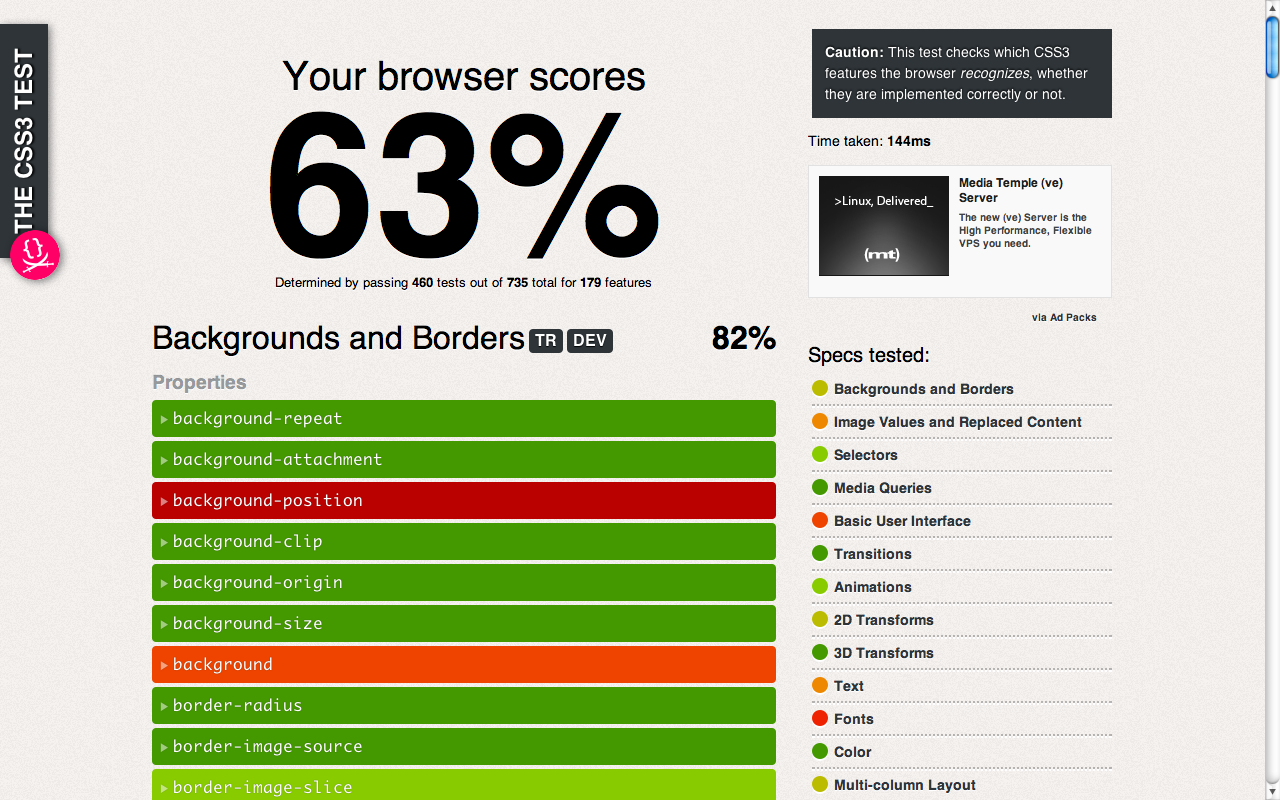 This project started as an attempt to improve dabblet and to generate data for the book chapter I’m writing for Smashing Book #3. I wanted to create a very simple/basic testsuite for CSS3 stuff so that you could hover on a e.g. CSS3 property and you got a nice browser support popup. While I didn’t achieve that (turns out BrowserScope doesn’t do that kind of thing), I still think it’s interesting as a spin-off project, especially since the results will probably surprise you.
How it works
css3test (very superficially) tests pretty much everything in the specs mentioned on the sidebar (not just the popular widely implemented stuff). You can click on every feature to expand it and see the exact the testcases run and whether they passed. It only checks what syntax the browser recognizes, which doesn’t necessarily mean it will work correctly when used. WebKit is especially notorious for cheating in tests like this, recognizing stuff it doesn’t understand, like the values “round” and “space” for background-repeat, but the cheating isn’t big enough to seriously compromise the test.
Whether a feature is supported with a prefix or not doesn’t matter for the result. If it’s supported without a prefix, it will test that one. If it’s supported only with a prefix, it will test the prefixed one. For properties especially, if an unprefixed one is supported, it will be used in all the tests.
Only stuff that’s in a W3C specification is tested. So, please don’t ask or send pull requests for proprietary things like -webkit-gradient() or -webkit-background-clip: text; or -webkit-box-reflect and so on.
Every feature contributes the same to the end score, as well as to the score of the individual spec, regardless of the number of tests it has.
Crazy shit
Chrome may display slightly different scores (1% difference) across pageloads. It seems that for some reason, it fails the tests for border-image completely on some pageloads, which doesn’t make any sense. Whoever wants to investigate, I’d be grateful. Edit: Fixed (someone found and submitted an even crazier workaround.).
Browserscope
This is the first project of mine in which I’ve used browserscope. This means that your results will be sent over to its servers and aggreggated. When I have enough data, I’m gonna built a nice table for everyone to see :) In the meantime, check the results page.
It doesn’t work on my browser, U SUCK!
The test won’t work on dinosaur browsers like IE8, but who cares measuring their CSS3 support anyway? “For a laugh” isn’t a good enough answer to warrant the time needed.
If you find a bug, please remember you didn’t pay a dime for this before nagging. Politely report it on Github, or even better, fix it and send a pull request.
Why did you build it?
To motivate browsers to support the less hyped stuff, because I’m tired of seeing the same things being evangelized over and over. There’s much more to CSS3.
Current results
At the time of this writing, these are the results for the major modern browsers:
- Chrome Canary, WebKit nightlies, Firefox Nightly: 64%
- Chrome, IE10PP4: 63%
- Firefox 10: 61%
- Safari 5.1, iOS5 Safari: 60%
- Opera 11.60: 56%
- Firefox 9: 58%
- Firefox 6-8: 57%
- Firefox 5, Opera 11.1 - 11.5: 55%
- Safari 5.0: 54%
- Firefox 4: 49%
- Safari 4: 47%
- Opera 10: 45%
- Firefox 3.6: 44%
- IE9: 39%
Enjoy! css3test.com Fork css3test on Github Browserscope results
Why tabs are clearly superior
If you follow me on twitter or have heard one of my talks you’ll probably know I despise spaces for indentation with a passion. However, I’ve never gone into the details of my opinion on stage, and twitter isn’t really the right medium for advocacy. I always wanted to write a blog post about my take on this old debate, so here it is.
Tabs for indentation, spaces for alignment
Let’s get this out of the way: Tabs should never be used for alignment. Using tabs for alignment is actively worse than using spaces for indentation and is the base of all arguments against tabs. But using tabs for alignment is misuse, and negates their main advantage: personalization. It’s like trying to eat soup with a fork and complaining because it doesn’t scoop up liquid well.
Consider this code snippet:
if (something) {
	let x = 10,
	    y = 0;
}
Each line inside the conditional is indented with a tab, but the variables are aligned with four spaces. Change the tab size to see how everything adapts beautifully:
And yes, of course using tabs for alignment is a mess, because that’s not what they’re for:
if (something) {
	let x = 10,
		y = 0;
}
Another example: remember CSS vendor prefixes?
div {
	-webkit-transition: 1s;
	   -moz-transition: 1s;
	    -ms-transition: 1s;
	     -o-transition: 1s;
	        transition: 1s;
}
1. Tabs can be personalized
The width of a tab character can be adjusted per editor. This is not a disadvantage of tabs as commonly evangelized, but a major advantage. People can view your code in the way they feel comfortable with, not in the way *you* prefer. Tabs are one step towards decoupling the code’s presentation from its logic, just like CSS decouples presentation from HTML. They give more power to the reader rather than letting the author control everything. Basically, using spaces is like saying “I don’t care about how you feel more comfortable reading code, I will force you to use my preferences because it’s my code”.
Personalization is incredibly valuable when a team is collaborating, as different engineers can have different opinions. Some engineers prefer their indents to be 2 spaces wide, some prefer them to be 4 spaces wide. With spaces for alignment, a lead engineer imposes their preference on the entire team; with tabs everyone gets to choose what they feel comfortable with.
2. You don’t depend on certain tools
When using spaces, you depend on your editor to abstract away the fact that an indent is actually N characters instead of one. You depend on your editor to insert N spaces every time you press the Tab key and to delete N characters every time you press backspace or delete near an indent. I have never seen an editor where this abstraction did not leak at all. If you’re not careful, it’s easy to end up with indentation that is not an integer multiple of the indent width, which is a mess. With tabs, the indent width is simply the number of tabs at the beginning of a line. You don’t depend on tools to hide anything, and change the meaning of keyboard keys. Even in the most basic of plain text editors, you can use the keyboard to navigate indents in integer increments.
3. Tabs encode strictly more information about the code
Used right, tabs are only used for a singular purpose: indentation. This makes them easy to target programmatically, e.g. through regular expressions or find & replace. Spaces on the other hand, have many meanings, so programmatically matching indents is a non-trivial problem. Even if you only match space characters at the beginning of a line, there is no way of knowing when to stop, as spaces are also used for alignment. Being able to tell the difference requires awareness about the semantics of the language itself.
4. Tabs facilitate portability
As pointed out by Norbert Süle in the comments, when you copy and paste code that’s indented with spaces, you have to manually adjust the indentation afterwards, unless the other person also happens to prefer the same width indents as you. With tabs, there is no such issue, as it’s always tabs so it will fit in with your (tabbed) code seamlessly. The world would be a better place if everyone used tabs.
5. Tabs take up less space
One of the least important arguments here, but still worth mentioning. Tabs take up only one byte, while spaces take up as many bytes as their width, usually 2-4x that. On large codebases this can add up. E.g. in a codebase of 1M loc, averaging 1 indent per line (good luck computing these kinds of stats with spaces btw, see 3 above), with an indent width of 4 spaces, you would save 3MB of space by using tabs instead of spaces. It’s not a tremendous cost if spaces actually offered a benefit, but it’s unclear what the benefit is.
The downsides of using tabs for indentation
Literally all downsides of using tabs for indentation stem from how vocal their opponents are and how pervasive spaces are for indentation. To the point that using spaces for indentation is associated with significantly higher salaries!
In browsers
It is unfortunate that most UAs have declared war to tabs by using a default tab size of 8, far too wide for any practical purpose.
For code you post online, you can use the tab-size property to set tab size to a more reasonable value, e.g. 4.
It’s widely supported.
For reading code on other websites, you can use an extension like Stylus to set the tab size to whatever you want. I have this rule applying on all websites:
/* ==UserStyle==
@name           7/22/2022, 5:43:07 PM
@namespace      *
@version        1.0.0
@description    A new userstyle
@author         Me
==/UserStyle== */

* {
	tab-size: 4 !important;
}
In tooling
Editors that handle smart tabs correctly are few and far between. Even VS Code, the most popular editor right now, doesn’t handle them correctly, though there are extensions (Tab-Indent Space-Align, Smart Tabs, and others)
What does it matter, tabs, spaces, whatever, it’s just a pointless detail
Sure, in the grand scheme of things, using spaces for indentation will not kill anyone. But it’s a proxy for a greater argument: that technology should make it possible to read code in the way you prefer, without having to get team buy-in on your preferences. There are other ways to do this (reformatting post-pull and pre-commit), but are too heavyweight and intrusive. If we can’t even get people to see the value of not enforcing the same indentation width on everyone, how can we expect them to see the value in further personalization?
Further reading
- Tabs. Spaces. Indentation. Alignment.
- Indentation With Spaces Considered Harmful
- Tabs vs spaces for code indentation
- Why I love having tabs in source code
- Tabs vs spaces
- Indent with tabs, align with spaces
- Relevant: Elastic tabstops
Thanks to Oli for proofreading the first version of this post.
Why tabs are clearly superior
If you follow me on twitter or have heard one of my talks you’ll probably know I despise spaces for indentation with a passion. However, I’ve never gone into the details of my opinion on stage, and twitter isn’t really the right medium for advocacy. I always wanted to write a blog post about my take on this old debate, so here it is.
Tabs take up less space
Yes, this might be an insignificant difference after gzipping and a nonexistent one after minification. But it means you need these processes to keep your code size reasonable. You depend on them, for no reason. Comments for example are useful, and it’s worth having them even if you knew you couldn’t minify or gzip your code. Tabs could do the same thing as spaces, so you’re just bloating your code for no reason.
Tabs can be personalized
The width of a tab character can be adjusted per editor. This is not a disadvantage of tabs as commonly evangelized, but a major advantage. People can view your code in the way they feel comfortable with, not in the way *you* prefer. Tabs decouple the code’s presentation from its logic, just like CSS decouples presentation from HTML. They give more power to the reader rather than letting the author control everything. Basically, using spaces is like saying “I don’t give a rat’s ass about how you feel more comfortable reading code. I will force you to use my preferences because it’s my code”.
Tabs are better for collaboration
Personalization is incredibly valuable when a team is collaborating, as different coders can have different opinions. Some coders prefer their indents to be 2 spaces wide, some coders prefer them to be 4 spaces wide. Rather than manually or automatically converting the code post-pull, and then back pre-commit, it would be adjusted automatically, depending on the editor’s tab-width setting, so every coder could start editing right away, with their favorite type of indent.
You don’t depend on certain tools
When using spaces, you depend on your editor to hide the fact that an indent is actually N characters instead of one. You depend on your editor to insert N spaces every time you press the Tab key and to delete N characters every time you press backspace or delete near an indent. When you have to use something that’s not your editor (for example when writing a snippet of code on a webapp that embeds something like codemirror) you will have to face the ugliness of your decision. Especially with codemirror, everyone else will have to face the ugliness of spaces too, as it converts tabs to spaces :(
Tabs are easy to select
Assume for some reason you want to select all indents and double them or convert them to spaces. This is very easy with tabs, because that’s their sole meaning. Tabs were invented for this sort of thing. Spaces on the other hand, have many meanings, so you can’t just find & replace space characters. And how do we usually call the practice of using things for a different purpose than they were made for? Yup, that’s right, using spaces for indentation is a hack.
Code indented with tabs is easier to copy & paste
As pointed out by Norbert Süle in the comments, when you copy and paste code that’s indented with spaces, you have to manually adjust the indentation afterwards, unless the other person also happens to prefer the same width indents as you. With tabs, there is no such issue, as it’s always tabs so it will fit in with your (tabbed) code seamlessly. The world would be a better place if everyone used tabs.
But what about the web? Tabs are super wide there!
This used to be a big problem, and even the enlightened coders that prefer tabs usually convert them to spaces before posting code online. However, CSS3 solves this problem, with the tab-size property. It’s supported by Opera, Firefox and very soon by WebKit too. It also degrades gracefully: The code is less pretty, but still perfectly readable.
Are spaces always evil?
Spaces are the best choice for aligning, rather than indenting. For example, in the following code snippet:
var x = 10, y = 0;
you need 4 spaces to make the variables line up. If you used tabs, they would only line up when the tab width is 4 and the formatting would look messed up in every other case. However, if this code snippet was also indented, the indents could (and should) still be tabs.
Another example is aligning CSS3 properties with different vendor prefixes. The indent should be done with tabs, but the aligning with spaces, like so:
div { -webkit-transition: 1s; -moz-transition: 1s; -ms-transition: 1s; -o-transition: 1s; transition: 1s; }
It’s just a pointless detail, are you seriously that obsessed?
Um, ok I am exaggerating a bit when I say how spaces suck. I do think they suck, although I admit the world has much bigger problems than coders who use spaces for indentation.
For example, coders that don’t name their variables properly. Or the ones that prefer Emacs over Vim ;)
Further reading
- Indentation With Spaces Considered Harmful
- Tabs vs spaces for code indentation
- Why I love having tabs in source code
- Tabs vs spaces
- Relevant: Elastic tabstops
Update: More reasons from commenters
Thanks to Oli for his proofreading!
Update: More reasons from commenters
- Tabs reduce typing effort (Yes, editors will insert groups of spaces automatically when you press tab, but cursor movement and deletions must be done one at a time).
- Tabs make typing consistent - inserting/deleting/moving past an indent is always a single keypress. With spaces, one keypress creates an indent, but then you need to press delete an *indeterminate number of times* to remove the indent. That means I have to watch what I’m doing and press delete until my cursor lines up with the previous line, or (3) occurs.
- Tabs are indivisible. With spaces it is easy to end up on a non-tab column, and then you have either messy code or waste time tidying up the indentation. Tabs eliminate this problem by “snapping” code to the correct indentation column automatically.
My new year’s resolution
Warning: Personal post ahead. If you’re here to read some code trickery, move along and wait for the next post, kthxbai
Blogs are excellent places for new year’s resolutions. Posts stay there for years, to remind you what you’ve been thinking long ago. A list on a piece of paper or a file in your computer will be forgotten and lost, but a resolution on your blog will come back to haunt you. Sometimes you want that extra push. I’m not too fond of new year’s resolutions and this may as well be my first, but this year there are certain goals I want to achieve, unlike previous years were things were more fluid.
So, in 2012 I want to…
- Land my dreamjob in a US company/organization I respect
- Get the hell out of Greece and move to the Bay Area
- Strive to improve my english even more, until I sound and write like a native speaker
- Find a publisher I respect that’s willing to print in full color and write my first book.
- Stop getting into stupid fights on twitter. They are destructive to both my well-being and my creativity.
- Get my degree in Computer Science. This has been my longest side project, 4 years and counting.
I wonder how many of those I will have achieved this time next year, how many I will have failed and how many I won’t care about any more…
My new year’s resolution
Warning: Personal post ahead. If you’re here to read some code trickery, move along and wait for the next post, kthxbai
Blogs are excellent places for new year’s resolutions. Posts stay there for years, to remind you what you’ve been thinking long ago. A list on a piece of paper or a file in your computer will be forgotten and lost, but a resolution on your blog will come back to haunt you. Sometimes you want that extra push. I’m not too fond of new year’s resolutions and this may as well be my first, but this year there are certain goals I want to achieve, unlike previous years were things were more fluid.
So, in 2012 I want to…
- Land my dreamjob in a US company/organization I respect
- Get the hell out of Greece and move to the Bay Area
- Strive to improve my english even more, until I sound and write like a native speaker
- Find a publisher I respect that’s willing to print in full color and write my first book.
- Stop getting into stupid fights on twitter. They are destructive to both my well-being and my creativity.
- Get my degree in Computer Science. This has been my longest side project, 4 years and counting.
I wonder how many of those I will have achieved this time next year, how many I will have failed and how many I won’t care about any more…