Reading List
The most recent articles from a list of feeds I subscribe to.
Moving an element along a circle
It all started a few months ago, when Chris Coyier casually asked me how would I move an element along a circle, without of course rotating the element itself. If I recall correctly, his solution was to use multiple keyframes, for various points on a circle’s circumference, approximating it. I couldn’t think of anything better at the time, but the question was stuck in the back of my head. 3 months ago, I came up with a first solution. Unfortunately, it required an extra wrapper element. The idea was to use two rotate transforms with different origins and opposite angles that cancel each other at any given time. The first transform-origin would be the center of the circle path and the other one the center of the element. Because we can’t use multiple transform-origins, a wrapper element was needed.
So, even though this solution was better, I wasn’t fully satisfied with it due to the need for the extra element. So, it kept being stuck in the back of my head.
Recently, I suggested to www-style that transform-origin should be a list and accept multiple origins and presented this example as a use case. And then Aryeh Gregor came up with this genius idea to prove that it’s already possible if you chain translate() transforms between the opposite rotates.
I simplified the code a bit, and here it is:
With the tools we currently have, I don’t think it gets any simpler than that.
Moving an element along a circle
It all started a few months ago, when Chris Coyier casually asked me how would I move an element along a circle, without of course rotating the element itself. If I recall correctly, his solution was to use multiple keyframes, for various points on a circle’s circumference, approximating it. I couldn’t think of anything better at the time, but the question was stuck in the back of my head. 3 months ago, I came up with a first solution. Unfortunately, it required an extra wrapper element. The idea was to use two rotate transforms with different origins and opposite angles that cancel each other at any given time. The first transform-origin would be the center of the circle path and the other one the center of the element. Because we can’t use multiple transform-origins, a wrapper element was needed.
So, even though this solution was better, I wasn’t fully satisfied with it due to the need for the extra element. So, it kept being stuck in the back of my head.
Recently, I suggested to www-style that transform-origin should be a list and accept multiple origins and presented this example as a use case. And then Aryeh Gregor came up with this genius idea to prove that it’s already possible if you chain translate() transforms between the opposite rotates.
I simplified the code a bit, and here it is:
With the tools we currently have, I don’t think it gets any simpler than that.
Simpler CSS typing animation, with the ch unit
A while ago, I posted about how to use steps() as an easing function to create a typing animation that degrades gracefully.
Today I decided to simplify it a bit and make it more flexible, at the cost of browser support. The new version fully works in Firefox 1+ and IE10, since Opera and WebKit don’t support the ch unit and even though IE9 supports it, it doesn’t support CSS animations. To put it simply, one ch unit is equivalent to the width of the zero (0) character of the font. So, in monospace fonts, it’s equivalent to the width of every character, since every character has the same width.
In the new version, we don’t need an obscuring span, so no extra HTML and it will work with non-solid backgrounds too. Also, even though the number of characters still needs to be hard-coded, it doesn’t need to be hardcoded in the animation any more, so it could be easily done through script without messing with creating/modifying stylesheets. Note how each animation only has one keyframe, and takes advantage of the fact that when the from (0%) and to (100%) keyframes are missing, the browser generates them from the fallback styles. I use this a lot when coding animations, as I hate duplication.
In browsers that support CSS animations, but not the ch unit (such as WebKit based browsers), the animation will still occur, since we included a fallback in ems, but it won’t be 100% perfect. I think that’s a pretty good fallback, but if it bothers you, just declare a fallback of auto (or don’t declare one at all, and it will naturally fall back to auto). In browsers that don’t support CSS animations at all (such as Opera), the caret will be a solid black line that doesn’t blink. I thought that’s better than not showing it at all, but if you disagree, it’s very easy to hide it in those browsers completely: Just swap the border-color between the keyframe and the h1 rule (hint: when a border-color is not declared, it’s currentColor).
Edit: It appears that Firefox’s support for the ch unit is a bit buggy so, the following example won’t work with the Monaco font for example. This is not the correct behavior.
Enjoy:
Simpler CSS typing animation, with the ch unit
A while ago, I posted about how to use steps() as an easing function to create a typing animation that degrades gracefully.
Today I decided to simplify it a bit and make it more flexible, at the cost of browser support. The new version fully works in Firefox 1+ and IE10, since Opera and WebKit don’t support the ch unit and even though IE9 supports it, it doesn’t support CSS animations. To put it simply, one ch unit is equivalent to the width of the zero (0) character of the font. So, in monospace fonts, it’s equivalent to the width of every character, since every character has the same width.
In the new version, we don’t need an obscuring span, so no extra HTML and it will work with non-solid backgrounds too. Also, even though the number of characters still needs to be hard-coded, it doesn’t need to be hardcoded in the animation any more, so it could be easily done through script without messing with creating/modifying stylesheets. Note how each animation only has one keyframe, and takes advantage of the fact that when the from (0%) and to (100%) keyframes are missing, the browser generates them from the fallback styles. I use this a lot when coding animations, as I hate duplication.
In browsers that support CSS animations, but not the ch unit (such as WebKit based browsers), the animation will still occur, since we included a fallback in ems, but it won’t be 100% perfect. I think that’s a pretty good fallback, but if it bothers you, just declare a fallback of auto (or don’t declare one at all, and it will naturally fall back to auto). In browsers that don’t support CSS animations at all (such as Opera), the caret will be a solid black line that doesn’t blink. I thought that’s better than not showing it at all, but if you disagree, it’s very easy to hide it in those browsers completely: Just swap the border-color between the keyframe and the h1 rule (hint: when a border-color is not declared, it’s currentColor).
Edit: It appears that Firefox’s support for the ch unit is a bit buggy so, the following example won’t work with the Monaco font for example. This is not the correct behavior.
Enjoy:
Exactly how much CSS3 does your browser support?
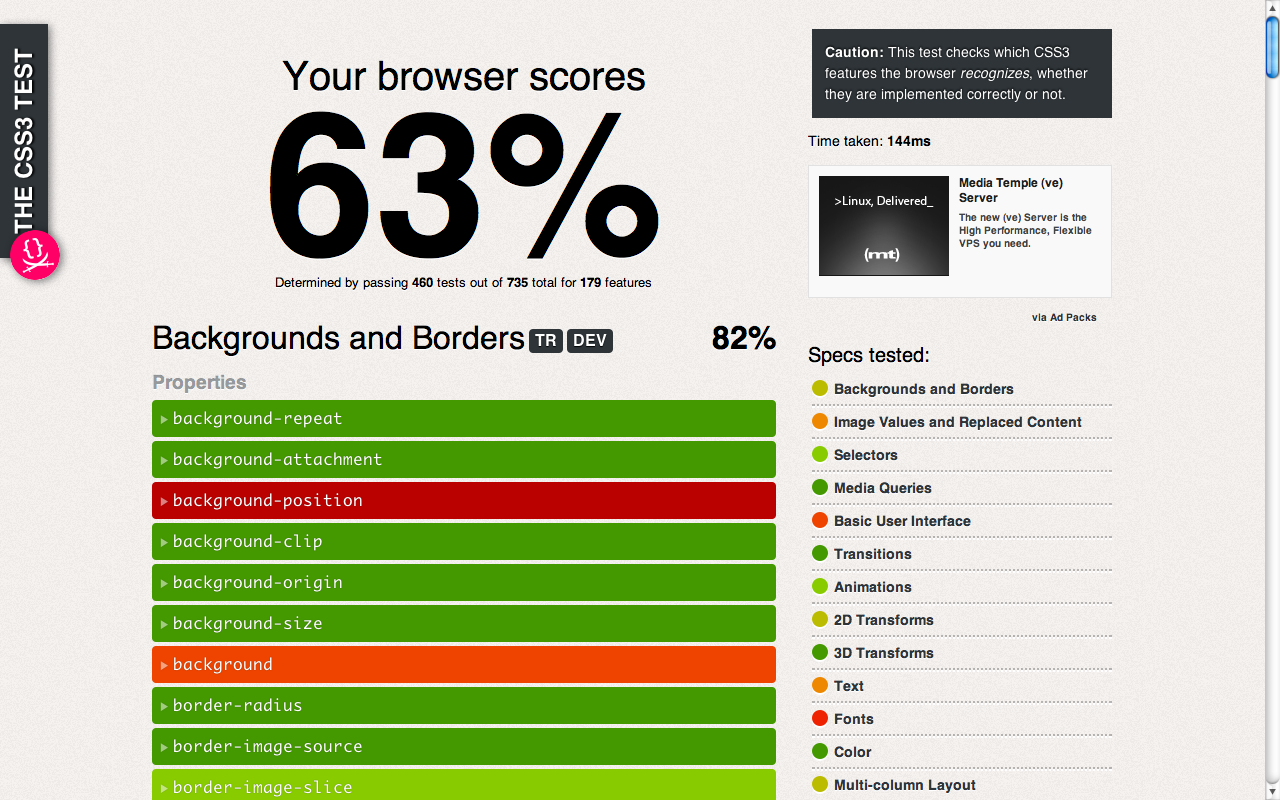 This project started as an attempt to improve dabblet and to generate data for the book chapter I’m writing for Smashing Book #3. I wanted to create a very simple/basic testsuite for CSS3 stuff so that you could hover on a e.g. CSS3 property and you got a nice browser support popup. While I didn’t achieve that (turns out BrowserScope doesn’t do that kind of thing), I still think it’s interesting as a spin-off project, especially since the results will probably surprise you.
How it works
css3test (very superficially) tests pretty much everything in the specs mentioned on the sidebar (not just the popular widely implemented stuff). You can click on every feature to expand it and see the exact the testcases run and whether they passed. It only checks what syntax the browser recognizes, which doesn’t necessarily mean it will work correctly when used. WebKit is especially notorious for cheating in tests like this, recognizing stuff it doesn’t understand, like the values “round” and “space” for background-repeat, but the cheating isn’t big enough to seriously compromise the test.
Whether a feature is supported with a prefix or not doesn’t matter for the result. If it’s supported without a prefix, it will test that one. If it’s supported only with a prefix, it will test the prefixed one. For properties especially, if an unprefixed one is supported, it will be used in all the tests.
Only stuff that’s in a W3C specification is tested. So, please don’t ask or send pull requests for proprietary things like -webkit-gradient() or -webkit-background-clip: text; or -webkit-box-reflect and so on.
Every feature contributes the same to the end score, as well as to the score of the individual spec, regardless of the number of tests it has.
Crazy shit
Chrome may display slightly different scores (1% difference) across pageloads. It seems that for some reason, it fails the tests for border-image completely on some pageloads, which doesn’t make any sense. Whoever wants to investigate, I’d be grateful. Edit: Fixed (someone found and submitted an even crazier workaround.).
Browserscope
This is the first project of mine in which I’ve used browserscope. This means that your results will be sent over to its servers and aggreggated. When I have enough data, I’m gonna built a nice table for everyone to see :) In the meantime, check the results page.
It doesn’t work on my browser, U SUCK!
The test won’t work on dinosaur browsers like IE8, but who cares measuring their CSS3 support anyway? “For a laugh” isn’t a good enough answer to warrant the time needed.
If you find a bug, please remember you didn’t pay a dime for this before nagging. Politely report it on Github, or even better, fix it and send a pull request.
Why did you build it?
To motivate browsers to support the less hyped stuff, because I’m tired of seeing the same things being evangelized over and over. There’s much more to CSS3.
Current results
At the time of this writing, these are the results for the major modern browsers:
- Chrome Canary, WebKit nightlies, Firefox Nightly: 64%
- Chrome, IE10PP4: 63%
- Firefox 10: 61%
- Safari 5.1, iOS5 Safari: 60%
- Opera 11.60: 56%
- Firefox 9: 58%
- Firefox 6-8: 57%
- Firefox 5, Opera 11.1 - 11.5: 55%
- Safari 5.0: 54%
- Firefox 4: 49%
- Safari 4: 47%
- Opera 10: 45%
- Firefox 3.6: 44%
- IE9: 39%
Enjoy! css3test.com Fork css3test on Github Browserscope results