Reading List
The most recent articles from a list of feeds I subscribe to.
Introducing Prism: An awesome new syntax highlighter
 For the past three weeks, on and off, I’ve been working on releasing Dabblet’s syntax highlighter as standalone, since many people had requested it. Zachary Forrest suggested the name “Prism” and I liked it so much I decided to go with it, even though there is an abandoned Mozilla project with the same name. I ended up refactoring and extending it so much that I will need to backport it to Dabblet one of these days! This doesn’t mean I bloated it, the core is still a tiny 1.5KB minified & gzipped. It just means it’s more awesome. :)
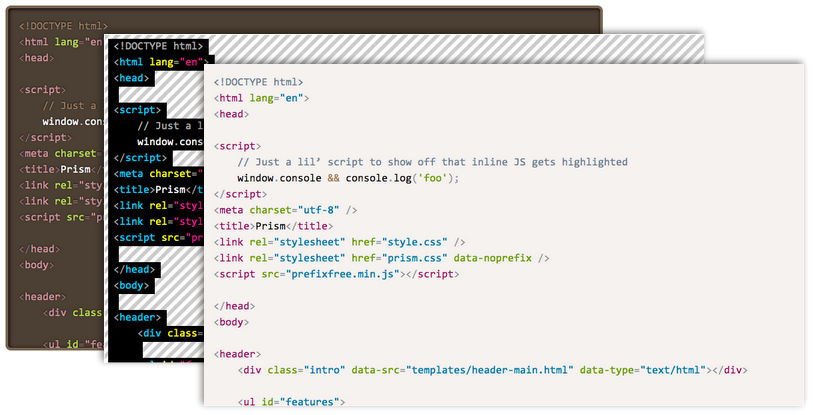
Seriously? The world needs another syntax highlighter?
In certain ways, Prism is better than any other syntax highlighter I’ve seen:
- It’s tiny. The core is only 1.5KB minified & gzipped, which can go up to 2KB with the currently available language definitions (CSS, Markup and JS). But many other highlighters are also small, so read on.
- It’s incredibly extensible. Not only it’s easy to add new languages (that’s a given with every syntax highlighter these days), but also to extend existing ones. Most importantly, it supports plugins, through hooks strategically placed in its source. There are a few plugins already available, and it’s really easy to write your own. I haven’t seen any other highlighter that supports plugins.
- It encourages good author practices. Other highlighters encourage or even force you to use elements that are semantically wrong, like
<pre>(on its own) or<script>. Prism forces you to use the only semantically correct element for marking up code:<code>. On its own for inline code, or inside a<pre>for blocks of code. In addition, the code language is declared through the way recommended in the HTML5 draft: through a language-xxxx class. - One of its best features: The language definition is inherited. This means that if multiple code snippets have the same language, you can just define it once, in one of their common ancestors. Obviously, if you define a language on the
<body>element, you’ve essentially declared a default language for the entire document. - It looks good. All three of its existing themes. Most people wanted me to release Dabblet’s highlighter because they found other highlighters (including their themes) quite ugly.
- It supports parallelism through Web Workers, for better performance in certain cases.
- It doesn’t force you to use any Prism-specific markup, not even a Prism-specific class name, only standard markup you should be using anyway. So, you can just try it for a while, remove it if you don’t like it and leave no traces behind.
However, there are some limitations too:
- Pre-existing HTML in the code block will be stripped off. However, there are plugins for links and highlighting certain lines.
- I decided not to support IE8. Prism won’t break on IE8, it just won’t work. I don’t think many people using IE8 and below are able to read code, so I don’t see the point.
Enjoy: prismjs.com
If you like this project, don’t forget to follow @prismjs on Twitter!
I’ll soon update this blog to use Prism in the code examples as well.
Introducing Prism: An awesome new syntax highlighter
For the past three weeks, on and off, I’ve been working on releasing Dabblet’s syntax highlighter as standalone, since many people had requested it. Zachary Forrest suggested the name “Prism” and I liked it so much I decided to go with it, even though there is an abandoned Mozilla project with the same name. I ended up refactoring and extending it so much that I will need to backport it to Dabblet one of these days! This doesn’t mean I bloated it, the core is still a tiny 1.5KB minified & gzipped. It just means it’s more awesome. :)
Seriously? The world needs another syntax highlighter?
In certain ways, Prism is better than any other syntax highlighter I’ve seen:
- It’s tiny. The core is only 1.5KB minified & gzipped, which can go up to 2KB with the currently available language definitions (CSS, Markup and JS). But many other highlighters are also small, so read on.
- It’s incredibly extensible. Not only it’s easy to add new languages (that’s a given with every syntax highlighter these days), but also to extend existing ones. Most importantly, it supports plugins, through hooks strategically placed in its source. There are a few plugins already available, and it’s really easy to write your own. I haven’t seen any other highlighter that supports plugins.
- It encourages good author practices. Other highlighters encourage or even force you to use elements that are semantically wrong, like
<pre>(on its own) or<script>. Prism forces you to use the only semantically correct element for marking up code:<code>. On its own for inline code, or inside a<pre>for blocks of code. In addition, the code language is declared through the way recommended in the HTML5 draft: through a language-xxxx class. - One of its best features: The language definition is inherited. This means that if multiple code snippets have the same language, you can just define it once, in one of their common ancestors. Obviously, if you define a language on the
<body>element, you’ve essentially declared a default language for the entire document. - It looks good. All three of its existing themes. Most people wanted me to release Dabblet’s highlighter because they found other highlighters (including their themes) quite ugly.
- It supports parallelism through Web Workers, for better performance in certain cases.
- It doesn’t force you to use any Prism-specific markup, not even a Prism-specific class name, only standard markup you should be using anyway. So, you can just try it for a while, remove it if you don’t like it and leave no traces behind.
However, there are some limitations too:
- Pre-existing HTML in the code block will be stripped off. However, there are plugins for links and highlighting certain lines.
- I decided not to support IE8. Prism won’t break on IE8, it just won’t work. I don’t think many people using IE8 and below are able to read code, so I don’t see the point.
Enjoy: prismjs.com
If you like this project, don’t forget to follow @prismjs on Twitter!
I’ll soon update this blog to use Prism in the code examples as well.
Important -prefix-free update
Those of you that have been following and/or using my work, are surely familiar with -prefix-free. Its promise was to let you write DRY code, without all the messy prefixes, that would be standards-compliant in the future (which is why I’m always against adding proprietary features in it, regardless of their popularity). The way -prefix-free works is that it feature tests which CSS features are available only with a prefix, and then adds the prefix in front of their occurences in the code. Nothing will happen if the feature is supported both with and without a prefix or if it’s not supported at all.
This worked well when browsers implementations aren’t significantly different from the unprefixed, standard version. It also works fine when the newer and the older version use incompatible syntaxes. For example, direction keywords in gradients. The old version uses top whereas the new version uses to bottom. If you include both versions, the cascade does its job and ignores the latter version if it’s not supported:
background: linear-gradient(top, white, black);
background: linear-gradient(to bottom, white, black);
However, when the same syntax means different things in the older and the newer version, things can go horribly wrong. Thankfully, this case is quite rare. A prime example of this is linear gradient angles. 0deg means a horizontal (left to right) gradient in prefixed linear-gradients and a vertical (bottom to top) gradient in unprefixed implementations, since they follow the newer Candidate Recommendation rather than the old draft. This wasn’t a problem when every browser supported only prefixed gradients. However, now that IE10 and Firefox 16 are unprefixing their gradients implementations, it was time for me to face the issue I was avoiding ever since I wrote -prefix-free.
The solution I decided on is consistent with -prefix-free’s original promise of allowing you to write mostly standards-compliant code that will not even need -prefix-free in the future. Therefore, it will assume that your gradients use the newer syntax, and if only a prefixed implementation is available, it will convert the angles to the legacy definition. This means that if you update -prefix-free on a page that includes gradients coded with the older definition, they might break. However, they would break anyway in modern browsers, so the sooner the better. Even if you weren’t using -prefix-free at all, and had written all the declarations by hand before the angles changed, you would still have to update your code. Unfortunately, that’s the risk we all take when using experimental features like CSS gradients and I think it’s worth it.
-prefix-free will not take care of any other syntax changes, since when the syntaxes are incompatible, you can easily include both declarations. The angles hotfix was included out of necessity because there is no other way to deal with it.
Here’s a handy JS function that converts older angles to newer ones:
function fromLegacy(deg) { return Math.abs(deg-450) % 360 }
You can read more about the changes in gradient syntax in this excellent IEblog article.
In addition to this change, a new feature was added to -prefix-free. If you ONLY want to use the prefixed version of a feature, but still don’t want to write out of all the prefixes, you can just use -*- as a prefix placeholder and it will be replaced with the current browser’s prefix on runtime. So, if you don’t want to change your angles, you can just prepend -*- to your linear-gradients, like so:
background: -*-linear-gradient(0deg, white, black);
However, it’s a much more futureproof and standards compatible solution to just update your angles to the new definition. You know you’ll have to do it at some point anyway. ;)
Edit: Although -prefix-free doesn’t handle syntax changes in radial gradients, since the syntaxes are mutually incompatible, you may use this little PrefixFree plugin I wrote for the CSS Patterns Gallery, which converts the standard syntax to legacy syntax when needed:
StyleFix.register(function(css, raw) {
	if (PrefixFree.functions.indexOf('radial-gradient') > -1) {
		css = css.replace(/radial-gradient\(([a-z-\s]+\s+)?at ([^,]+)(?=,)/g, function($0, shape, center){
			return 'radial-gradient(' + center + (shape? ', ' + shape : '');
		});
	}

	return css;
});
Keep in mind however that it’s very crude and not very well tested.
Important -prefix-free update
Those of you that have been following and/or using my work, are surely familiar with -prefix-free. Its promise was to let you write DRY code, without all the messy prefixes, that would be standards-compliant in the future (which is why I’m always against adding proprietary features in it, regardless of their popularity). The way -prefix-free works is that it feature tests which CSS features are available only with a prefix, and then adds the prefix in front of their occurences in the code. Nothing will happen if the feature is supported both with and without a prefix or if it’s not supported at all.
This worked well when browsers implementations aren’t significantly different from the unprefixed, standard version. It also works fine when the newer and the older version use incompatible syntaxes. For example, direction keywords in gradients. The old version uses top whereas the new version uses to bottom. If you include both versions, the cascade does its job and ignores the latter version if it’s not supported:
background: linear-gradient(top, white, black);
background: linear-gradient(to bottom, white, black);
However, when the same syntax means different things in the older and the newer version, things can go horribly wrong. Thankfully, this case is quite rare. A prime example of this is linear gradient angles. 0deg means a horizontal (left to right) gradient in prefixed linear-gradients and a vertical (bottom to top) gradient in unprefixed implementations, since they follow the newer Candidate Recommendation rather than the old draft. This wasn’t a problem when every browser supported only prefixed gradients. However, now that IE10 and Firefox 16 are unprefixing their gradients implementations, it was time for me to face the issue I was avoiding ever since I wrote -prefix-free.
The solution I decided on is consistent with -prefix-free’s original promise of allowing you to write mostly standards-compliant code that will not even need -prefix-free in the future. Therefore, it will assume that your gradients use the newer syntax, and if only a prefixed implementation is available, it will convert the angles to the legacy definition. This means that if you update -prefix-free on a page that includes gradients coded with the older definition, they might break. However, they would break anyway in modern browsers, so the sooner the better. Even if you weren’t using -prefix-free at all, and had written all the declarations by hand before the angles changed, you would still have to update your code. Unfortunately, that’s the risk we all take when using experimental features like CSS gradients and I think it’s worth it.
-prefix-free will not take care of any other syntax changes, since when the syntaxes are incompatible, you can easily include both declarations. The angles hotfix was included out of necessity because there is no other way to deal with it.
Here’s a handy JS function that converts older angles to newer ones:
function fromLegacy(deg) { return Math.abs(deg-450) % 360 }
You can read more about the changes in gradient syntax in this excellent IEblog article.
In addition to this change, a new feature was added to -prefix-free. If you ONLY want to use the prefixed version of a feature, but still don’t want to write out of all the prefixes, you can just use -*- as a prefix placeholder and it will be replaced with the current browser’s prefix on runtime. So, if you don’t want to change your angles, you can just prepend -*- to your linear-gradients, like so:
background: -*-linear-gradient(0deg, white, black);
However, it’s a much more futureproof and standards compatible solution to just update your angles to the new definition. You know you’ll have to do it at some point anyway. ;)
Edit: Although -prefix-free doesn’t handle syntax changes in radial gradients, since the syntaxes are mutually incompatible, you may use this little PrefixFree plugin I wrote for the CSS Patterns Gallery, which converts the standard syntax to legacy syntax when needed:
StyleFix.register(function(css, raw) {
	if (PrefixFree.functions.indexOf('radial-gradient') > -1) {
		css = css.replace(/radial-gradient\(([a-z-\s]+\s+)?at ([^,]+)(?=,)/g, function($0, shape, center){
			return 'radial-gradient(' + center + (shape? ', ' + shape : '');
		});
	}

	return css;
});
Keep in mind however that it’s very crude and not very well tested.
So, you’ve been invited to speak
I’ve been lucky enough to be invited to do about 25 talks over the course of the past few years and I have quite a few upcoming gigs as well, most of them at international conferences around Europe and the US. Despite my speaking experience, I’m still very reluctant to call myself a “professional speaker” or even a “speaker” at all. In case you follow me on twitter, you might have noticed that my bio says “Often pretends to be a speaker”, and that captures exactly how I feel. I’m not one of those confident performers that don’t just present interesting stuff, but also can blurt jokes one after the other, almost like stand-up comedians and never backtrack or go “ummm”. I greatly admire these people and I aspire to become as confident as them on stage one day. People like Aral Balkan, Christian Heilmann, Nicole Sullivan, Jake Archibald and many others. Unlike them, I often backtrack mid-sentence, say a lot of "ummmm"s and sometimes talk about stuff that was going to be later in my slides, all of which are very awkward.
However, I’ve reached the conclusion that I must be doing something right. I do get a lot of overwhelmingly positive feedback after almost every talk, even by people I admire in the industry. I don’t think I’ve ever gotten a negative comment for a talk, even in cases that I thought I had screwed up. Naturally, after all these conferences, I’ve attended a lot of technical talks myself, and I’ve gathered some insight on what constitutes a technical talk the audience will enjoy. I’ve been pondering to write a post with advice about this for a long time, but my lack of confidence about my speaking abilities put me off the task. However, since people seem to consider me good, I figured it might help others doing technical talks as well.
All of the following are rules of thumb. You have to keep in mind that there are exceptions to every single one, but it’s often quicker and more interesting to talk in absolutes. I will try to stay away from what’s already been said in other similar articles, such as “tell a story” or “be funny” etc, not because it’s bad advice, but because a) I’m not really good at those so I prefer to let others discuss them and b) I don’t like repeating stuff that’s already been said numerous times before. I will try to focus on what I do differently, and why I think it works. It might not fit your style and that’s ok. Audiences like a wide range of presentation styles, otherwise I’d be screwed, as I don’t fit the traditional “good speaker” profile. Also, it goes without saying that some of my advice might be flat out wrong. I’m just trying to do pattern recognition to figure out why people like my talks. That’s bound to be error-prone. My talks might be succeeding in spite of X and not because of it.
1. Do something unique
There are many nice talks with good minimal slides (almost everyone has read Presentation Zen by now), funny pictures, good content and confident presenters. In fact, they dominate almost every conference I’ve been at. You can always become a good speaker by playing it safe, and many famous speakers in the industry have earned their fame by doing so. There is absolutely nothing wrong with that. However, to stand out doing that kind of talk, you need to be really, really good. Hats off to the speakers that managed to stand out doing talks like that, because it means they are truly amazing.
However, if you, like me, fear that your speaking skills are not yet close to that caliber, you need to figure out something else that sets you apart. Something that will make your talk memorable. We see a lot of innovation in our discipline, but it’s limited to the scripts and apps we write. Why not to our presentations as well? Do something different, and make it your thing, your “trademark” way of presenting.
For me, that was the embedded demos in my slides. I usually have a small text field where I write code, and something (often the entire slide or text field itself) that displays the outcome. This lets the attendees see not just the end result, but also the intermediate states until we get there, which often proves out to be enlightening. It also makes the slide quite flexible, as I can always show something extra if I have the time.
Of course, it also means that things might (and if you talk often enough, will at some point) go wrong. To mitigate this to a degree, I try to keep demos small, with a sensible starting state, so that I won’t have to write a lot of code. Which brings us to the next point.
2. Never show a lot of code on a slide
I have a theory: Attendees’ understanding of code decreases exponentially as the lines of simultaneously displayed code increase. Avoid showing many lines of code at once like the plague. Although I’ve shown up to 10 lines of code on a single slide (maybe even more), I usually try to keep it well below five. Ideally less than three even. If you absolutely must present more code, try to use a technique to make the audience understand it by chunks, so that they still only have to process very little code at any given time.
One technique I use for that is showing little code at first, and writing the rest on stage, gradually, explaining the steps as I go. When that isn’t possible or it doesn’t make sense (for example when there is no visual result to see), I try to show parts of the code step by step, explaining what everything does as it appears. This doesn’t necessarily mean showing one line at a time. For example, if you are showing a JS function, it makes sense to show the closing brace at the same time as the opening brace and not at the end. Show the elements of the code in the order you would write them in a top-down implementation, not by pure source order (although in some cases those two may coincide). To make this more clear, here’s an example slide where I used this technique. It’s from my “Polyfilling the gaps” talk at JSConf EU 2011, one of the very few talks of mine that had no live coding.
Also, it goes without saying that if you have to present a lot of code at once, syntax highlighting is a must. Comments aren’t: That’s what you are there for. Comments just add visual clutter and make it harder for people to interpret the actual code. Also, while explaining the code, try to somehow highlight the part you’re currently describing, even if your method is as rudimentary as selecting the text. Otherwise, if someone misses a sentence, they will completely lose track.
3. IDEs are not good presentation tools
I’ve seen this so many times: Someone wants to live demo a technology and fires up their IDE or text editor and starts coding. The audience tries to follow along at first, but at some point almost always gets lost. While these tools are great for programming, they are not presentation tools. They have a lot of distracting clutter, very small text and require you to show parts of the code that aren’t really relevant. They also require you to switch applications to toggle between the code and result, which disrupts the flow of your presentation.
In addition, the probability you will make a mistake increases exponentially with the amount of code you write, both in real life and especially in presentations where you are also nervous. Then the audience is stuck with an embarrassed presenter trying to find what’s wrong for five minutes, until someone from the audience decides to put them out of their misery and shout that a closing parenthesis is missing on line 25.
That’s why live coding has gotten a bad reputation over the years.
As you’ve probably figured from tip #1, I’m not against live coding. Done well, it can really help the audience learn. However, if not done properly, it can end up completely wrecking a talk. Even if you absolutely have to use an external tool, try to make the experience as smooth as possible:
- Hide any toolbars, sidebars, panels. If your editor doesn’t allow you to hide everything that isn’t relevant, use another editor.
- Make the text BIG. If possible, as big as the text in your slides. Remember: Text in slides is big, because you need even the attendees sitting in the back rows to still be able to read it. Why is it that this simple consideration seems to escape so many presenter minds when they switch from slides to code?
- If parts of the code are needed but not relevant (e.g. CSS files in a JavaScript talk), put them in separate files and reference them. Try to minimize the code you will actually show as much as possible, and then even more.
- If applicable, use LiveReload and have the browser window and code editor side by side.
4. Don’t aim to beginners (only)
Some of the nastiest criticism I’ve seen against people’s talks was that they were too elementary. Getting feedback like that has almost become a phobia of mine. Of course, it’s always better if your entire audience is at the same level, and you are fully aware what that level is. However, that’s almost never the case, so you will have to err on one side. Do your best to cater to the median, but when you have to err, err on the side of more advanced content. A somewhat selfish reason would be that when people find your talk too elementary, they will blame you; when they find it too advanced, they will blame themselves. However, it’s not just covering your ass, it’s better for your audience as well. Someone who didn’t learn anything new gets absolutely nothing out of your talk (unless it’s an interesting performance on its own, e.g. so funny it could have been stand up comedy for geeks). A person that learned many things but didn’t understand some of the more advanced concepts will still have gotten a lot out of it.
If someone learns a useful thing or two from your talk, that’s what they’ll remember. Even if the rest of the talk was elementary or too advanced for them, they will walk out with a positive impression, thinking “I learned something today!”. Even if most of your talk is elementary, try to sneak in some more advanced or obscure bits, that not many people know.
My favorite approach to cater for a diverse audience with very different levels of experience, is to pick a narrow topic, start from the very basics and work my way up to more advanced concepts. This way everyone learns something, and nobody feels intimidated. On the flip side, if you are in a multi-track conference, this also limits the potential audience that might come to your talk.
5. Eat your own dog food
I’m a huge fan of HTML-based (or SVG-based) slideshows. I’ve always been, since my first talk. It’s a technology you’re already accustomed to, so you can do amazing things with it. You can write scripts that demonstrate the concepts you describe in some visual way, you can do live demos, you can embed iframes of other people’s demos, you know how to style it much better than you likely know how to use Keynote. Yes, if you’re used to traditional presentation tools, it might be hard at first. Many features you’ve been taking for granted will be missing. Styling is not visual, there are no presenter notes, no next slide preview, no automatic adjustment to the projector resolution to name a few. But what you gain in potential and expressiveness, are totally worth the trade-off. Also, rather than having the talk prep keep you from writing code and becoming better at what you do, it will now actually contribute to it! It’s also a great chance to try experimental stuff, as it’s going to be run in a very controlled environment.
You don’t even need to write your own presentation framework if you don’t want to. There are a ton available now, such as my own CSSS, impress.js and many others.
6. Involve the audience
There is an old Chinese proverb that goes like:
Tell me, and I’ll forget Show me, and I’ll remember Involve me, and I’ll understand
I’ve noticed that audiences respond extremely well to talks that attempt to involve them. Seb-Lee Delisle gave a talk at Fronteers 2011 where he involved the audience by ideas like demonstrating Web Sockets through making their iPhones flash in such a way that he could create light patterns with the audience. Even though some of the demos failed (I think something crashed, don’t remember very well), the audience loved every bit. I’ve rarely seen people that excited about a talk.
Involving the audience was something I wanted to do for a while. In my recent Regular Expressions talks, I had a series of small “challenges” where the audience tried to write a regexp to match a certain set of strings as quickly as possible and tweet it. I provided a link to an app I made especially for that. The person who got most regexes right (or more right than others) won a book. This was also very well received and lots of positive feedback mentioned it. When it feels like a game, learning is much more fun.