Reading List
The most recent articles from a list of feeds I subscribe to.
Spot the unsubscribe (link)!
After getting fed up with too many “promotional” emails and newsletters with incredibly obscure unsubscribe links, I decided to make this tumblr to point out such examples of digital douchebaggery. This annoying dark pattern is so widespread that Google even added a feature to Gmail for making those unsubscribe links obvious!
Unsubscribe links are crucial to promotional emails. They are not just another menu item. They are not something that should be hidden in a blurb of tiny low contrast text. Unsubscribe links should be immediately obvious to anyone looking for them. You want people to be reading your email because they’re interested, not because they can‘t find the way out. Otherwise you are the digital equivalent of those annoying door-to-door salesmen who just won’t go away.
— From my introductory post on Spot the unsubscribe!

On the spur of the moment, after yet another email newsletter with a hard to find Unsubscribe link, I decided to quickly put together a tumblog about this UX pet peeve of mine, called Spot the Unsubscribe!. In less than an hour, it was ready and had a few posts as well :)
Hopefully if this bothers others as well, there will be submissions. Otherwise, new posts will be rather infrequent.
Conical gradients, today!
 It’s no secret that I like conical gradients. In as early as 2011, I wrote a draft for conical-gradient() in CSS, that Tab later said helped him when he added them in CSS Image Values Level 4 in 2012. However, almost three years later, no progress has been made in implementing them. Sure, the spec is still relatively incomplete, but that’s not the reason conical gradients have gotten no traction. Far more underspecified features have gotten experimental implementations in the past. The reason conical gradients are still unimplemented, is because very few developers know they exist, so browsers see no demand.
Another reason was that Cairo, the graphics library used in Chrome and Firefox had no way of drawing a conical gradient. However, this changed a while ago, when they supported mesh gradients, of which conical gradients are a mere special case.
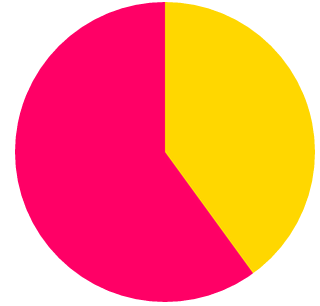
Recently, I was giving a talk on creating pie charts with CSS on a few conferences, and yet again, I was reminded of how useful conical gradients can be. While every CSS or SVG solution is several lines of code with varying levels of hackiness, conical gradients can give us a pie chart with a straightforward, DRY, one liner. For example, this is how to create a pie chart that shows 40% in gold and 60% in #f06:
padding: 5em; /* size */
background: conic-gradient(gold 40%, #f06 0);
border-radius: 50%; /* make it round */
 So, I decided to take matters in my own hands. I wrote a polyfill, which I also used in my talk to demonstrate how awesome conical gradients can be and what cool things they can do. Today, during my CSSConf talk, I released it publicly.
In addition, I mention to developers how important speaking up is for getting their favorite features implemented. Browsers prioritize which features to implement based on what developers ask for. It’s a pity that so few of us realize how much of a say we collectively have in this. This is more obvious with Microsoft and their Uservoice forum where developers can vote on which features they want to see worked on, but pretty much every major browser works in a similar way. They monitor what developers request and what other browsers implement, and decide accordingly. The squeaky wheel will get the feature, so if you really want to see something implemented, speak up.
Since “speaking up” can be a bit vague (“speak up where?” I can hear you asking), I also filed bug reports with all major browsers, that you can also find in the polyfill page, so that you can comment or vote on them. That doesn’t mean that speaking up on blogs or social media is not useful though: That’s why browsers have devrel teams. The more noise we collectively make about the features we want, the more likely it is to be heard. However, the odds are higher if we all channel our voices to the venues browser developers follow and our voice is stronger and louder if we concentrate it in the same places instead of having many separate voices all over the place.
Also, I’m using the term “noise” here a bit figuratively. While it’s valuable to make it clear that we are interested in a certain feature, it’s even more useful to say why. Providing use cases will not only grab browsers’ attention more, but it will also convince other developers as well.
So go ahead, play with conic gradients, and if you agree with me that they are fucking awesome and we need them natively on the Web, make noise.
Conical gradients, today!
 It’s no secret that I like conical gradients. In as early as 2011, I wrote a draft for conical-gradient() in CSS, that Tab later said helped him when he added them in CSS Image Values Level 4 in 2012. However, almost three years later, no progress has been made in implementing them. Sure, the spec is still relatively incomplete, but that’s not the reason conical gradients have gotten no traction. Far more underspecified features have gotten experimental implementations in the past. The reason conical gradients are still unimplemented, is because very few developers know they exist, so browsers see no demand.
Another reason was that Cairo, the graphics library used in Chrome and Firefox had no way of drawing a conical gradient. However, this changed a while ago, when they supported mesh gradients, of which conical gradients are a mere special case.
Recently, I was giving a talk on creating pie charts with CSS on a few conferences, and yet again, I was reminded of how useful conical gradients can be. While every CSS or SVG solution is several lines of code with varying levels of hackiness, conical gradients can give us a pie chart with a straightforward, DRY, one liner. For example, this is how to create a pie chart that shows 40% in gold and 60% in #f06:
padding: 5em; /* size */
background: conic-gradient(gold 40%, #f06 0);
border-radius: 50%; /* make it round */
So, I decided to take matters in my own hands. I wrote a polyfill, which I also used in my talk to demonstrate how awesome conical gradients can be and what cool things they can do. Today, during my CSSConf talk, I released it publicly.
In addition, I mention to developers how important speaking up is for getting their favorite features implemented. Browsers prioritize which features to implement based on what developers ask for. It’s a pity that so few of us realize how much of a say we collectively have in this. This is more obvious with Microsoft and their Uservoice forum where developers can vote on which features they want to see worked on, but pretty much every major browser works in a similar way. They monitor what developers request and what other browsers implement, and decide accordingly. The squeaky wheel will get the feature, so if you really want to see something implemented, speak up.
Since “speaking up” can be a bit vague (“speak up where?” I can hear you asking), I also filed bug reports with all major browsers, that you can also find in the polyfill page, so that you can comment or vote on them. That doesn’t mean that speaking up on blogs or social media is not useful though: That’s why browsers have devrel teams. The more noise we collectively make about the features we want, the more likely it is to be heard. However, the odds are higher if we all channel our voices to the venues browser developers follow and our voice is stronger and louder if we concentrate it in the same places instead of having many separate voices all over the place.
Also, I’m using the term “noise” here a bit figuratively. While it’s valuable to make it clear that we are interested in a certain feature, it’s even more useful to say why. Providing use cases will not only grab browsers’ attention more, but it will also convince other developers as well.
So go ahead, play with conic gradients, and if you agree with me that they are fucking awesome and we need them natively on the Web, make noise.
Idea: Extending native DOM prototypes without collisions
As I pointed out in yesterday’s blog post, one of the reasons why I don’t like using jQuery is its wrapper objects. For jQuery, this was a wise decision: Back in 2006 when it was first developed, IE releases had a pretty icky memory leak bug that could be easily triggered when one added properties to elements. Oh, and we also didn’t have access to element prototypes on IE back then, so we had to add these properties manually on every element. Prototype.js attempted to go that route and the result was such a mess that they decided to change their decision in Prototype 2.0 and go with wrapper objects too. There were even long essays being written back then about how much of a monumentally bad idea it was to extend DOM elements.
The first IE release that exposed element prototypes was IE8: We got access to Node.prototype, Element.prototype and a few more. Some were mutable, some were not. On IE9, we got the full bunch, including HTMLElement.prototype and its descendants, such as HTMLParagraphElement. The memory leak bugs were mitigated in IE8 and fixed in IE9. However, we still don’t extend native DOM elements, and for good reason: collisions are still a very real risk. No library wants to add a bunch of methods on elements, it’s just bad form. It’s like being invited in someone’s house and defecating all over the floor.
But what if we could add methods to elements without the chance of collisions? (well, technically, by minimizing said chance). We could only add one property to Element.prototype, and then hang all our methods on that. E.g. if our library was called yolo and had two methods, foo() and bar(), calls to it would look like:
var element = document.querySelector(".someclass");
element.yolo.foo();
element.yolo.bar();
// or you can even chain, if you return the element in each of them!
element.yolo.foo().yolo.bar();
Sure, it’s more awkward than wrapper objects, but the benefit of using native DOM elements is worth it if you ask me. Of course, YMMV.
It’s basically exactly the same thing we do with globals: We all know that adding tons of global variables is bad practice, so every library adds one global and hangs everything off of that.
However, if we try to implement something like this in the naïve way, we will find that it’s kind of hard to reference the element used from our namespaced functions:
Element.prototype.yolo = {
	foo: function () {
		console.log(this);
	},

	bar: function () { /* ... */ }
};

someElement.yolo.foo(); // Object {foo: function, bar: function}
What happened here? this inside any of these functions refers to the object that they are called on, not the element that object is hanging on! We need to be a bit more clever to get around this issue.
Keep in mind that this in the object inside yolo would have access to the element we’re trying to hang these methods off of. But we’re not running any code there, so we’re not taking advantage of that. If only we could get a reference to that object’s context! However, running a function (e.g. element.yolo().foo()) would spoil our nice API.
Wait a second. We can run code on properties, via ES5 accessors! We could do something like this:
Object.defineProperty(Element.prototype, "yolo", {
	get: function () {
		return {
			element: this,
			foo: function() {
				console.log(this.element);
			},

			bar: function() { /* ... */ }
		}
	},
	configurable: true,
	writeable: false
});

someElement.yolo.foo(); // It works! (Logs our actual element)
This works, but there is a rather annoying issue here: We are generating this object and redefining our functions every single time this property is called. This is a rather bad idea for performance. Ideally, we want to generate this object once, and then return the generated object. We also don’t want every element to have its own completely separate instance of the functions we defined, we want to define these functions on a prototype, and use the wonderful JS inheritance for them, so that our library is also dynamically extensible. Luckily, there is a way to do all this too:
var Yolo = function(element) {
	this.element = element;
};

Yolo.prototype = {
	foo: function() {
		console.log(this.element);
	},

	bar: function() { /* ... */ }
};

Object.defineProperty(Element.prototype, "yolo", {
	get: function () {
		Object.defineProperty(this, "yolo", {
			value: new Yolo(this)
		});

		return this.yolo;
	},
	configurable: true,
	writeable: false
});

someElement.yolo.foo(); // It works! (Logs our actual element)

// And it’s dynamically extensible too!
Yolo.prototype.baz = function(color) {
	this.element.style.background = color;
};

someElement.yolo.baz("red") // Our element gets a red background
Note that in the above, the getter is only executed once. After that, it overwrites the yolo property with a static value: An instance of the Yolo object. Since we’re using Object.defineProperty() we also don’t run into the issue of breaking enumeration (for..in loops), since these properties have enumerable: false by default.
There is still the wart that these methods need to use this.element instead of this. We could fix this by wrapping them:
for (let method in Yolo.prototype) {
	Yolo.prototype[method] = function(){
		var callback = Yolo.prototype[method];

		Yolo.prototype[method] = function () {
			var ret = callback.apply(this.element, arguments);

			// Return the element, for chainability!
			return ret === undefined? this.element : ret;
		}
	}
}
However, now you can’t dynamically add methods to Yolo.prototype and have them automatically work like the native Yolo methods in element.yolo, so it kinda hurts extensibility (of course you could still add methods that use this.element and they would work).
Thoughts?
Idea: Extending native DOM prototypes without collisions
As I pointed out in yesterday’s blog post, one of the reasons why I don’t like using jQuery is its wrapper objects. For jQuery, this was a wise decision: Back in 2006 when it was first developed, IE releases had a pretty icky memory leak bug that could be easily triggered when one added properties to elements. Oh, and we also didn’t have access to element prototypes on IE back then, so we had to add these properties manually on every element. Prototype.js attempted to go that route and the result was such a mess that they decided to change their decision in Prototype 2.0 and go with wrapper objects too. There were even long essays being written back then about how much of a monumentally bad idea it was to extend DOM elements.
The first IE release that exposed element prototypes was IE8: We got access to Node.prototype, Element.prototype and a few more. Some were mutable, some were not. On IE9, we got the full bunch, including HTMLElement.prototype and its descendants, such as HTMLParagraphElement. The memory leak bugs were mitigated in IE8 and fixed in IE9. However, we still don’t extend native DOM elements, and for good reason: collisions are still a very real risk. No library wants to add a bunch of methods on elements, it’s just bad form. It’s like being invited in someone’s house and defecating all over the floor.
But what if we could add methods to elements without the chance of collisions? (well, technically, by minimizing said chance). We could only add one property to Element.prototype, and then hang all our methods on that. E.g. if our library was called yolo and had two methods, foo() and bar(), calls to it would look like:
var element = document.querySelector(".someclass");
element.yolo.foo();
element.yolo.bar();
// or you can even chain, if you return the element in each of them!
element.yolo.foo().yolo.bar();
Sure, it’s more awkward than wrapper objects, but the benefit of using native DOM elements is worth it if you ask me. Of course, YMMV.
It’s basically exactly the same thing we do with globals: We all know that adding tons of global variables is bad practice, so every library adds one global and hangs everything off of that.
However, if we try to implement something like this in the naïve way, we will find that it’s kind of hard to reference the element used from our namespaced functions:
Element.prototype.yolo = {
	foo: function () {
		console.log(this);
	},

	bar: function () { /* ... */ }
};

someElement.yolo.foo(); // Object {foo: function, bar: function}
What happened here? this inside any of these functions refers to the object that they are called on, not the element that object is hanging on! We need to be a bit more clever to get around this issue.
Keep in mind that this in the object inside yolo would have access to the element we’re trying to hang these methods off of. But we’re not running any code there, so we’re not taking advantage of that. If only we could get a reference to that object’s context! However, running a function (e.g. element.yolo().foo()) would spoil our nice API.
Wait a second. We can run code on properties, via ES5 accessors! We could do something like this:
Object.defineProperty(Element.prototype, "yolo", {
	get: function () {
		return {
			element: this,
			foo: function() {
				console.log(this.element);
			},

			bar: function() { /* ... */ }
		}
	},
	configurable: true,
	writeable: false
});

someElement.yolo.foo(); // It works! (Logs our actual element)
This works, but there is a rather annoying issue here: We are generating this object and redefining our functions every single time this property is called. This is a rather bad idea for performance. Ideally, we want to generate this object once, and then return the generated object. We also don’t want every element to have its own completely separate instance of the functions we defined, we want to define these functions on a prototype, and use the wonderful JS inheritance for them, so that our library is also dynamically extensible. Luckily, there is a way to do all this too:
var Yolo = function(element) {
	this.element = element;
};

Yolo.prototype = {
	foo: function() {
		console.log(this.element);
	},

	bar: function() { /* ... */ }
};

Object.defineProperty(Element.prototype, "yolo", {
	get: function () {
		Object.defineProperty(this, "yolo", {
			value: new Yolo(this)
		});

		return this.yolo;
	},
	configurable: true,
	writeable: false
});

someElement.yolo.foo(); // It works! (Logs our actual element)

// And it’s dynamically extensible too!
Yolo.prototype.baz = function(color) {
	this.element.style.background = color;
};

someElement.yolo.baz("red") // Our element gets a red background
Note that in the above, the getter is only executed once. After that, it overwrites the yolo property with a static value: An instance of the Yolo object. Since we’re using Object.defineProperty() we also don’t run into the issue of breaking enumeration (for..in loops), since these properties have enumerable: false by default.
There is still the wart that these methods need to use this.element instead of this. We could fix this by wrapping them:
for (let method in Yolo.prototype) {
	Yolo.prototype[method] = function(){
		var callback = Yolo.prototype[method];

		Yolo.prototype[method] = function () {
			var ret = callback.apply(this.element, arguments);

			// Return the element, for chainability!
			return ret === undefined? this.element : ret;
		}
	}
}
However, now you can’t dynamically add methods to Yolo.prototype and have them automatically work like the native Yolo methods in element.yolo, so it kinda hurts extensibility (of course you could still add methods that use this.element and they would work).
Thoughts?