Reading List
The most recent articles from a list of feeds I subscribe to.
Granular interfaces
A few weeks ago a spec change for an application we’re working on forced us to refactor part of the codebase. It was food for thought about the flexibility granular interfaces provide, and choosing the right abstraction at the right time. This is a short writeup on the thought process we went through as we updated our logic to support a new feature now and allow more options in the future.
Imagine we were hired to build a course platform. We’re working on the code that grants access to a course after a user purchased it.
First, we’ll create a course object with a Purchasable interface to indicate it can be purchased, and a Registrable interface to indicate a registration should be created after the customer has paid.
class Course implements Purchasable, Registrable
{
}
Somewhere down the line in our checkout code, we can loop over the order items and create registrations for each registrable product we come across.
foreach ($order->items as $orderItem) {
if ($orderItem->purchasable instanceof Registrable) {
createRegistration($orderItem->purchasable);
}
}
Later on, the client asks how they can sell a bundle of courses. Purchasing a bundle would register a customer for a bunch of courses at once.
Since a bundle can be purchased, it will implement the Purchasable interface. However, implementing the Registrable interface wouldn’t make sense. After the bundle is purchased, registrations need to be created for the underlying courses, not the bundle itself.
class Bundle implements Purchasable
{
public function __construct(
public array $courses
) {
}
}
This shows that the Registrable interface has not one but two responsibilities. It indicates that something can be tied to a registration, and it tells the system to create registrations after payment.
A course fulfills both responsibilities, but a bundle only needs to provision. Let’s introduce a new CreatesRegistrations interface only to create registrations.
class Bundle implements Product, CreatesRegistrations
{
public function __construct(
public array $courses
) {
}
public function createsRegistrationsFor(): array
{
return $this->courses;
}
}
In our checkout code, we add another check for the new interface.
foreach ($order->items as $orderItem) {
if ($orderItem->purchasable instanceof Registrable) {
createRegistration($cartItem->purchasable);
}
if ($orderItem->purchasable instanceof CreatesRegistrations) {
foreach ($orderItem->purchasable->createsRegistrationsFor() as $registrable) {
createRegistration($registrable);
}
}
}
That solves our problem, but our checkout code is getting bloated. Even worse, there are now two ways to tell our system a product will create registrations. If we want to know wether a product will create a registration, we have to check for both the Registrable and CreatesRegistrations interfaces.
We can consolidate the behavior to always use our CreatesRegistrations interface. The Course object can return a reference to itself.
class Course implements Product, Registrable, CreatesRegistrations
{
public function providesRegistrationsFor(): array
{
return [$this];
}
}
And we can revert our checkout code is back to one createRegistration call.
foreach ($order->items as $orderItem) {
if ($orderItem->product instanceof ProvidesRegistrations) {
foreach ($orderItem->product->providesRegistrationsFor() as $registrable) {
createRegistration($registrable);
}
}
}
After refactoring to a granular interface, our system became more flexible and composable. Small interfaces communicate intent more clearly, making it easier to understand the flow of a system.
That doesn’t mean we should be paralyzed to find the perfect abstraction before we start. We only realized our interface wasn’t granular enough after it grew out of its original use case. As a system evolves, abstractions should arise from current needs, not future possibilities.
As mentioned on Twitter, this guideline is formalized in the “I” in SOLID: the interface segregation principle.
Using markdown in HTML (in markdown) in Hugo
The markdown specification allows you to inline HTML in a markdown document.
This is a regular paragraph.
<table>
<tr>
<td>Foo</td>
</tr>
</table>
This is another regular paragraph.
But once you’re in HTML, you can’t write markdown anymore. If you’d want to italicize Foo, this won’t work:
<table>
<tr>
<td>*Foo*</td>
</tr>
</table>
On my blog, I sometimes want to wrap a whole chunk of markdown in an HTML, like a div with a class name.
<div class="highlight">
This is [markdown](https://daringfireball.net/projects/markdown/syntax#html).
</div>
The solution is a custom shortcode, located in layouts/shortcodes/markdown.html.
{{ .Inner }}The shortcode does nothing more than parse the inner contents as markdown. So I can happily switch back to markdown from HTML.
<div class="highlight">
{{% markdown %}}
This is [markdown](https://daringfireball.net/projects/markdown/syntax#html).
{{% /markdown %}}
</div>
There might be a more idiomatic way to do this but I haven’t come across any clues. If there is I’d love to know about it, but for now this works like a charm.
Non-reactive data in Alpine.js
Sometimes you want to store data in your Alpine component without wrapping it in a JavaScript proxy (which is how Alpine keeps everything reactive).
For example, third party libraries might have issues when wrapped in a proxy. Chart.js is one of those. If you store a Chart.js instance in Alpine data, the chart will error.
To prevent Alpine from making the property reactive, the property shouldn’t be on the data object in the first place. One way to create state without storing it on an object is with the revealing module pattern.
<div x-data="chart">
<canvas x-ref="canvas"></canvas>
</div>
Alpine.data('chart', () => {
let chart;
return {
init() {
chart = new Chart(this.$refs.canvas, { … });
},
update() {
// Fetch new data…
chart.update();
},
};
});With the revealing module pattern, the data is stored in a regular variable, and privately available in the component.
If you need to expose it to the outside world, you can add a getter.
Alpine.data('chart', () => {
let chart;
return {
init() {
chart = new Chart(this.$refs.canvas, { … });
},
// …
get chart() {
return chart;
},
};
});Composable seeders in Laravel with callOnce
Laravel 9 is fresh out the door, and it contains a small contribution of mine: a new callOnce method for database seeders.
It solves a problem with seeders I’ve had for a long time, and thanks to @brendt_gd and @rubenvanassche’s input I was able to propose a lightweight solution. Here’s a quick overview of the problems it solves, and how it’s used.
Say you’re working on a CMS-like project. There are users (than can log in and publish posts), posts, pages, and categories.
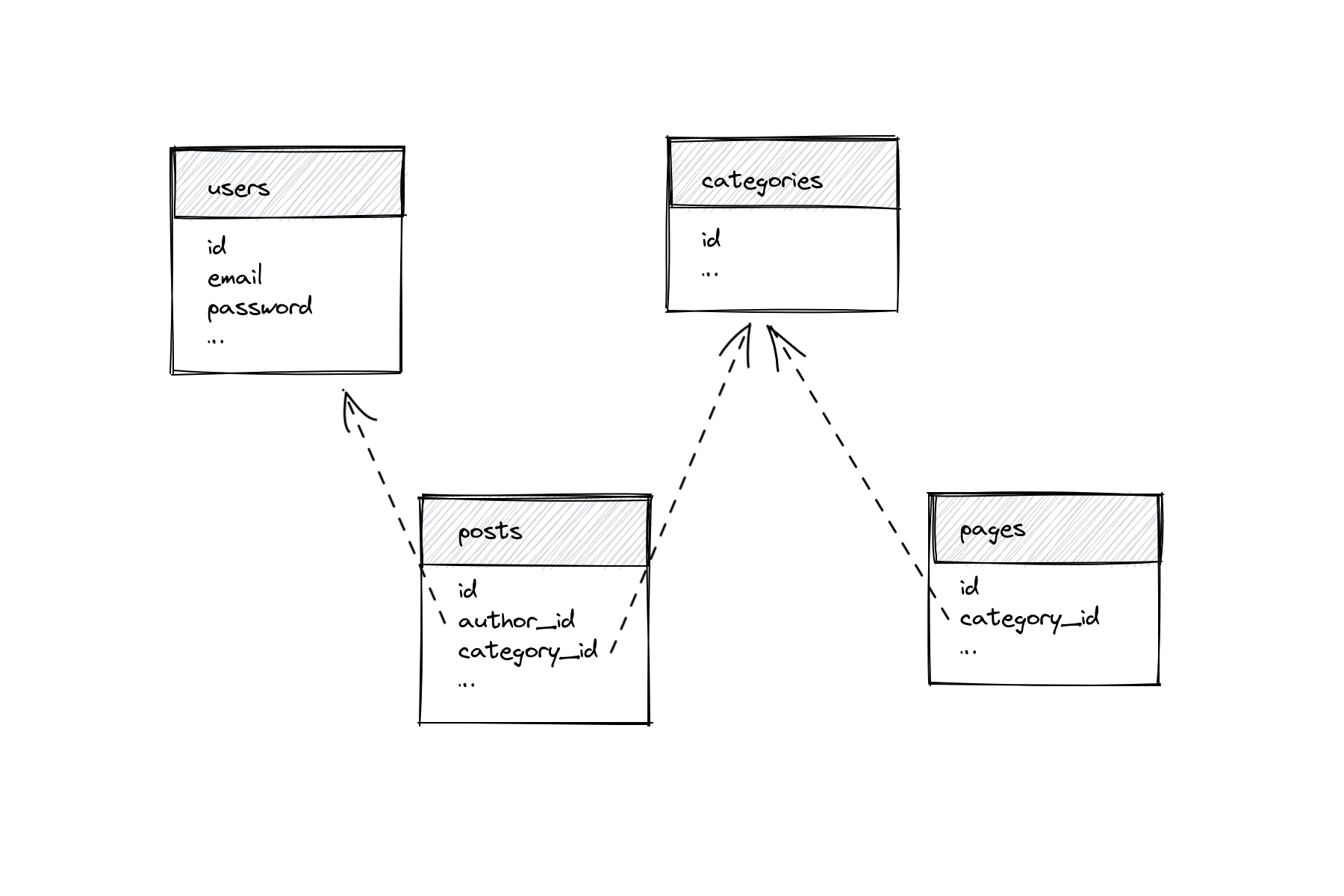
Your seeder would be ordered based on the relationships. Specifically, users and categories need to be seeded before pages and posts.
class DatabaseSeeder extends Seeder
{
public function run()
{
$this->call([
UserSeeder::class,
CategorySeeder::class,
PageSeeder::class,
PostSeeder::class,
]);
}
}
In bigger projects with tens, or hundreds of models, a single DatabaseSeeder can get quite slow. And in any project: if you’re planning to work on a new feature for posts, there’s no reason to wait for pages to seed. But since PostSeeder expects users als categories to already exist, you can’t run in on its own.
You could have PostSeeder seed its own users and categories, but then DatabaseSeeder is seeding a bunch of unnecessary data.
Enter callOnce, a new seeder method in Laravel 9. callOnce works similar to PHP’s own require_once. It will only run a seeder the first time its called.
With callOnce, you specify depending data in the seeders you need them.
class PostSeeder extends Seeder
{
public function run()
{
$this->callOnce([
UserSeeder::class,
CategorySeeder::class,
]);
}
}
class PageSeeder extends Seeder
{
public function run()
{
$this->callOnce([
CategorySeeder::class,
]);
}
}Despite PostSeeder and PageSeeder both calling CategorySeeder, categories will only be seeded once. This allows you to declare all relationship dependencies inside the seeders, without worrying about seeding data multiple times.
I’m looking forward to be able to run seeders specifically for the feature I’m working on, especially in large projects.
Laravel Blade & View Models
A view model represents data for a specific view or page. In its simplest form, a view model is a plain PHP object with a bunch of (typed) properties.
class ProfileViewModel
{
public function __construct(
public User $user,
public array $companies,
public string $action,
) {}
}
View models make the dependencies of a view explicit. With a view model, you don’t need to dig into the view’s markup to find out which data it requires.
To use a view model, instantiate it in your controller action, and pass it to the view. I’ve built the habit to pass view models as $view variables to keep them consistent across all templates.
class ProfileController
{
public function edit()
{
$viewModel = new ProfileViewModel(
user: Auth::user(),
companies: Companies::all(),
action: action([ProfileController::class, 'update']),
);
return view('profile.edit', ['view' => $viewModel]);
}
}
<form action="{{ $view->action }}" method="POST">
<input name="name" value="{{ old('name', $view->user->name) }}">
<select name="company_id">
@foreach($view->companies as $company)
…
@endforeach
</select>
</form>IDE superpowers
And now for the fun part: type hint the variable in a @php block at the start of your Blade view, and start writing HTML.
@php
/** @var $view App\Http\ViewModels\ProfileViewModel */
@endphp
<form action="{{ $view->action }}" method="POST">
<input name="name" value="{{ old('name', $view->user->name) }}">
<select name="company_id">
@foreach($view->companies as $company)
…
@endforeach
</select>
</form>This is where view models shine. An IDE will recognize the @var declaration and provide autocompletion for the view data. In addition, if you rename one of the view’s properties using an IDE’s refactoring capabilities, it’ll also rename the usages in the views.
Refactor rename ProfileViewModel in PhpStorm:
 class ProfileViewModel
{
public function __construct(
public User $user,
- public array $companies,
+ public array $organizations,
public string $action,
) {}
}
ProfileController and profile/edit.blade.php will be automatically updated:
 class ProfileController
{
public function edit()
{
$viewModel = new ProfileViewModel(
user: Auth::user(),
- companies: Companies::all(),
+ organizations: Companies::all(),
action: action([ProfileController::class, 'update']),
);
return view('profile.edit', ['view' => $viewModel]);
}
}
<select name="company_id">
- @foreach($view->companies as $company)
+ @foreach($view->organizations as $company)
…
@endforeach
</select>Computed Data
View models are also a great place to compute data before sending it to a view. This keeps complex statements outside of controllers and views.
class ProfileViewModel
{
public bool $isSpatieMember;
public function __construct(
public User $user,
public array $companies,
public array $organizations,
public string $action,
) {
$this->isSpatieMember =
$user->organization->name === 'Spatie';
}
}
You could implement this as $user->isSpatieMember(), but I prefer view models for one-off things.
Ergonomics
You can standardize the $view variable by creating a base ViewModel class that implements Arrayable.
use Illuminate\Support\Arrayable;
abstract class ViewModel implements Arrayable
{
public function toArray()
{
return ['view' => $this];
}
}
- class ProfileViewModel
+ class ProfileViewModel extends ViewModel
{
// …
} class ProfileController
{
public function edit()
{
// …
- return view('profile.edit', ['view' => $viewModel]);
+ return view('profile.edit', $viewModel);
}
}Granularity
Alternatively, you could be more granular and specify the exact data you want to display instead of passing models.
This approach requires more boilerplate. However, it makes the view’s dependencies more explicit and reusable. For example, this ProfileViewModel could be reused for other models than User.
class ProfileViewModel extends ViewModel
{
public function __construct(
public string $name,
public string $email,
public int $jobId,
public array $jobs,
public string $storeUrl,
) {}
}