Reading List
The most recent articles from a list of feeds I subscribe to.
Why pipes sometimes get "stuck": buffering
Here’s a niche terminal problem that has bothered me for years but that I never really understood until a few weeks ago. Let’s say you’re running this command to watch for some specific output in a log file:
tail -f /some/log/file | grep thing1 | grep thing2
If log lines are being added to the file relatively slowly, the result I’d see is… nothing! It doesn’t matter if there were matches in the log file or not, there just wouldn’t be any output.
I internalized this as “uh, I guess pipes just get stuck sometimes and don’t
show me the output, that’s weird”, and I’d handle it by just
running grep thing1 /some/log/file | grep thing2 instead, which would work.
So as I’ve been doing a terminal deep dive over the last few months I was really excited to finally learn exactly why this happens.
why this happens: buffering
The reason why “pipes get stuck” sometimes is that it’s VERY common for programs to buffer their output before writing it to a pipe or file. So the pipe is working fine, the problem is that the program never even wrote the data to the pipe!
This is for performance reasons: writing all output immediately as soon as you can uses more system calls, so it’s more efficient to save up data until you have 8KB or so of data to write (or until the program exits) and THEN write it to the pipe.
In this example:
tail -f /some/log/file | grep thing1 | grep thing2
the problem is that grep thing1 is saving up all of its matches until it has
8KB of data to write, which might literally never happen.
programs don’t buffer when writing to a terminal
Part of why I found this so disorienting is that tail -f file | grep thing
will work totally fine, but then when you add the second grep, it stops
working!! The reason for this is that the way grep handles buffering depends
on whether it’s writing to a terminal or not.
Here’s how grep (and many other programs) decides to buffer its output:
- Check if stdout is a terminal or not using the
isattyfunction- If it’s a terminal, use line buffering (print every line immediately as soon as you have it)
- Otherwise, use “block buffering” – only print data if you have at least 8KB or so of data to print
So if grep is writing directly to your terminal then you’ll see the line as
soon as it’s printed, but if it’s writing to a pipe, you won’t.
Of course the buffer size isn’t always 8KB for every program, it depends on the implementation. For grep the buffering is handled by libc, and libc’s buffer size is
defined in the BUFSIZ variable. Here’s where that’s defined in glibc.
(as an aside: “programs do not use 8KB output buffers when writing to a terminal” isn’t, like, a law of terminal physics, a program COULD use an 8KB buffer when writing output to a terminal if it wanted, it would just be extremely weird if it did that, I can’t think of any program that behaves that way)
commands that buffer & commands that don’t
One annoying thing about this buffering behaviour is that you kind of need to remember which commands buffer their output when writing to a pipe.
Some commands that don’t buffer their output:
- tail
- cat
- tee
I think almost everything else will buffer output, especially if it’s a command where you’re likely to be using it for batch processing. Here’s a list of some common commands that buffer their output when writing to a pipe, along with the flag that disables block buffering.
- grep (
--line-buffered) - sed (
-u) - awk (there’s a
fflush()function) - tcpdump (
-l) - jq (
-u) - tr (
-u) - cut (can’t disable buffering)
Those are all the ones I can think of, lots of unix commands (like sort) may
or may not buffer their output but it doesn’t matter because sort can’t do
anything until it finishes receiving input anyway.
Also I did my best to test both the Mac OS and GNU versions of these but there are a lot of variations and I might have made some mistakes.
programming languages where the default “print” statement buffers
Also, here are a few programming language where the default print statement will buffer output when writing to a pipe, and some ways to disable buffering if you want:
- C (disable with
setvbuf) - Python (disable with
python -u, orPYTHONUNBUFFERED=1, orsys.stdout.reconfigure(line_buffering=False), orprint(x, flush=True)) - Ruby (disable with
STDOUT.sync = true) - Perl (disable with
$| = 1)
I assume that these languages are designed this way so that the default print function will be fast when you’re doing batch processing.
Also whether output is buffered or not might depend on how you print, for
example in C++ cout << "hello\n" buffers when writing to a pipe but cout << "hello" << endl will flush its output.
when you press Ctrl-C on a pipe, the contents of the buffer are lost
Let’s say you’re running this command as a hacky way to watch for DNS requests
to example.com, and you forgot to pass -l to tcpdump:
sudo tcpdump -ni any port 53 | grep example.com
When you press Ctrl-C, what happens? In a magical perfect world, what I would
want to happen is for tcpdump to flush its buffer, grep would search for
example.com, and I would see all the output I missed.
But in the real world, what happens is that all the programs get killed and the
output in tcpdump’s buffer is lost.
I think this problem is probably unavoidable – I spent a little time with
strace to see how this works and grep receives the SIGINT before
tcpdump anyway so even if tcpdump tried to flush its buffer grep would
already be dead.
After a little more investigation, there is a workaround: if you find
tcpdump’s PID and kill -TERM $PID, then tcpdump will flush the buffer so
you can see the output. That’s kind of a pain but I tested it and it seems to
work.
redirecting to a file also buffers
It’s not just pipes, this will also buffer:
sudo tcpdump -ni any port 53 > output.txt
Redirecting to a file doesn’t have the same “Ctrl-C will totally destroy the
contents of the buffer” problem though – in my experience it usually behaves
more like you’d want, where the contents of the buffer get written to the file
before the program exits. I’m not 100% sure whether this is something you can
always rely on or not.
a bunch of potential ways to avoid buffering
Okay, let’s talk solutions. Let’s say you’ve run this command:
tail -f /some/log/file | grep thing1 | grep thing2
I asked people on Mastodon how they would solve this in practice and there were 5 basic approaches. Here they are:
solution 1: run a program that finishes quickly
Historically my solution to this has been to just avoid the “command writing to pipe slowly” situation completely and instead run a program that will finish quickly like this:
cat /some/log/file | grep thing1 | grep thing2 | tail
This doesn’t do the same thing as the original command but it does mean that you get to avoid thinking about these weird buffering issues.
(you could also do grep thing1 /some/log/file but I often prefer to use an
“unnecessary” cat)
solution 2: remember the “line buffer” flag to grep
You could remember that grep has a flag to avoid buffering and pass it like this:
tail -f /some/log/file | grep --line-buffered thing1 | grep thing2
solution 3: use awk
Some people said that if they’re specifically dealing with a multiple greps
situation, they’ll rewrite it to use a single awk instead, like this:
tail -f /some/log/file | awk '/thing1/ && /thing2/'
Or you would write a more complicated grep, like this:
tail -f /some/log/file | grep -E 'thing1.*thing2'
(awk also buffers, so for this to work you’ll want awk to be the last command in the pipeline)
solution 4: use stdbuf
stdbuf uses LD_PRELOAD to turn off libc’s buffering, and you can use it to turn off output buffering like this:
tail -f /some/log/file | stdbuf -o0 grep thing1 | grep thing2
Like any LD_PRELOAD solution it’s a bit unreliable – it doesn’t work on
static binaries, I think won’t work if the program isn’t using libc’s
buffering, and doesn’t always work on Mac OS. Harry Marr has a really nice How stdbuf works post.
solution 5: use unbuffer
unbuffer program will force the program’s output to be a TTY, which means
that it’ll behave the way it normally would on a TTY (less buffering, colour
output, etc). You could use it in this example like this:
tail -f /some/log/file | unbuffer grep thing1 | grep thing2
Unlike stdbuf it will always work, though it might have unwanted side
effects, for example grep thing1’s will also colour matches.
If you want to install unbuffer, it’s in the expect package.
that’s all the solutions I know about!
It’s a bit hard for me to say which one is “best”, I think personally I’m
mostly likely to use unbuffer because I know it’s always going to work.
If I learn about more solutions I’ll try to add them to this post.
I’m not really sure how often this comes up
I think it’s not very common for me to have a program that slowly trickles data into a pipe like this, normally if I’m using a pipe a bunch of data gets written very quickly, processed by everything in the pipeline, and then everything exits. The only examples I can come up with right now are:
- tcpdump
tail -f- watching log files in a different way like with
kubectl logs - the output of a slow computation
what if there were an environment variable to disable buffering?
I think it would be cool if there were a standard environment variable to turn
off buffering, like PYTHONUNBUFFERED in Python. I got this idea from a
couple of blog posts by Mark Dominus
in 2018. Maybe NO_BUFFER like NO_COLOR?
The design seems tricky to get right; Mark points out that NETBSD has environment variables called STDBUF, STDBUF1, etc which gives you a
ton of control over buffering but I imagine most developers don’t want to
implement many different environment variables to handle a relatively minor
edge case.
I’m also curious about whether there are any programs that just automatically flush their output buffers after some period of time (like 1 second). It feels like it would be nice in theory but I can’t think of any program that does that so I imagine there are some downsides.
stuff I left out
Some things I didn’t talk about in this post since these posts have been getting pretty long recently and seriously does anyone REALLY want to read 3000 words about buffering?
- the difference between line buffering and having totally unbuffered output
- how buffering to stderr is different from buffering to stdout
- this post is only about buffering that happens inside the program, your operating system’s TTY driver also does a little bit of buffering sometimes
- other reasons you might need to flush your output other than “you’re writing to a pipe”
Importing a frontend Javascript library without a build system
I like writing Javascript without a build system and for the millionth time yesterday I ran into a problem where I needed to figure out how to import a Javascript library in my code without using a build system, and it took FOREVER to figure out how to import it because the library’s setup instructions assume that you’re using a build system.
Luckily at this point I’ve mostly learned how to navigate this situation and either successfully use the library or decide it’s too difficult and switch to a different library, so here’s the guide I wish I had to importing Javascript libraries years ago.
I’m only going to talk about using Javacript libraries on the frontend, and only about how to use them in a no-build-system setup.
In this post I’m going to talk about:
- the three main types of Javascript files a library might provide (ES Modules, the “classic” global variable kind, and CommonJS)
- how to figure out which types of files a Javascript library includes in its build
- ways to import each type of file in your code
the three kinds of Javascript files
There are 3 basic types of Javascript files a library can provide:
- the “classic” type of file that defines a global variable. This is the kind
of file that you can just
<script src>and it’ll Just Work. Great if you can get it but not always available - an ES module (which may or may not depend on other files, we’ll get to that)
- a “CommonJS” module. This is for Node, you can’t use it in a browser at all without using a build system.
I’m not sure if there’s a better name for the “classic” type but I’m just going to call it “classic”. Also there’s a type called “AMD” but I’m not sure how relevant it is in 2024.
Now that we know the 3 types of files, let’s talk about how to figure out which of these the library actually provides!
where to find the files: the NPM build
Every Javascript library has a build which it uploads to NPM. You might be thinking (like I did originally) – Julia! The whole POINT is that we’re not using Node to build our library! Why are we talking about NPM?
But if you’re using a link from a CDN like https://cdnjs.cloudflare.com/ajax/libs/Chart.js/4.4.1/chart.umd.min.js, you’re still using the NPM build! All the files on the CDNs originally come from NPM.
Because of this, I sometimes like to npm install the library even if I’m not
planning to use Node to build my library at all – I’ll just create a new temp
folder, npm install there, and then delete it when I’m done. I like being able to poke
around in the files in the NPM build on my filesystem, because then I can be
100% sure that I’m seeing everything that the library is making available in
its build and that the CDN isn’t hiding something from me.
So let’s npm install a few libraries and try to figure out what types of
Javascript files they provide in their builds!
example library 1: chart.js
First let’s look inside Chart.js, a plotting library.
$ cd /tmp/whatever
$ npm install chart.js
$ cd node_modules/chart.js/dist
$ ls *.*js
chart.cjs  chart.js  chart.umd.js  helpers.cjs  helpers.js
This library seems to have 3 basic options:
option 1: chart.cjs. The .cjs suffix tells me that this is a CommonJS
file, for using in Node. This means it’s impossible to use it directly in the
browser without some kind of build step.
option 2:chart.js. The .js suffix by itself doesn’t tell us what kind of
file it is, but if I open it up, I see import '@kurkle/color'; which is an
immediate sign that this is an ES module – the import ... syntax is ES
module syntax.
option 3: chart.umd.js. “UMD” stands for “Universal Module Definition”,
which I think means that you can use this file either with a basic <script src>, CommonJS,
or some third thing called AMD that I don’t understand.
how to use a UMD file
When I was using Chart.js I picked Option 3. I just needed to add this to my code:
<script src="./chart.umd.js"> </script>
and then I could use the library with the global Chart environment variable.
Couldn’t be easier. I just copied chart.umd.js into my Git repository so that
I didn’t have to worry about using NPM or the CDNs going down or anything.
the build files aren’t always in the dist directory
A lot of libraries will put their build in the dist directory, but not
always! The build files’ location is specified in the library’s package.json.
For example here’s an excerpt from Chart.js’s package.json.
  "jsdelivr": "./dist/chart.umd.js",
  "unpkg": "./dist/chart.umd.js",
  "main": "./dist/chart.cjs",
  "module": "./dist/chart.js",
I think this is saying that if you want to use an ES Module (module) you
should use dist/chart.js, but the jsDelivr and unpkg CDNs should use
./dist/chart.umd.js. I guess main is for Node.
chart.js’s package.json also says "type": "module", which according to this documentation
tells Node to treat files as ES modules by default. I think it doesn’t tell us
specifically which files are ES modules and which ones aren’t but it does tell
us that something in there is an ES module.
example library 2: @atcute/oauth-browser-client
@atcute/oauth-browser-client
is a library for logging into Bluesky with OAuth in the browser.
Let’s see what kinds of Javascript files it provides in its build!
$ npm install @atcute/oauth-browser-client
$ cd node_modules/@atcute/oauth-browser-client/dist
$ ls *js
constants.js  dpop.js  environment.js  errors.js  index.js  resolvers.js
It seems like the only plausible root file in here is index.js, which looks
something like this:
export { configureOAuth } from './environment.js';
export * from './errors.js';
export * from './resolvers.js';
This export syntax means it’s an ES module. That means we can use it in
the browser without a build step! Let’s see how to do that.
how to use an ES module with importmaps
Using an ES module isn’t an easy as just adding a <script src="whatever.js">. Instead, if
the ES module has dependencies (like @atcute/oauth-browser-client does) the
steps are:
- Set up an import map in your HTML
- Put import statements like
import { configureOAuth } from '@atcute/oauth-browser-client';in your JS code - Include your JS code in your HTML like this:
<script type="module" src="YOURSCRIPT.js"></script>
The reason we need an import map instead of just doing something like import { BrowserOAuthClient } from "./oauth-client-browser.js" is that internally the module has more import statements like import {something} from @atcute/client, and we need to tell the browser where to get the code for @atcute/client and all of its other dependencies.
Here’s what the importmap I used looks like for @atcute/oauth-browser-client:
<script type="importmap">
{
  "imports": {
    "nanoid": "./node_modules/nanoid/bin/dist/index.js",
    "nanoid/non-secure": "./node_modules/nanoid/non-secure/index.js",
    "nanoid/url-alphabet": "./node_modules/nanoid/url-alphabet/dist/index.js",
    "@atcute/oauth-browser-client": "./node_modules/@atcute/oauth-browser-client/dist/index.js",
    "@atcute/client": "./node_modules/@atcute/client/dist/index.js",
    "@atcute/client/utils/did": "./node_modules/@atcute/client/dist/utils/did.js"
  }
}
</script>
Getting these import maps to work is pretty fiddly, I feel like there must be a tool to generate them automatically but I haven’t found one yet. It’s definitely possible to write a script that automatically generates the importmaps using esbuild’s metafile but I haven’t done that and maybe there’s a better way.
I decided to set up importmaps yesterday to get github.com/jvns/bsky-oauth-example to work, so there’s some example code in that repo.
Also someone pointed me to Simon Willison’s download-esm, which will download an ES module and rewrite the imports to point to the JS files directly so that you don’t need importmaps. I haven’t tried it yet but it seems like a great idea.
problems with importmaps: too many files
I did run into some problems with using importmaps in the browser though – it needed to download dozens of Javascript files to load my site, and my webserver in development couldn’t keep up for some reason. I kept seeing files fail to load randomly and then had to reload the page and hope that they would succeed this time.
It wasn’t an issue anymore when I deployed my site to production, so I guess it was a problem with my local dev environment.
Also one slightly annoying thing about ES modules in general is that you need to
be running a webserver to use them, I’m sure this is for a good reason but it’s
easier when you can just open your index.html file without starting a
webserver.
Because of the “too many files” thing I think actually using ES modules with importmaps in this way isn’t actually that appealing to me, but it’s good to know it’s possible.
how to use an ES module without importmaps
If the ES module doesn’t have dependencies then it’s even easier – you don’t need the importmaps! You can just:
- put
<script type="module" src="YOURCODE.js"></script>in your HTML. Thetype="module"is important. - put
import {whatever} from "https://example.com/whatever.js"inYOURCODE.js
alternative: use esbuild
If you don’t want to use importmaps, you can also use a build system like esbuild. I talked about how to do that in Some notes on using esbuild, but this blog post is about ways to avoid build systems completely so I’m not going to talk about that option here. I do still like esbuild though and I think it’s a good option in this case.
what’s the browser support for importmaps?
CanIUse says that importmaps are in
“Baseline 2023: newly available across major browsers” so my sense is that in
2024 that’s still maybe a little bit too new? I think I would use importmaps
for some fun experimental code that I only wanted like myself and 12 people to
use, but if I wanted my code to be more widely usable I’d use esbuild instead.
example library 3: @atproto/oauth-client-browser
Let’s look at one final example library! This is a different Bluesky auth
library than @atcute/oauth-browser-client.
$ npm install @atproto/oauth-client-browser
$ cd node_modules/@atproto/oauth-client-browser/dist
$ ls *js
browser-oauth-client.js  browser-oauth-database.js  browser-runtime-implementation.js  errors.js  index.js  indexed-db-store.js  util.js
Again, it seems like only real candidate file here is index.js. But this is a
different situation from the previous example library! Let’s take a look at
index.js:
There’s a bunch of stuff like this in index.js:
__exportStar(require("@atproto/oauth-client"), exports);
__exportStar(require("./browser-oauth-client.js"), exports);
__exportStar(require("./errors.js"), exports);
var util_js_1 = require("./util.js");
This require() syntax is CommonJS syntax, which means that we can’t use this
file in the browser at all, we need to use some kind of build step, and
ESBuild won’t work either.
Also in this library’s package.json it says "type": "commonjs" which is
another way to tell it’s CommonJS.
how to use a CommonJS module with esm.sh
Originally I thought it was impossible to use CommonJS modules without learning a build system, but then someone Bluesky told me about esm.sh! It’s a CDN that will translate anything into an ES Module. skypack.dev does something similar, I’m not sure what the difference is but one person mentioned that if one doesn’t work sometimes they’ll try the other one.
For @atproto/oauth-client-browser using it seems pretty simple, I just need to put this in my HTML:
<script type="module" src="script.js"> </script>
and then put this in script.js.
import { BrowserOAuthClient } from "https://esm.sh/@atproto/oauth-client-browser@0.3.0"
It seems to Just Work, which is cool! Of course this is still sort of using a build system – it’s just that esm.sh is running the build instead of me. My main concerns with this approach are:
- I don’t really trust CDNs to keep working forever – usually I like to copy dependencies into my repository so that they don’t go away for some reason in the future.
- I’ve heard of some issues with CDNs having security compromises which scares me.
- I don’t really understand what esm.sh is doing.
esbuild can also convert CommonJS modules into ES modules
I also learned that you can also use esbuild to convert a CommonJS module
into an ES module, though there are some limitations – the import { BrowserOAuthClient } from syntax doesn’t work. Here’s a github issue about that.
I think the esbuild approach is probably more appealing to me than the
esm.sh approach because it’s a tool that I already have on my computer so I
trust it more. I haven’t experimented with this much yet though.
summary of the three types of files
Here’s a summary of the three types of JS files you might encounter, options for how to use them, and how to identify them.
Unhelpfully a .js or .min.js file extension could be any of these 3
options, so if the file is something.js you need to do more detective work to
figure out what you’re dealing with.
- “classic” JS files
- How to use it::
<script src="whatever.js"></script> - Ways to identify it:
- The website has a big friendly banner in its setup instructions saying “Use this with a CDN!” or something
- A
.umd.jsextension - Just try to put it in a
<script src=...tag and see if it works
- How to use it::
- ES Modules
- Ways to use it:
- If there are no dependencies, just
import {whatever} from "./my-module.js"directly in your code - If there are dependencies, create an importmap and
import {whatever} from "my-module"- or use download-esm to remove the need for an importmap
- Use esbuild or any ES Module bundler
- If there are no dependencies, just
- Ways to identify it:
- Look for an
importorexportstatement. (notmodule.exports = ..., that’s CommonJS) - An
.mjsextension - maybe
"type": "module"inpackage.json(though it’s not clear to me which file exactly this refers to)
- Look for an
- Ways to use it:
- CommonJS Modules
- Ways to use it:
- Use https://esm.sh to convert it into an ES module, like
https://esm.sh/@atproto/oauth-client-browser@0.3.0 - Use a build somehow (??)
- Use https://esm.sh to convert it into an ES module, like
- Ways to identify it:
- Look for
require()ormodule.exports = ...in the code - A
.cjsextension - maybe
"type": "commonjs"inpackage.json(though it’s not clear to me which file exactly this refers to)
- Look for
- Ways to use it:
it’s really nice to have ES modules standardized
The main difference between CommonJS modules and ES modules from my perspective is that ES modules are actually a standard. This makes me feel a lot more confident using them, because browsers commit to backwards compatibility for web standards forever – if I write some code using ES modules today, I can feel sure that it’ll still work the same way in 15 years.
It also makes me feel better about using tooling like esbuild because even if
the esbuild project dies, because it’s implementing a standard it feels likely
that there will be another similar tool in the future that I can replace it
with.
the JS community has built a lot of very cool tools
A lot of the time when I talk about this stuff I get responses like “I hate javascript!!! it’s the worst!!!”. But my experience is that there are a lot of great tools for Javascript (I just learned about https://esm.sh yesterday which seems great! I love esbuild!), and that if I take the time to learn how things works I can take advantage of some of those tools and make my life a lot easier.
So the goal of this post is definitely not to complain about Javascript, it’s to understand the landscape so I can use the tooling in a way that feels good to me.
questions I still have
Here are some questions I still have, I’ll add the answers into the post if I learn the answer.
- Is there a tool that automatically generates importmaps for an ES Module that I have set up locally? (apparently yes: jspm)
- How can I convert a CommonJS module into an ES module on my computer, the way https://esm.sh does? (apparently esbuild can sort of do this, though named exports don’t work)
- When people normally build CommonJS modules into regular JS code, what’s code is doing that? Obviously there are tools like webpack, rollup, esbuild, etc, but do those tools all implement their own JS parsers/static analysis? How many JS parsers are there out there?
- Is there any way to bundle an ES module into a single file (like
atcute-client.js), but so that in the browser I can still import multiple different paths from that file (like both@atcute/client/lexiconsand@atcute/client)?
all the tools
Here’s a list of every tool we talked about in this post:
- Simon Willison’s download-esm which will download an ES module and convert the imports to point at JS files so you don’t need an importmap
- https://esm.sh/ and skypack.dev
- esbuild
- JSPM can generate importmaps
Writing this post has made me think that even though I usually don’t want to
have a build that I run every time I update the project, I might be willing to
have a build step (using download-esm or something) that I run only once
when setting up the project and never run again except maybe if I’m updating my
dependency versions.
that’s all!
Thanks to Marco Rogers who taught me a lot of the things in this post. I’ve probably made some mistakes in this post and I’d love to know what they are – let me know on Bluesky or Mastodon!
New microblog with TILs
I added a new section to this site a couple weeks ago called TIL (“today I learned”).
the goal: save interesting tools & facts I posted on social media
One kind of thing I like to post on Mastodon/Bluesky is “hey, here’s a cool thing”, like the great SQLite repl litecli, or the fact that cross compiling in Go Just Works and it’s amazing, or cryptographic right answers, or this great diff tool. Usually I don’t want to write a whole blog post about those things because I really don’t have much more to say than “hey this is useful!”
It started to bother me that I didn’t have anywhere to put those things: for example recently I wanted to use diffdiff and I just could not remember what it was called.
the solution: make a new section of this blog
So I quickly made a new folder called /til/, added some
custom styling (I wanted to style the posts to look a little bit like a tweet),
made a little Rake task to help me create new posts quickly (rake new_til), and
set up a separate RSS Feed for it.
I think this new section of the blog might be more for myself than anything, now when I forget the link to Cryptographic Right Answers I can hopefully look it up on the TIL page. (you might think “julia, why not use bookmarks??” but I have been failing to use bookmarks for my whole life and I don’t see that changing ever, putting things in public is for whatever reason much easier for me)
So far it’s been working, often I can actually just make a quick post in 2 minutes which was the goal.
inspired by Simon Willison’s TIL blog
My page is inspired by Simon Willison’s great TIL blog, though my TIL posts are a lot shorter.
I don’t necessarily want everything to be archived
This came about because I spent a lot of time on Twitter, so I’ve been thinking about what I want to do about all of my tweets.
I keep reading the advice to “POSSE” (“post on your own site, syndicate elsewhere”), and while I find the idea appealing in principle, for me part of the appeal of social media is that it’s a little bit ephemeral. I can post polls or questions or observations or jokes and then they can just kind of fade away as they become less relevant.
I find it a lot easier to identify specific categories of things that I actually want to have on a Real Website That I Own:
- blog posts here!
- comics at https://wizardzines.com/comics/!
- now TILs at https://jvns.ca/til/)
and then let everything else be kind of ephemeral.
I really believe in the advice to make email lists though – the first two (blog posts & comics) both have email lists and RSS feeds that people can subscribe to if they want. I might add a quick summary of any TIL posts from that week to the “blog posts from this week” mailing list.
ASCII control characters in my terminal
Hello! I’ve been thinking about the terminal a lot and yesterday I got curious
about all these “control codes”, like Ctrl-A, Ctrl-C, Ctrl-W, etc. What’s
the deal with all of them?
a table of ASCII control characters
Here’s a table of all 33 ASCII control characters, and what they do on my machine (on Mac OS), more or less. There are about a million caveats, but I’ll talk about what it means and all the problems with this diagram that I know about.
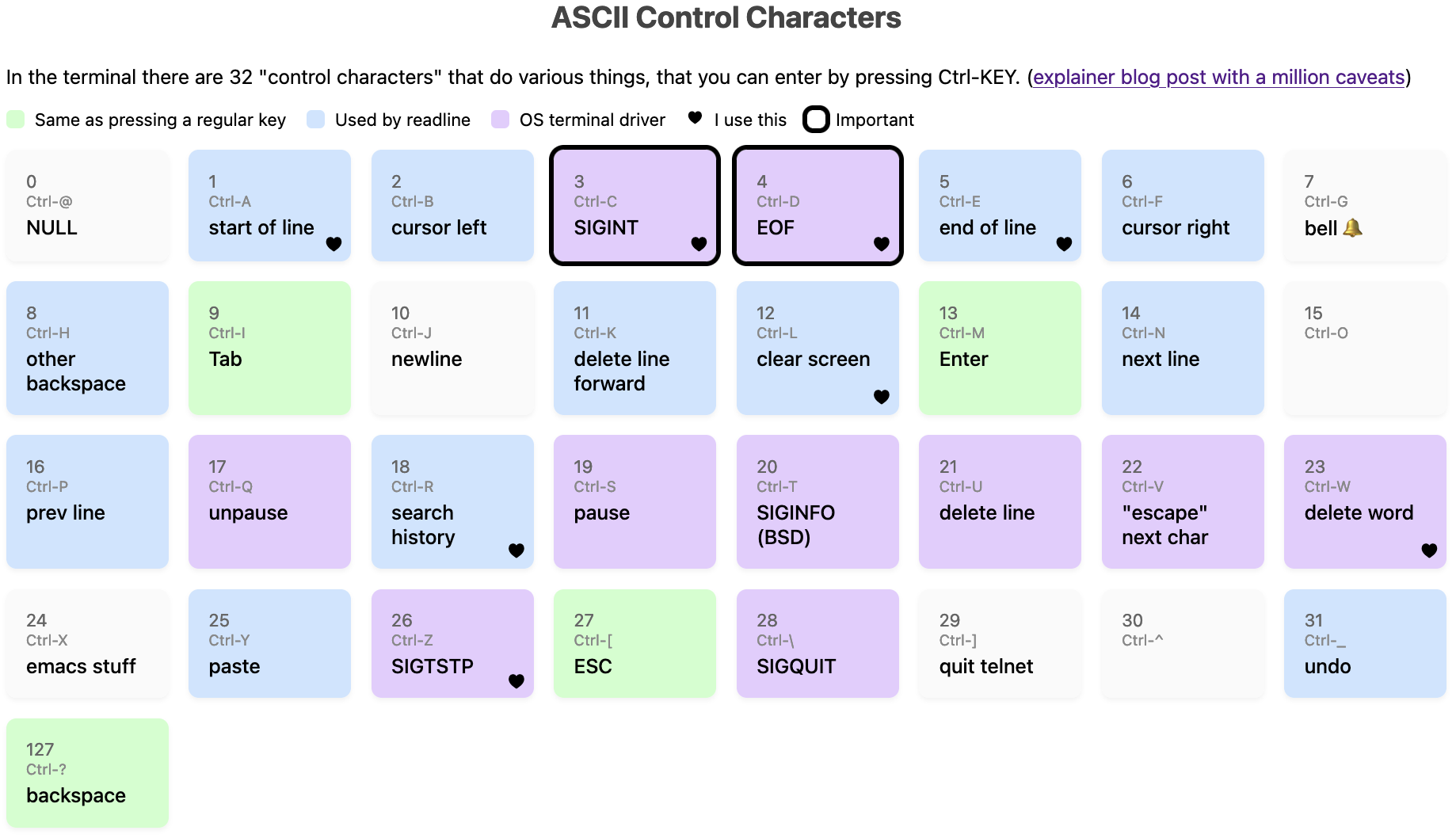
You can also view it as an HTML page (I just made it an image so it would show up in RSS).
different kinds of codes are mixed together
The first surprising thing about this diagram to me is that there are 33 control codes, split into (very roughly speaking) these categories:
- Codes that are handled by the operating system’s terminal driver, for
example when the OS sees a
3(Ctrl-C), it’ll send aSIGINTsignal to the current program - Everything else is passed through to the application as-is and the
application can do whatever it wants with them. Some subcategories of
those:
- Codes that correspond to a literal keypress of a key on your keyboard
(
Enter,Tab,Backspace). For example when you pressEnter, your terminal gets sent13. - Codes used by
readline: “the application can do whatever it wants” often means “it’ll do more or less what thereadlinelibrary does, whether the application actually usesreadlineor not”, so I’ve labelled a bunch of the codes thatreadlineuses - Other codes, for example I think
Ctrl-Xhas no standard meaning in the terminal in general but emacs uses it very heavily
- Codes that correspond to a literal keypress of a key on your keyboard
(
There’s no real structure to which codes are in which categories, they’re all just kind of randomly scattered because this evolved organically.
(If you’re curious about readline, I wrote more about readline in entering text in the terminal is complicated, and there are a lot of cheat sheets out there)
there are only 33 control codes
Something else that I find a little surprising is that are only 33 control codes –
A to Z, plus 7 more (@, [, \, ], ^, _, ?). This means that if you want to
have for example Ctrl-1 as a keyboard shortcut in a terminal application,
that’s not really meaningful – on my machine at least Ctrl-1 is exactly the
same thing as just pressing 1, Ctrl-3 is the same as Ctrl-[, etc.
Also Ctrl+Shift+C isn’t a control code – what it does depends on your
terminal emulator. On Linux Ctrl-Shift-X is often used by the terminal
emulator to copy or open a new tab or paste for example, it’s not sent to the
TTY at all.
Also I use Ctrl+Left Arrow all the time, but that isn’t a control code,
instead it sends an ANSI escape sequence (ctrl-[[1;5D) which is a different
thing which we absolutely do not have space for in this post.
This “there are only 33 codes” thing is totally different from how keyboard
shortcuts work in a GUI where you can have Ctrl+KEY for any key you want.
the official ASCII names aren’t very meaningful to me
Each of these 33 control codes has a name in ASCII (for example 3 is ETX).
When all of these control codes were originally defined, they weren’t being
used for computers or terminals at all, they were used for the telegraph machine.
Telegraph machines aren’t the same as UNIX terminals so a lot of the codes were repurposed to mean something else.
Personally I don’t find these ASCII names very useful, because 50% of the time the name in ASCII has no actual relationship to what that code does on UNIX systems today. So it feels easier to just ignore the ASCII names completely instead of trying to figure which ones still match their original meaning.
It’s hard to use Ctrl-M as a keyboard shortcut
Another thing that’s a bit weird is that Ctrl-M is literally the same as
Enter, and Ctrl-I is the same as Tab, which makes it hard to use those two as keyboard shortcuts.
From some quick research, it seems like some folks do still use Ctrl-I and
Ctrl-M as keyboard shortcuts (here’s an example), but to do that
you need to configure your terminal emulator to treat them differently than the
default.
For me the main takeaway is that if I ever write a terminal application I
should avoid Ctrl-I and Ctrl-M as keyboard shortcuts in it.
how to identify what control codes get sent
While writing this I needed to do a bunch of experimenting to figure out what various key combinations did, so I wrote this Python script echo-key.py that will print them out.
There’s probably a more official way but I appreciated having a script I could customize.
caveat: on canonical vs noncanonical mode
Two of these codes (Ctrl-W and Ctrl-U) are labelled in the table as
“handled by the OS”, but actually they’re not always handled by the OS, it
depends on whether the terminal is in “canonical” mode or in “noncanonical mode”.
In canonical mode,
programs only get input when you press Enter (and the OS is in charge of deleting characters when you press Backspace or Ctrl-W). But in noncanonical mode the program gets
input immediately when you press a key, and the Ctrl-W and Ctrl-U codes are passed through to the program to handle any way it wants.
Generally in noncanonical mode the program will handle Ctrl-W and Ctrl-U
similarly to how the OS does, but there are some small differences.
Some examples of programs that use canonical mode:
- probably pretty much any noninteractive program, like
greporcat git, I think
Examples of programs that use noncanonical mode:
python3,irband other REPLs- your shell
- any full screen TUI like
lessorvim
caveat: all of the “OS terminal driver” codes are configurable with stty
I said that Ctrl-C sends SIGINT but technically this is not necessarily
true, if you really want to you can remap all of the codes labelled “OS
terminal driver”, plus Backspace, using a tool called stty, and you can view
the mappings with stty -a.
Here are the mappings on my machine right now:
$ stty -a
cchars: discard = ^O; dsusp = ^Y; eof = ^D; eol = <undef>;
	eol2 = <undef>; erase = ^?; intr = ^C; kill = ^U; lnext = ^V;
	min = 1; quit = ^\; reprint = ^R; start = ^Q; status = ^T;
	stop = ^S; susp = ^Z; time = 0; werase = ^W;
I have personally never remapped any of these and I cannot imagine a reason I
would (I think it would be a recipe for confusion and disaster for me), but I
asked on Mastodon and people said the most common reasons they used
stty were:
- fix a broken terminal with
stty sane - set
stty erase ^Hto change how Backspace works - set
stty ixoff - some people even map
SIGINTto a different key, like theirDELETEkey
caveat: on signals
Two signals caveats:
- If the
ISIGterminal mode is turned off, then the OS won’t send signals. For examplevimturns offISIG - Apparently on BSDs, there’s an extra control code (
Ctrl-T) which sendsSIGINFO
You can see which terminal modes a program is setting using strace like this,
terminal modes are set with the ioctl system call:
$ strace -tt -o out  vim
$ grep ioctl out | grep SET
here are the modes vim sets when it starts (ISIG and ICANON are
missing!):
17:43:36.670636 ioctl(0, TCSETS, {c_iflag=IXANY|IMAXBEL|IUTF8,
c_oflag=NL0|CR0|TAB0|BS0|VT0|FF0|OPOST, c_cflag=B38400|CS8|CREAD,
c_lflag=ECHOK|ECHOCTL|ECHOKE|PENDIN, ...}) = 0
and it resets the modes when it exits:
17:43:38.027284 ioctl(0, TCSETS, {c_iflag=ICRNL|IXANY|IMAXBEL|IUTF8,
c_oflag=NL0|CR0|TAB0|BS0|VT0|FF0|OPOST|ONLCR, c_cflag=B38400|CS8|CREAD,
c_lflag=ISIG|ICANON|ECHO|ECHOE|ECHOK|IEXTEN|ECHOCTL|ECHOKE|PENDIN, ...}) = 0
I think the specific combination of modes vim is using here might be called “raw mode”, man cfmakeraw talks about that.
there are a lot of conflicts
Related to “there are only 33 codes”, there are a lot of conflicts where
different parts of the system want to use the same code for different things,
for example by default Ctrl-S will freeze your screen, but if you turn that
off then readline will use Ctrl-S to do a forward search.
Another example is that on my machine sometimes Ctrl-T will send SIGINFO
and sometimes it’ll transpose 2 characters and sometimes it’ll do something
completely different depending on:
- whether the program has
ISIGset - whether the program uses
readline/ imitates readline’s behaviour
caveat: on “backspace” and “other backspace”
In this diagram I’ve labelled code 127 as “backspace” and 8 as “other backspace”. Uh, what?
I think this was the single biggest topic of discussion in the replies on Mastodon – apparently there’s a LOT of history to this and I’d never heard of any of it before.
First, here’s how it works on my machine:
- I press the
Backspacekey - The TTY gets sent the byte
127, which is calledDELin ASCII - the OS terminal driver and readline both have
127mapped to “backspace” (so it works both in canonical mode and noncanonical mode) - The previous character gets deleted
If I press Ctrl+H, it has the same effect as Backspace if I’m using
readline, but in a program without readline support (like cat for instance),
it just prints out ^H.
Apparently Step 2 above is different for some folks – their Backspace key sends
the byte 8 instead of 127, and so if they want Backspace to work then they
need to configure the OS (using stty) to set erase = ^H.
There’s an incredible section of the Debian Policy Manual on keyboard configuration
that describes how Delete and Backspace should work according to Debian
policy, which seems very similar to how it works on my Mac today. My
understanding (via this mastodon post)
is that this policy was written in the 90s because there was a lot of confusion
about what Backspace should do in the 90s and there needed to be a standard
to get everything to work.
There’s a bunch more historical terminal stuff here but that’s all I’ll say for now.
there’s probably a lot more diversity in how this works
I’ve probably missed a bunch more ways that “how it works on my machine” might be different from how it works on other people’s machines, and I’ve probably made some mistakes about how it works on my machine too. But that’s all I’ve got for today.
Some more stuff I know that I’ve left out: according to stty -a Ctrl-O is
“discard”, Ctrl-R is “reprint”, and Ctrl-Y is “dsusp”. I have no idea how
to make those actually do anything (pressing them does not do anything
obvious, and some people have told me what they used to do historically but
it’s not clear to me if they have a use in 2024), and a lot of the time in practice
they seem to just be passed through to the application anyway so I just
labelled Ctrl-R and Ctrl-Y as
readline.
not all of this is that useful to know
Also I want to say that I think the contents of this post are kind of interesting
but I don’t think they’re necessarily that useful. I’ve used the terminal
pretty successfully every day for the last 20 years without knowing literally
any of this – I just knew what Ctrl-C, Ctrl-D, Ctrl-Z, Ctrl-R,
Ctrl-L did in practice (plus maybe Ctrl-A, Ctrl-E and Ctrl-W) and did
not worry about the details for the most part, and that was
almost always totally fine except when I was trying to use xterm.js.
But I had fun learning about it so maybe it’ll be interesting to you too.
Using less memory to look up IP addresses in Mess With DNS
I’ve been having problems for the last 3 years or so where Mess With DNS periodically runs out of memory and gets OOM killed.
This hasn’t been a big priority for me: usually it just goes down for a few minutes while it restarts, and it only happens once a day at most, so I’ve just been ignoring. But last week it started actually causing a problem so I decided to look into it.
This was kind of winding road where I learned a lot so here’s a table of contents:
- there’s about 100MB of memory available
- the problem: OOM killing the backup script
- attempt 1: use SQLite
- attempt 2: use a trie
- attempt 3: make my array use less memory
there’s about 100MB of memory available
I run Mess With DNS on a VM without about 465MB of RAM, which according to
ps aux (the RSS column) is split up something like:
- 100MB for PowerDNS
- 200MB for Mess With DNS
- 40MB for hallpass
That leaves about 110MB of memory free.
A while back I set GOMEMLIMIT to 250MB to try to make sure the garbage collector ran if Mess With DNS used more than 250MB of memory, and I think this helped but it didn’t solve everything.
the problem: OOM killing the backup script
A few weeks ago I started backing up Mess With DNS’s database for the first time using restic.
This has been working okay, but since Mess With DNS operates without much extra
memory I think restic sometimes needed more memory than was available on the
system, and so the backup script sometimes got OOM killed.
This was a problem because
- backups might be corrupted sometimes
- more importantly, restic takes out a lock when it runs, and so I’d have to manually do an unlock if I wanted the backups to continue working. Doing manual work like this is the #1 thing I try to avoid with all my web services (who has time for that!) so I really wanted to do something about it.
There’s probably more than one solution to this, but I decided to try to make Mess With DNS use less memory so that there was more available memory on the system, mostly because it seemed like a fun problem to try to solve.
what’s using memory: IP addresses
I’d run a memory profile of Mess With DNS a bunch of times in the past, so I knew exactly what was using most of Mess With DNS’s memory: IP addresses.
When it starts, Mess With DNS loads this database where you can look up the
ASN of every IP address into memory, so that when it
receives a DNS query it can take the source IP address like 74.125.16.248 and
tell you that IP address belongs to GOOGLE.
This database by itself used about 117MB of memory, and a simple du told me
that was too much – the original text files were only 37MB!
$ du -sh *.tsv
26M	ip2asn-v4.tsv
11M	ip2asn-v6.tsv
The way it worked originally is that I had an array of these:
type IPRange struct {
	StartIP net.IP
	EndIP   net.IP
	Num     int
	Name    string
	Country string
}
and I searched through it with a binary search to figure out if any of the ranges contained the IP I was looking for. Basically the simplest possible thing and it’s super fast, my machine can do about 9 million lookups per second.
attempt 1: use SQLite
I’ve been using SQLite recently, so my first thought was – maybe I can store all of this data on disk in an SQLite database, give the tables an index, and that’ll use less memory.
So I:
- wrote a quick Python script using sqlite-utils to import the TSV files into an SQLite database
- adjusted my code to select from the database instead
This did solve the initial memory goal (after a GC it now hardly used any memory at all because the table was on disk!), though I’m not sure how much GC churn this solution would cause if we needed to do a lot of queries at once. I did a quick memory profile and it seemed to allocate about 1KB of memory per lookup.
Let’s talk about the issues I ran into with using SQLite though.
problem: how to store IPv6 addresses
SQLite doesn’t have support for big integers and IPv6 addresses are 128 bits,
so I decided to store them as text. I think BLOB might have been better, I
originally thought BLOBs couldn’t be compared but the sqlite docs say they can.
I ended up with this schema:
CREATE TABLE ipv4_ranges (
   start_ip INTEGER NOT NULL,
   end_ip INTEGER NOT NULL,
   asn INTEGER NOT NULL,
   country TEXT NOT NULL,
   name TEXT NOT NULL
);
CREATE TABLE ipv6_ranges (
   start_ip TEXT NOT NULL,
   end_ip TEXT NOT NULL,
   asn INTEGER,
   country TEXT,
   name TEXT
);
CREATE INDEX idx_ipv4_ranges_start_ip ON ipv4_ranges (start_ip);
CREATE INDEX idx_ipv6_ranges_start_ip ON ipv6_ranges (start_ip);
CREATE INDEX idx_ipv4_ranges_end_ip ON ipv4_ranges (end_ip);
CREATE INDEX idx_ipv6_ranges_end_ip ON ipv6_ranges (end_ip);
Also I learned that Python has an ipaddress module, so I could use
ipaddress.ip_address(s).exploded to make sure that the IPv6 addresses were
expanded so that a string comparison would compare them properly.
problem: it’s 500x slower
I ran a quick microbenchmark, something like this. It printed out that it could look up 17,000 IPv6 addresses per second, and similarly for IPv4 addresses.
This was pretty discouraging – being able to look up 17k addresses per section is kind of fine (Mess With DNS does not get a lot of traffic), but I compared it to the original binary search code and the original code could do 9 million per second.
	ips := []net.IP{}
	count := 20000
	for i := 0; i < count; i++ {
		// create a random IPv6 address
		bytes := randomBytes()
		ip := net.IP(bytes[:])
		ips = append(ips, ip)
	}
	now := time.Now()
	success := 0
	for _, ip := range ips {
		_, err := ranges.FindASN(ip)
		if err == nil {
			success++
		}
	}
	fmt.Println(success)
	elapsed := time.Since(now)
	fmt.Println("number per second", float64(count)/elapsed.Seconds())
time for EXPLAIN QUERY PLAN
I’d never really done an EXPLAIN in sqlite, so I thought it would be a fun opportunity to see what the query plan was doing.
sqlite> explain query plan select * from ipv6_ranges where '2607:f8b0:4006:0824:0000:0000:0000:200e' BETWEEN start_ip and end_ip;
QUERY PLAN
`--SEARCH ipv6_ranges USING INDEX idx_ipv6_ranges_end_ip (end_ip>?)
It looks like it’s just using the end_ip index and not the start_ip index,
so maybe it makes sense that it’s slower than the binary search.
I tried to figure out if there was a way to make SQLite use both indexes, but I couldn’t find one and maybe it knows best anyway.
At this point I gave up on the SQLite solution, I didn’t love that it was slower and also it’s a lot more complex than just doing a binary search. I felt like I’d rather keep something much more similar to the binary search.
A few things I tried with SQLite that did not cause it to use both indexes:
- using a compound index instead of two separate indexes
- running
ANALYZE - using
INTERSECTto intersect the results ofstart_ip < ?and? < end_ip. This did make it use both indexes, but it also seemed to make the query literally 1000x slower, probably because it needed to create the results of both subqueries in memory and intersect them.
attempt 2: use a trie
My next idea was to use a trie, because I had some vague idea that maybe a trie would use less memory, and I found this library called ipaddress-go that lets you look up IP addresses using a trie.
I tried using it here’s the code, but I think I was doing something wildly wrong because, compared to my naive array + binary search:
- it used WAY more memory (800MB to store just the IPv4 addresses)
- it was a lot slower to do the lookups (it could do only 100K/second instead of 9 million/second)
I’m not really sure what went wrong here but I gave up on this approach and decided to just try to make my array use less memory and stick to a simple binary search.
some notes on memory profiling
One thing I learned about memory profiling is that you can use runtime
package to see how much memory is currently allocated in the program. That’s
how I got all the memory numbers in this post. Here’s the code:
func memusage() {
	runtime.GC()
	var m runtime.MemStats
	runtime.ReadMemStats(&m)
	fmt.Printf("Alloc = %v MiB\n", m.Alloc/1024/1024)
	// write mem.prof
	f, err := os.Create("mem.prof")
	if err != nil {
		log.Fatal(err)
	}
	pprof.WriteHeapProfile(f)
	f.Close()
}
Also I learned that if you use pprof to analyze a heap profile there are two
ways to analyze it: you can pass either --alloc-space or --inuse-space to
go tool pprof. I don’t know how I didn’t realize this before but
alloc-space will tell you about everything that was allocated, and
inuse-space will just include memory that’s currently in use.
Anyway I ran go tool pprof -pdf --inuse_space mem.prof > mem.pdf a lot. Also
every time I use pprof I find myself referring to my own intro to pprof, it’s probably
the blog post I wrote that I use the most often. I should add --alloc-space
and --inuse-space to it.
attempt 3: make my array use less memory
I was storing my ip2asn entries like this:
type IPRange struct {
	StartIP net.IP
	EndIP   net.IP
	Num     int
	Name    string
	Country string
}
I had 3 ideas for ways to improve this:
- There was a lot of repetition of
Nameand theCountry, because a lot of IP ranges belong to the same ASN net.IPis an[]byteunder the hood, which felt like it involved an unnecessary pointer, was there a way to inline it into the struct?- Maybe I didn’t need both the start IP and the end IP, often the ranges were consecutive so maybe I could rearrange things so that I only had the start IP
idea 3.1: deduplicate the Name and Country
I figured I could store the ASN info in an array, and then just store the index
into the array in my IPRange struct. Here are the structs so you can see what
I mean:
type IPRange struct {
	StartIP netip.Addr
	EndIP   netip.Addr
	ASN     uint32
	Idx     uint32
}

type ASNInfo struct {
	Country string
	Name    string
}

type ASNPool struct {
	asns   []ASNInfo
	lookup map[ASNInfo]uint32
}
This worked! It brought memory usage from 117MB to 65MB – a 50MB savings. I felt good about this.
Here’s all of the code for that part.
how big are ASNs?
As an aside – I’m storing the ASN in a uint32, is that right? I looked in the ip2asn
file and the biggest one seems to be 401307, though there are a few lines that
say 4294901931 which is much bigger, but also are just inside the range of a
uint32. So I can definitely use a uint32.
59.101.179.0 59.101.179.255 4294901931 Unknown AS4294901931
idea 3.2: use netip.Addr instead of net.IP
It turns out that I’m not the only one who felt that net.IP was using an
unnecessary amount of memory – in 2021 the folks at Tailscale released a new
IP address library for Go which solves this and many other issues. They wrote a great blog post about it.
I discovered (to my delight) that not only does this new IP address library exist and do exactly what I want, it’s also now in the Go
standard library as netip.Addr. Switching to netip.Addr was
very easy and saved another 20MB of memory, bringing us to 46MB.
I didn’t try my third idea (remove the end IP from the struct) because I’d already been programming for long enough on a Saturday morning and I was happy with my progress.
It’s always such a great feeling when I think “hey, I don’t like this, there must be a better way” and then immediately discover that someone has already made the exact thing I want, thought about it a lot more than me, and implemented it much better than I would have.
all of this was messier in real life
Even though I tried to explain this in a simple linear way “I tried X, then I tried Y, then I tried Z”, that’s kind of a lie – I always try to take my actual debugging process (total chaos) and make it seem more linear and understandable because the reality is just too annoying to write down. It’s more like:
- try sqlite
- try a trie
- second guess everything that I concluded about sqlite, go back and look at the results again
- wait what about indexes
- very very belatedly realize that I can use
runtimeto check how much memory everything is using, start doing that - look at the trie again, maybe I misunderstood everything
- give up and go back to binary search
- look at all of the numbers for tries/sqlite again to make sure I didn’t misunderstand
A note on using 512MB of memory
Someone asked why I don’t just give the VM more memory. I could very easily afford to pay for a VM with 1GB of memory, but I feel like 512MB really should be enough (and really that 256MB should be enough!) so I’d rather stay inside that constraint. It’s kind of a fun puzzle.
a few ideas from the replies
Folks had a lot of good ideas I hadn’t thought of. Recording them as inspiration if I feel like having another Fun Performance Day at some point.
- Try Go’s unique package for the
ASNPool. Someone tried this and it uses more memory, probably because Go’s pointers are 64 bits - Try compiling with
GOARCH=386to use 32-bit pointers to sace space (maybe in combination with usingunique!) - It should be possible to store all of the IPv6 addresses in just 64 bits, because only the first 64 bits of the address are public
- Interpolation search might be faster than binary search since IP addresses are numeric
- Try the MaxMind db format with mmdbwriter or mmdbctl
- Tailscale’s art routing table package
the result: saved 70MB of memory!
I deployed the new version and now Mess With DNS is using less memory! Hooray!
A few other notes:
- lookups are a little slower – in my microbenchmark they went from 9 million lookups/second to 6 million, maybe because I added a little indirection. Using less memory and a little more CPU seemed like a good tradeoff though.
- it’s still using more memory than the raw text files do (46MB vs 37MB), I guess pointers take up space and that’s okay.
I’m honestly not sure if this will solve all my memory problems, probably not! But I had fun, I learned a few things about SQLite, I still don’t know what to think about tries, and it made me love binary search even more than I already did.